135
Polyend Tracker Manual
134
Polyend Tracker Manual
NOTESNOTES
FX Steps
7
FX Steps
7
7.1 Step FX Descriptions
Step FX are a collection of 37 effect types that can be applied into one of
two step locations using the dedicated Step FX buttons. Creative step
patterns can be generated by applying and also combining. FX do not
always need a note and instrument in the same step event. For example,
lter cutoff can adjust the cutoff value, applied to previous triggered note.
The Step library also provides some brief information on each effect.
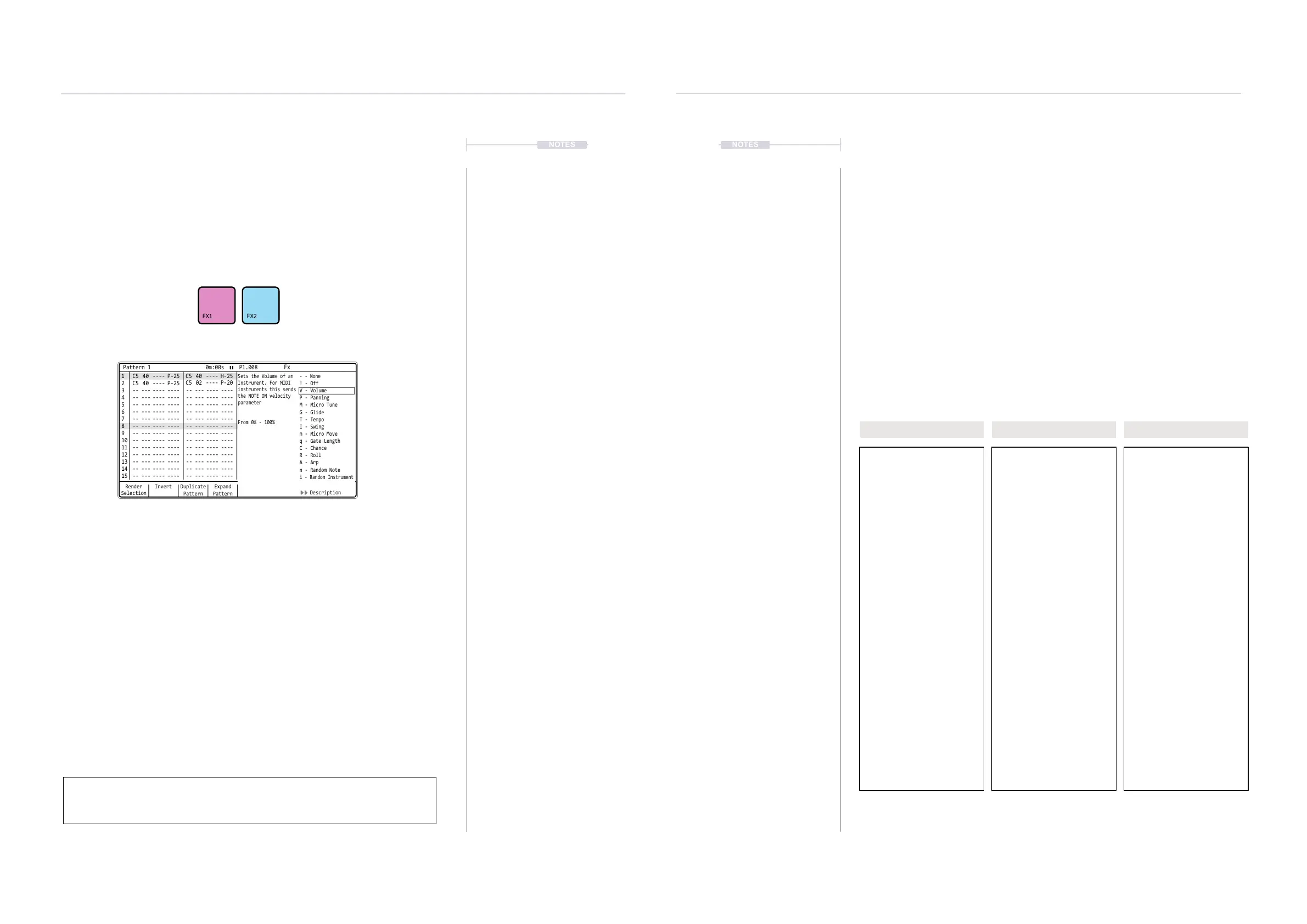
▌ ACCESSING THE EFFECT DESCRIPTIONS
1. Press [Pattern] to select the pattern mode page.
2. Select a blank or existing step event.
3. Hold [FX1] or [FX2] + Press Screen Button 7 or 8. This toggles the
description window open or closed.
4. Scroll to select effect while holding the FX button + Turn (Jog).The
description provided will represent the FX highlighted in the list.
5. If in REC mode the FX will be selected for the step from within this
menu list.
When adjusting the value with the jog control for an FX slot with an instrument
loaded to the step, the audio applied through the effect will be automatically
previewed.
Render
Selection
1 1
2
C5 40 ---- P-25
C5 40 ---- P-25
-- --- ---- ---- -- --- ---- ---- -- --- ---- ---- -- --- ---- ----
-- --- ---- ---- -- --- ---- ---- -- --- ---- ---- -- --- ---- ----
-- --- ---- ---- -- --- ---- ---- -- --- ---- ---- -- --- ---- ----
-- --- ---- ---- -- --- ---- ---- -- --- ---- ---- -- --- ---- ----
-- --- ---- ---- -- --- ---- ---- -- --- ---- ---- -- --- ---- ----
-- --- ---- ---- -- --- ---- ---- -- --- ---- ---- -- --- ---- ----
-- --- ---- ---- -- --- ---- ---- -- --- ---- ---- -- --- ---- ----
-- --- ---- ---- -- --- ---- ---- -- --- ---- ---- -- --- ---- ----
-- --- ---- ---- -- --- ---- ---- -- --- ---- ---- -- --- ---- ----
-- --- ---- ---- -- --- ---- ---- -- --- ---- ---- -- --- ---- ----
-- --- ---- ---- -- --- ---- ---- -- --- ---- ---- -- --- ---- ----
-- --- ---- ---- -- --- ---- ---- -- --- ---- ---- -- --- ---- ----
-- --- ---- ---- -- --- ---- ---- -- --- ---- ---- -- --- ---- ----
C5 02 ---- P-20
C5 40 ---- H-25
C4 12 ---- A 4
C5 40 ---- P-20
C5 40 ---- P-25
C5 40 ---- P-25
2
3 3
4 4
5 5
6 6
7 7
9 9
11 11
13 13
15 15
8 8
10 10
12 12
14 14
Paste
Pattern
Expand
Pattern
Copy
Pattern
Duplicate
Pattern
Invert MoreShrink
Pattern
Pattern 1 0m:00s P1.008
Fx
- - None
Sets the Volume of an
Instrument. For MIDI
instruments this sends
the NOTE ON velocity
parameter
From 0% - 100%
! - Off
P - Panning
M - Micro Tune
G - Glide
T - Tempo
I - Swing
m - Micro Move
q - Gate Length
C - Chance
R - Roll
A - Arp
n - Random Note
i - Random Instrument
V - Volume
Description
Note PatternFX1
Instrument
FX2
7.2 Step FX Reference
The effects are contained into a library of 37 FX types which can be
selected into the step. The details for each effect varies depending on its
function. Also the interaction with other steps or the note or instrument may
be relevant for some effects. The descriptions are built into the FX menu,
but these are limited in the descriptions. A deeper understanding of the FX
is benecial and brings more clarity to what at rst glance can be confusing.
One effect can be loaded into a step FX slot. Each step has 2 FX slots so a
total of two FX are possible. While this may seem limiting it is worth
remembering that some traditional effects also exist in the audio signal chain.
For example delay. The FX should be considered more like mini applications
that not only affect the audio but also affect the behaviour of the step and
sometimes the pattern itself.
This section and following parts will hopefully demystify their use, especially
within pragmatic use case examples.
- None
! Off
C Chance
R Roll
f Random FX
S Slice Playback of Sample
T Tempo
I Swing
m Micro Timing
G Glide
q Gate Length
A Arpeggiator
a - f MIDI Out
F Slide Up
J Slide Down
0 MIDI Chord
V Volume
P Panning
M Micro Tuning
n Random Note
i Random Instrument
v Random Volume
r Reverse Sample
P Position in sample / wave
g Volume LFO Rate
h Panning LFO Rate
j Filter LFO Rate
k Position LFO Rate
I Finetune LFO Rate
D Overdrive amount
L Low Pass Filter
B Band Pass Filter
H High Pass Filter
s Delay Send
t Reverb Send
E Bit Depth
U Tuning
Affects Audio Sound.
Affects Step Behaviour. Affects Structure / Timing



 To Next Page