93
Polyend Tracker Manual
92
Polyend Tracker Manual
5.9 Instrument Step Parameters
Each step event has an instrument which is based on a sample, either raw
or edited or formed into a granular or wavetable instrument. Any instrument
added to the 48 instrument pool is available to be added to a step.
Instrument Summary
NOTESNOTES
Sequencing Steps
5
Sequencing Steps
5
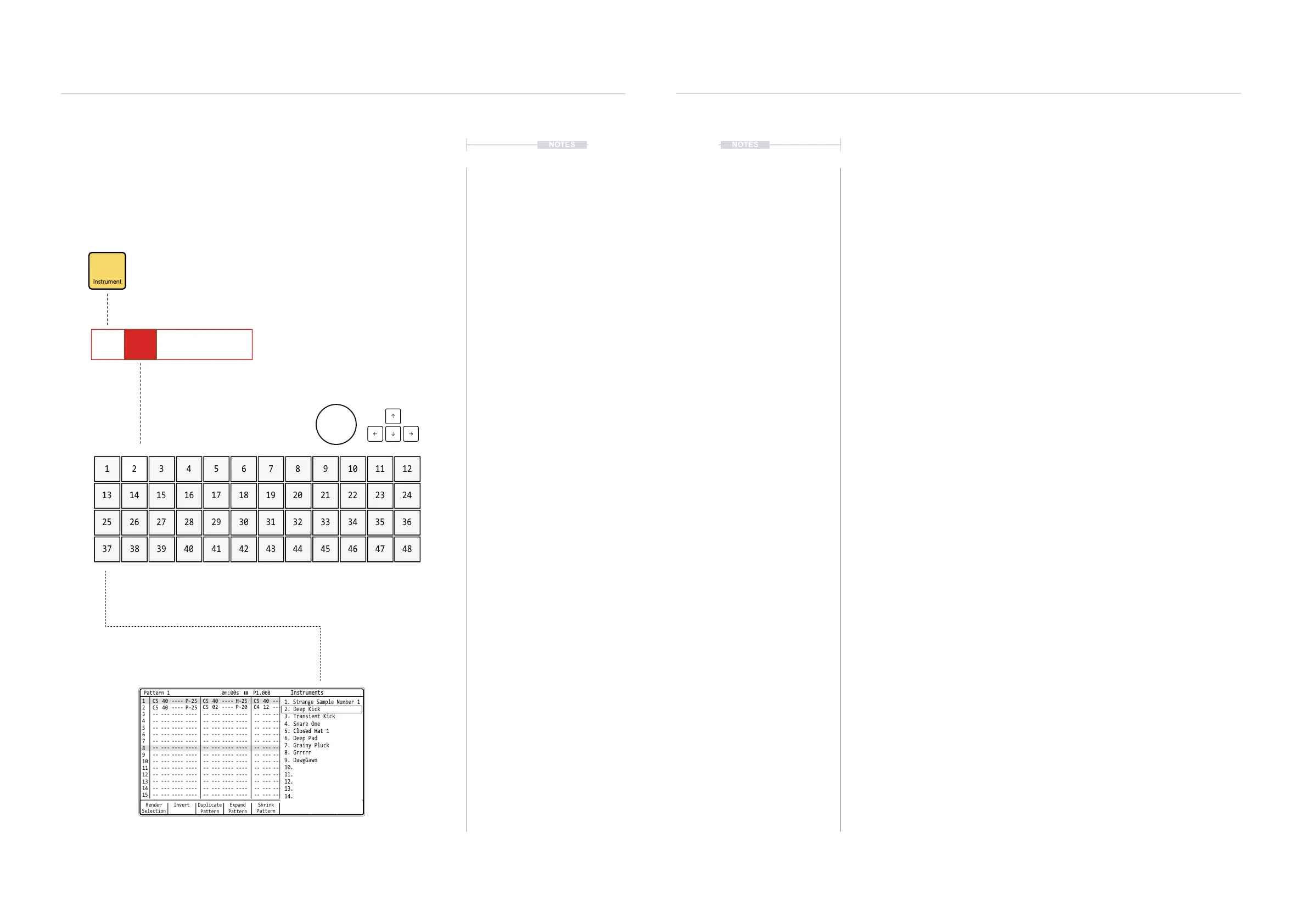
Instrument parameter has a dedicated
button when working in the pattern.
Instrument is the second parameter in the
step event and is highlighted when selected
Pads are used to populate an instrument step event.
Also it is possible to use (Jog) & [Up], [Down], [Left], [Right]
Instruments in the pool are mapped across the pads. Starting at 1 top left and pad
bottom right, ends at 48. This therefore covers the entire 48 instruments slots.
While holding [Instrument], the pop-up window will
display the available instrument list where the
selection can be made to load to the step event.
Note PatternFX1
Instrument
FX2
C5 02 V 10 P 25
1 5 102 76 113 8 124 9
13 17 2214 1918 2315 20 2416 21
25 29 3426 3130 3527 32 3628 33
37 41 4638 4342 4739 44 4840 45
▌ DETAILED APPLICATION OF AN INSTRUMENT TO A STEP
1. Press [Pattern] to select the pattern mode page.
2. Select a blank or existing step event.
3. Press [Instrument] to ensure the instrument parameter is selected in the
step event. This is a short press - do not hold [Instrument] otherwise
this will only temporarily select the parameter while being held.
4. Select recording mode, Press [Rec]. The steps selected will appear red
as opposed to green when in normal playback mode.
5. Assign an Instrument by either:-
• Press [PAD] to select the instrument based on the number for the
pad selected. Pressing [PAD] will also iterate steps based on ‘Step
Jump’ setting. Fastest Method.
• Hold [Instrument] + [PAD]. The pad selected will refer to the
instrument applied. The pads are laid out 1-48 representing the
instrument pool slots. Fast & Most Accurate Method.
• Hold [Instrument] + Turn (Jog). Adds a note value to the step.
Navigation is displayed on the pad note screen. Accurate and Quick
Method.
• Hold [Instrument] + Press [Up] or [Down] to highlight slots, [Left] or
[Right] to scroll by page of slots. Navigation and selection is shown
on the pop-up screen. Release [Instrument] to select. Accurate, But
Slower Method
• Hold [Instrument] alone, until pad notes are displayed and then
release [Instrument] to apply the selected instrument. Note can be
edited later if required. Quick but Inaccurate Method.
5. The instrument will be added, displayed with amber coloured text.
Instruments are always added with a note.
Render
Selection
1 1
2
C5 40 ---- P-25
C5 40 ---- P-25
-- --- ---- ---- -- --- ---- ---- -- --- ---- ---- -- --- ---- ----
-- --- ---- ---- -- --- ---- ---- -- --- ---- ---- -- --- ---- ----
-- --- ---- ---- -- --- ---- ---- -- --- ---- ---- -- --- ---- ----
-- --- ---- ---- -- --- ---- ---- -- --- ---- ---- -- --- ---- ----
-- --- ---- ---- -- --- ---- ---- -- --- ---- ---- -- --- ---- ----
-- --- ---- ---- -- --- ---- ---- -- --- ---- ---- -- --- ---- ----
-- --- ---- ---- -- --- ---- ---- -- --- ---- ---- -- --- ---- ----
-- --- ---- ---- -- --- ---- ---- -- --- ---- ---- -- --- ---- ----
-- --- ---- ---- -- --- ---- ---- -- --- ---- ---- -- --- ---- ----
-- --- ---- ---- -- --- ---- ---- -- --- ---- ---- -- --- ---- ----
-- --- ---- ---- -- --- ---- ---- -- --- ---- ---- -- --- ---- ----
-- --- ---- ---- -- --- ---- ---- -- --- ---- ---- -- --- ---- ----
-- --- ---- ---- -- --- ---- ---- -- --- ---- ---- -- --- ---- ----
C5 02 ---- P-20
C5 40 ---- H-25
C4 12 ---- A 4
C5 40 ---- P-20
C5 40 ---- P-25
C5 40 ---- P-25
2
3 3
4 4
5 5
6 6
7 7
9 9
11 11
13 13
15 15
8 8
10 10
12 12
14 14
Paste
Pattern
Expand
Pattern
Copy
Pattern
Duplicate
Pattern
Invert MoreShrink
Pattern
Pattern 1 0m:00s P1.008
Instruments
1. Strange Sample Number 1
2. Deep Kick
4. Snare One
5. Closed Hat 15. Closed Hat 1
6. Deep Pad
7. Grainy Pluck
8. Grrrrr
9. DawgGawn
10.
11.
12.
13.
14.
3. Transient Kick



 To Next Page