221
Polyend Tracker Manual
220
Polyend Tracker Manual
NOTESNOTES
Song Mode
9
Song Mode
9
9.6 Playing Songs and Patterns
Playing songs within song mode performs differently to playing patterns in
the pattern view. It is however also possible to play only patterns from
within Song mode. The dedicated play button will play a song in song mode
and will play the pattern only when in pattern mode.
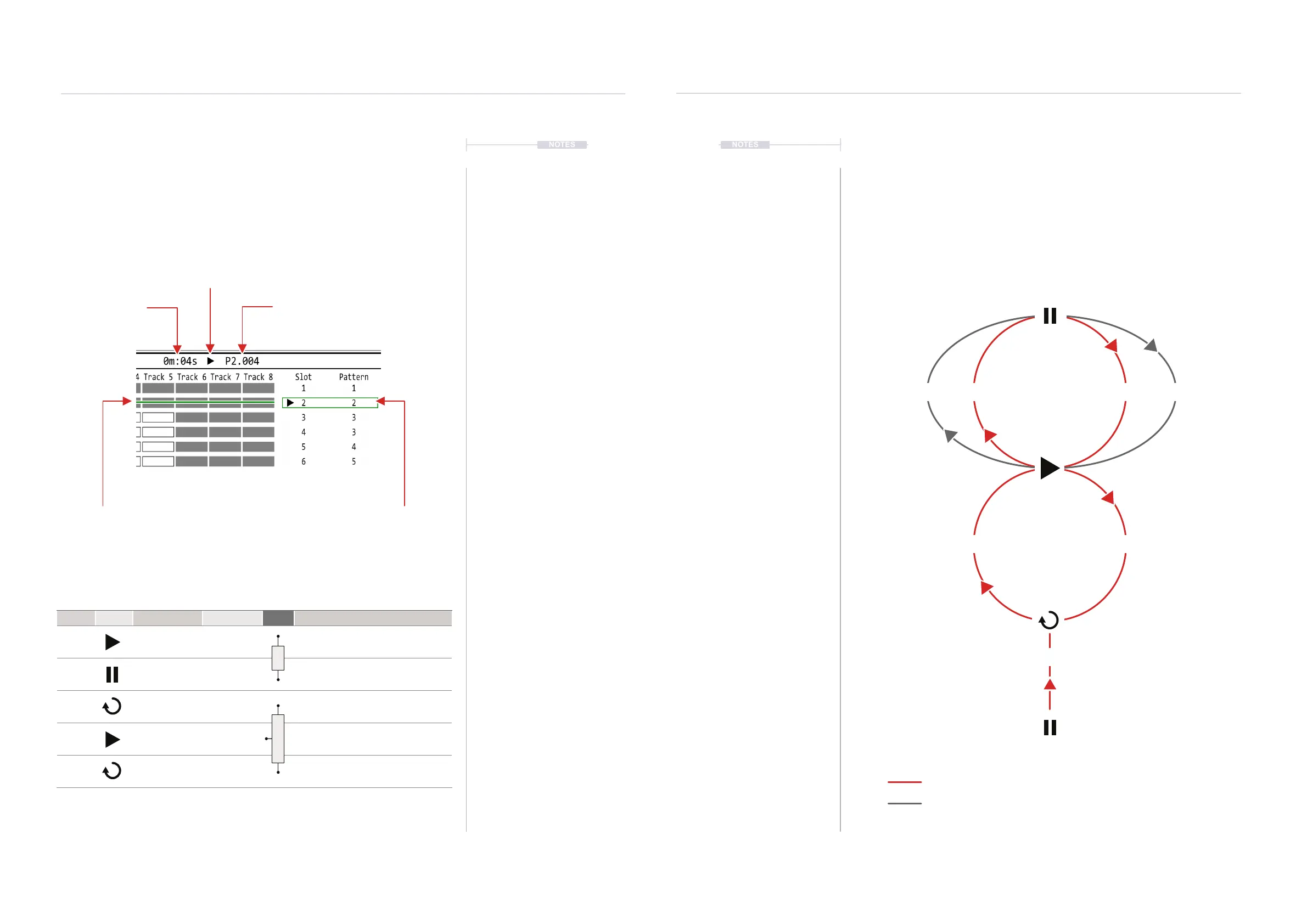
Song Playback Options
Time
Total play time in
Minutes : Seconds
Progress Bar
Progress indicator of
steps within pattern slot
Playback Loop
Songs will play on loop.
Playback will restart when the
last slot row is completed.
Progress Marker
Progress indicator of
current pattern slot
Screen Buttons
Dedicated Buttons
Pattern
Currently played pattern
number it’s step
Transport
Playback status symbol. Also
shown in pattern slot and
across various pages.
Mode Symbol Screen Button State Button Description
Song [Play Song] Play Song
Will play the song. Changing to pattern
mode will play and display patterns in sync
with song. Same as pressing [Play]
Song [Stop] Pause
When playing, button will toggle pause.
Press again to commence from the start of
the paused pattern. Same as pressing [Play]
Song to
Pattern
[Play Pattern] Play Pattern
Play the currently selected pattern in a loop.
Same as pressing [Shift] + [Play]
Pattern
to Song
[Continue Song] Play Song
Switches from playing pattern to play song
from current position. Same as pressing
[Shift] + [Play]
Song to
Pattern
[Loop Pattern] Loop Pattern
Switches from playing song to play and loop
pattern from current position. Same as
pressing [Shift] + [Play]
[Play Song]
[Loop Pattern]
[Play Pattern]
[Play]
PLAY
SONG
PLAY
PATTERN
[Play] [Stop]
[Continue Song]
Playback Behaviour.
Playing a song in song mode can be performed from the dedicated play
button or the screen buttons. Songs will play in loop meaning the song will
continue to play from the start after the last slot row is completed. Patterns
can also be played and looped from song mode. Switching between pattern
and song playback is possible using the screen buttons , which change
function to reect the current status.
PlayShift + Play



 To Next Page