183
Polyend Tracker Manual
182
Polyend Tracker Manual
NOTESNOTES
Audio
8
Audio
8
Mic Input
The microphone input is not represented in the mixer as it is just used for
sample recording with no pass through, although audio monitoring does
exist in the sample recorder. The input is a mono audio input connected by
the 3.5mm mic in. A few things should be considered when using a mic.
• Tracker does not supply 48V Phantom power normally used for
condenser microphones. Dynamic mics are therefore advised.
• The Mic selection input is in the sample recorder. Two options exist,
Mic LG (Low Gain) and Mic HG (High Gain). The selection will
depend on the microphone being used. Microphones with a strong
driver on the input may need a lower gain setting to avoid clipping.
Microphones with a weaker driver on the audio may need a high
gain setting to ensure a better dynamic range.
• The microphone may use a stereo TRS or Mono TR connection,
however recording from a microphone will always be in mono.
• Recording with a microphone follows similar principles to line-in. The
gain may need more pre-adjustment before recording due to the
nature or microphones and recording.
8.4 FM Radio
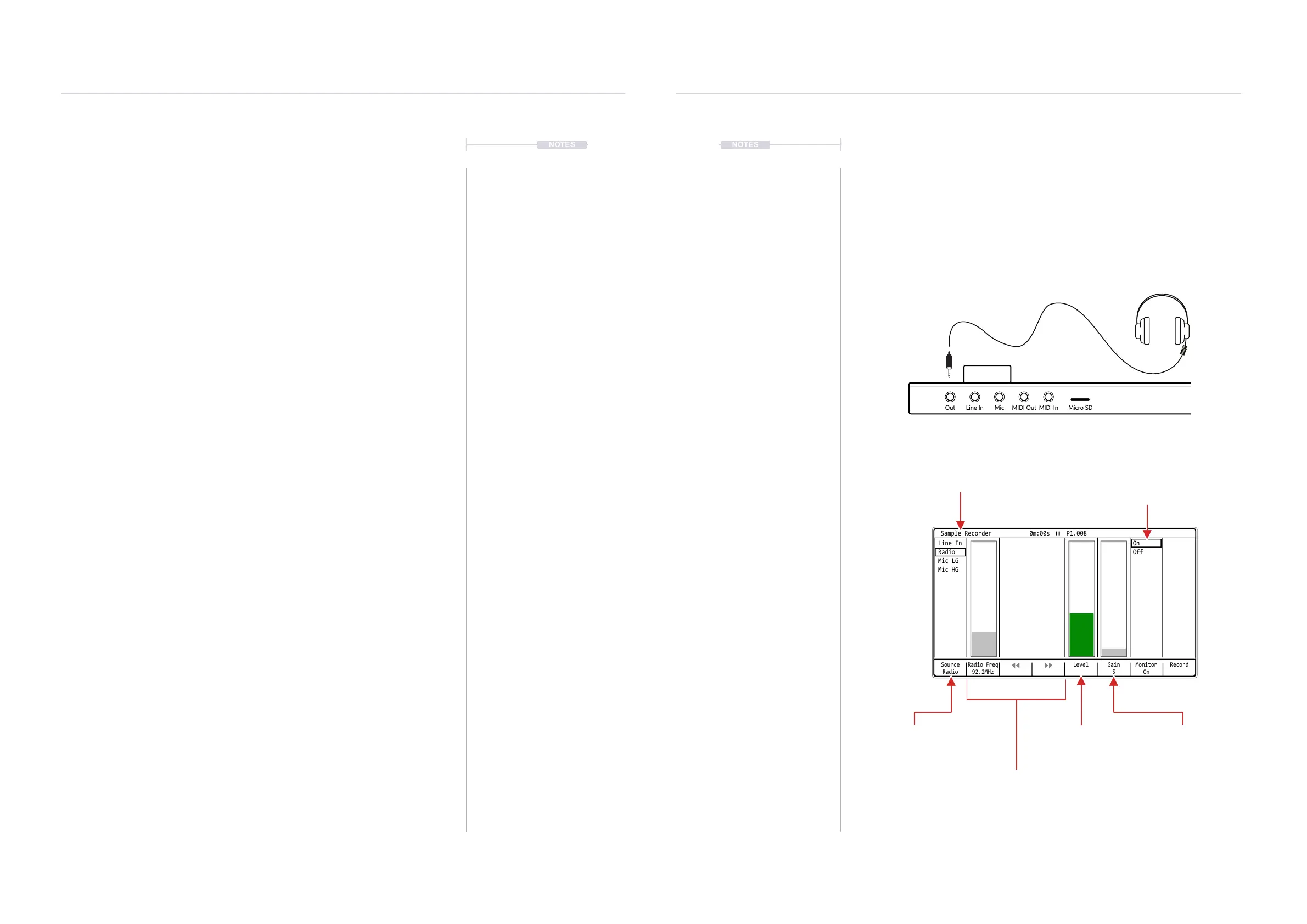
Tracker has a built in FM Radio. This can be used for sampling and
capturing various static or radio signals. Be aware of copyright when
sampling radio especially if considering to release a commercial track.
Source
Radio
Radio Freq
92.2MHz
Gain
5
Monitor
On
RecordLevel
On
Off
Line In
Radio
Mic LG
Mic HG
Sample Recorder 0m:00s P1.008
Monitor audio to out
Sample Recorder
Hosts the FM Radio Tuner
Tuning
Manual tuning with (Jog) when selecting
[Radio Freq]. The [Left] and [Right] to
scan frequencies to ne auto tune.
Source
Select the Radio as the
audio input to the sampler.
Gain
Adjustment for boosting
the signal level
Level
Visual indicator of radio
volume level.
Out Line In Mic MIDI Out MIDI In Micro SD
USB
Any cable plugged into the Audio Out jack will act as an antenna for the FM Radio.



 To Next Page