245
Polyend Tracker Manual
244
Polyend Tracker Manual
NOTES
The ability to connect to a PC or Mac via a MIDI connection is possible, which can allow software
synths and plug-ins to be controlled by Tracker. Tracker will need a hub or will need to be powered
by the PC / Mac as the USB connection is the source of power for Tracker.
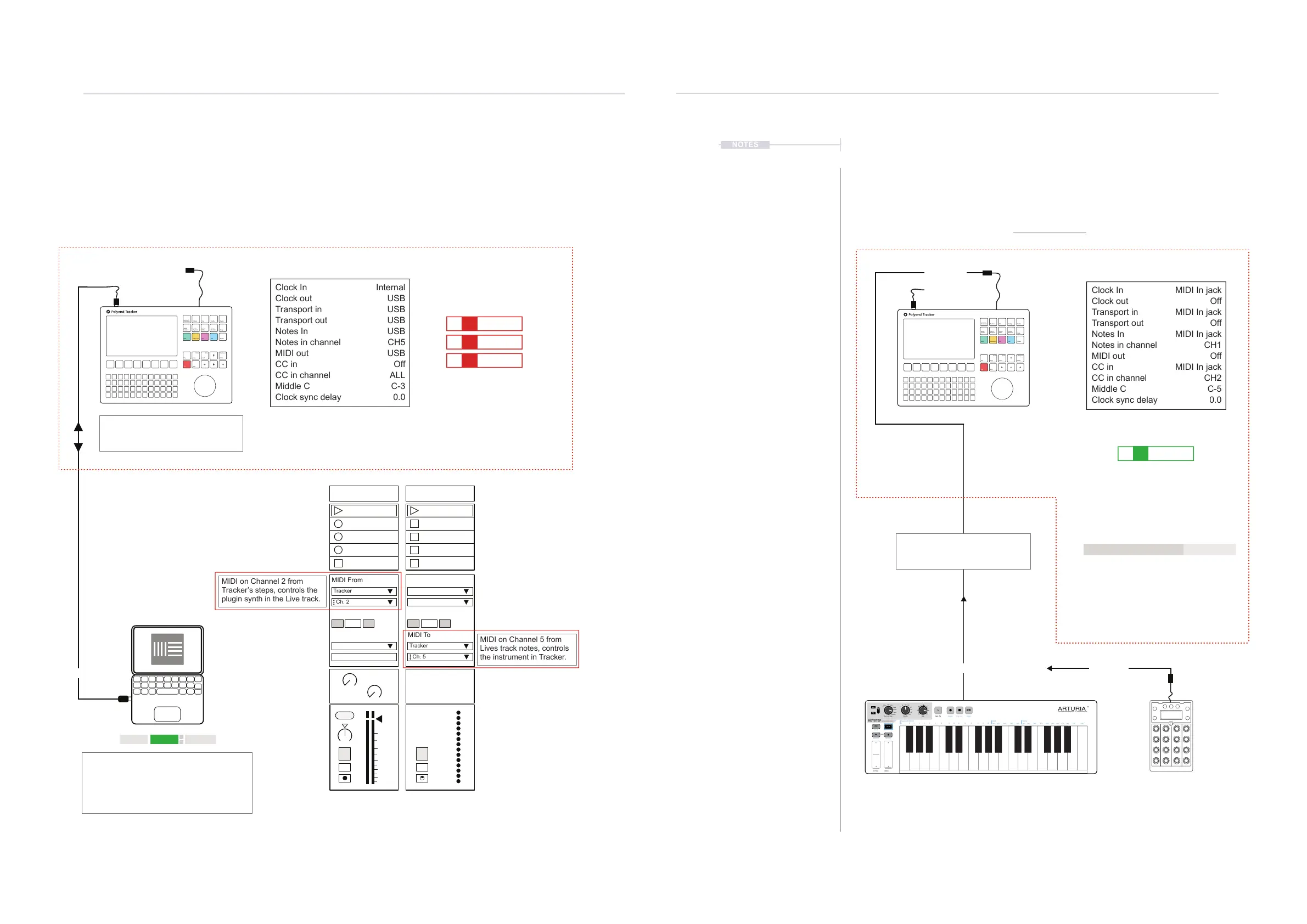
An external device, keyboard or drum pads can be connected to control
Tracker by MIDI either by USB or via the 5 Pin MIDI dongle. Notes can be
played or recorded and CC messages controlling assigned parameters.
MIDI
11
MIDI
11
Link EXT TAP
102.00
1 Plugin A 2 MIDI
MIDI From MIDI From
Tracker
Master Tracker
Ch. 2
In In
2
1
s
s
Auto Auto
Monitor Monitor
Audio To MIDI To
A
Sends
B
1.53
0
12
24
36
48
60
Tracker: Cong > MIDI
Tracker: Steps Set for MIDI Output.
Instrument; M02 = MIDI Channel 2
Notes out melody to the PC or Mac.
USB MIDI
Tracker can also record MIDI Incoming ie from a DAW using in live recording
mode, [Rec] + [Play]. Tracker Middle C adjusted from C-5 to C-3 to match Ableton
Live and Channel 5 set for Notes In
Clock In
Clock out
Transport in
Transport out
Notes In
Notes in channel
MIDI out
CC in
CC in channel
Middle C
Clock sync delay
Internal
USB
USB
USB
USB
CH5
USB
Off
ALL
C-3
0.0
Transport control e.g. Play, Stop can be
set by DAW or Tracker. It is advised to
dened which device control the clock.
MIDI settings in the Live preferences page will
need to be set ‘On’ for MIDI Ports, Input &
Output. When controlling to/from Tracker.
External function, in Live should be on to use
external sync settings and tempo is
synchronised from Tracker.
MIDI on Channel 2 from
Tracker’s steps, controls the
plugin synth in the Live track.
MIDI on Channel 5 from
Lives track notes, controls
the instrument in Tracker.
Example Conguration 2: Tracker in / out with Ableton Live.
USB
MIDI OUT
Instrument
Parameters
Sample
Loader
Note
Play
Rec
Master
Song
Pattern
Backspace
Delete
File
Sample
Editor
FX1
Insert
Home
Perform
Sample
Playback
Instrument
Copy
Paste
Shift
Config
Sample
Recorder
FX2
C5 M02 - - - - - - - -
E5 M02 - - - - - - - -
G5 M02 - - - - - - - -
Ch. 5
Off
Off
Tracker: Cong > MIDI
The keyboard will control the current
instrument in Channel 1.
USB MIDI
Notes can be recorded in live
recording mode. The note and note off
messages are captured in the steps.
Control change (CC) assignments
Clock In
Clock out
Transport in
Transport out
Notes In
Notes in channel
MIDI out
CC in
CC in channel
Middle C
Clock sync delay
MIDI In jack
Off
MIDI In jack
Off
MIDI In jack
CH1
Off
MIDI In jack
CH2
C-5
0.0
Transport control e.g. Play, Stop and
Clock is dictated by an external
devices as is current Tempo.
Optional controller used for control
change (CC) messages on channel 2
Keyboard or Pad controller used for MIDI note information on
channel 1. To record variable velocity into Tracker make sure the
Cong > General > ‘Recording Options’ have a Velocity option
enabled. Otherwise velocity is recorded at xed value.
Example Conguration 1: Tracker as the secondary follower.
MIDI OUT
MIDI IN
MIDI OUT
Function CC #
Performance Mode Tracks CC41 - CC48
Performance Mode Effects CC51 - CC62
Master Mixer Levels CC71 - CC78
Delay & Reverb Mix CC79 & CC80
Dry Mix CC81
Line In Level CC82
Instrument
Parameters
Sample
Loader
Note
Play
Rec
Master
Song
Pattern
Backspace
Delete
File
Sample
Editor
FX1
Insert
Home
Perform
Sample
Playback
Instrument
Copy
Paste
Shift
Config
Sample
Recorder
FX2
A#3 16 - - - - - - - -
OFF -- - - - - - - - -
ARTURIA
YOUR EXPERIENCE - Y OUR SOUND
PITCH MOD
RESET
Transpose
Append Clear Last Restart
Keyboard MIDI CH
1 2 3 4 5 6 7 8 9 10 11 12 13 14 15 16
10% 25% 50% 75% 90% Off 53% 55% 57% 59% 61% 64% 67% 70% 73% 75%
Gate Swing
Rest / TieSeq / Arp Mode Time Div Rate
1/4
1/Up
1/8
2/Dwn
1/16
3/Inc
1/32
4/Exc
1/4T
5/Rand
1/8T
6/Order
1/16T
7/Up x2
1/32T
8/Dwn x2
Chord
KEYSTEP
CONTROLLER & SEQUENCER
Seq
Arp
Kbd Play
(C)
HOLD SHIFT
-
+
Tap



 To Next Page