129
Polyend Tracker Manual
128
Polyend Tracker Manual
NOTESNOTES
Granular Parameters
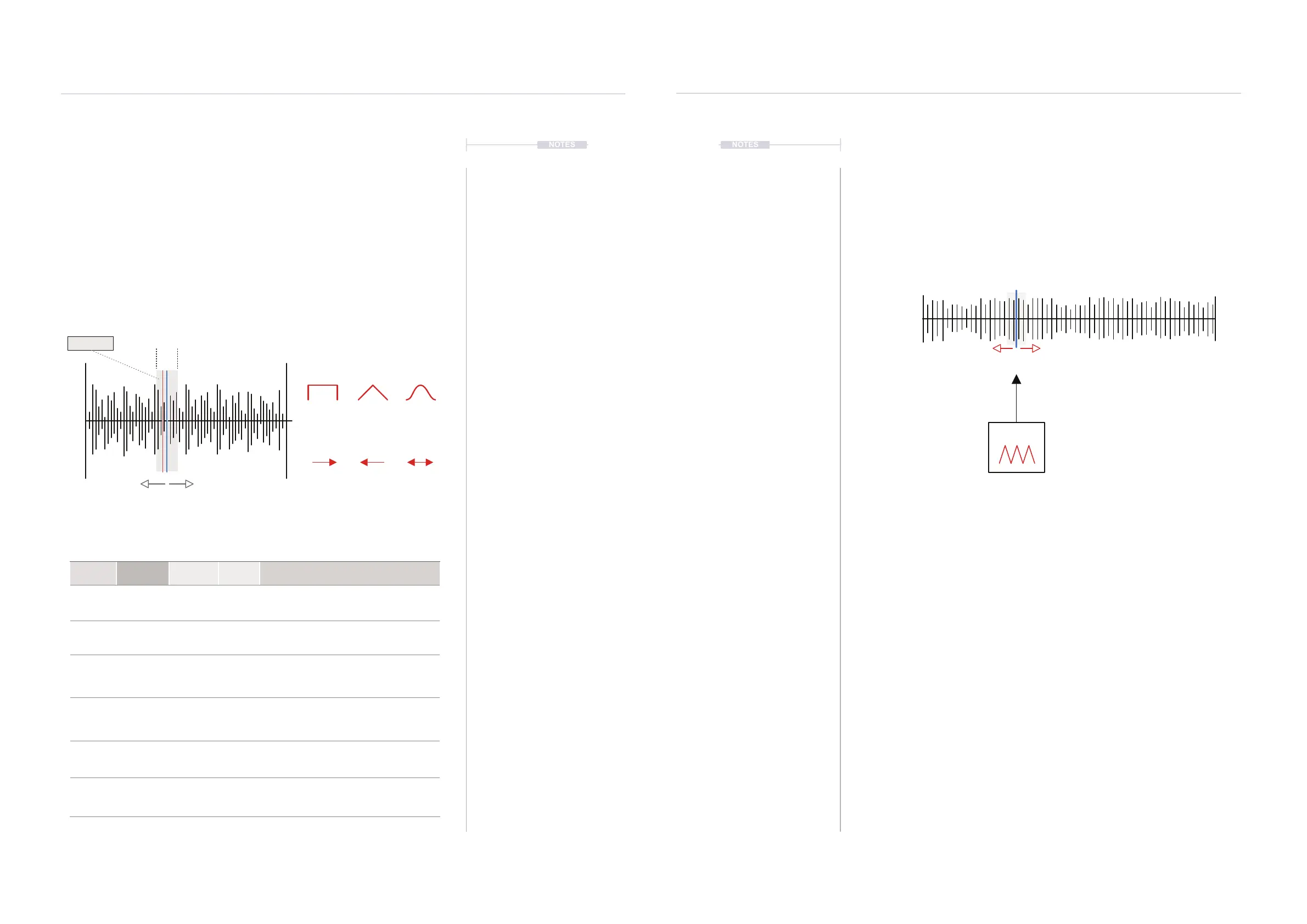
The granular play mode is a simplied application of granular synthesis and
consists of four core parameters. The grain length is duration of the small
slice of audio, while loop denes the direction of playback across the grain.
Shape is the envelope shape applied to the grain playback, recognised in
the attack phase. The position parameter is what brings out the its sonic
character. This can be manually adjusted to nd a sweet spot or modulated
with the envelope or LFO to introduce movement and interest. Tracker
operates with a single grain.
Instruments
6
Instruments
6
Position
(Blue Bar)
Length
Play Head
(Red Bar)
Shape will determine the
envelope of the playback
Grain
Direction will determine the
playback of the grain
Forward Reverse Pingpong
Square Triangle Gauss
Function Parameter
Screen
Button
Range Description
Edit Play Mode 7th & 8th
Modes
Selects the play mode to apply. Includes
Wavetable and Granular as well as 1-Shot and the
three loop modes.
Aid Preview 1st
Hold to play the grain from the current position
selected. Also hold while adjusting position to
‘scan’ for the desired sound.
Edit Position 2nd
Variable
Selects the grain playback position within the
sample. This can be manually adjusted to nd the
desired ‘sweet spot’ or modulated with an LFO or
Envelope for movement and interest.
Edit Length 3rd
1-1000ms
Sets the width in ms of the grain. This will be the
small slice of the sample that is played.
Edit Shape 4th
Square,
Triangle,
Gauss
Sets the envelope shape for the grain playback.
Particularly pertinent in the attack phase.
Edit Loop 5th
Forward,
Reverse,
Pingpong
Selects the grain playback direction.
Modulating Granular Position
The granular position can be modulated from within the instrument
automation page using an envelope or LFO. This adds movement and
interest and creates glitchy or textural sounds
Hold [Preview] in the granular page while the LFO is running will display the
animated position dynamically in real time.
The LFO Speed and granular parameters can have an affect on the sound
developed. Also the LFO amount will determine how much of the sample is
navigated with varying the position. Small amounts will be more predictable
textures and pad like sounds. Larger amount settings will move the position
wider in the sample creating more glitchy, less predictable sounds.
LFO
Sample
+ Grain
Select the ‘Sample playback’ page to view granular play mode.
Select ‘Instrument Parameter’ page 2 to
edit the LFO and instrument automation
Position



 To Next Page