193
Polyend Tracker Manual
192
Polyend Tracker Manual
NOTESNOTES
Audio
8
Audio
8
▌ RENDER AND EXPORT A FULL PATTERN
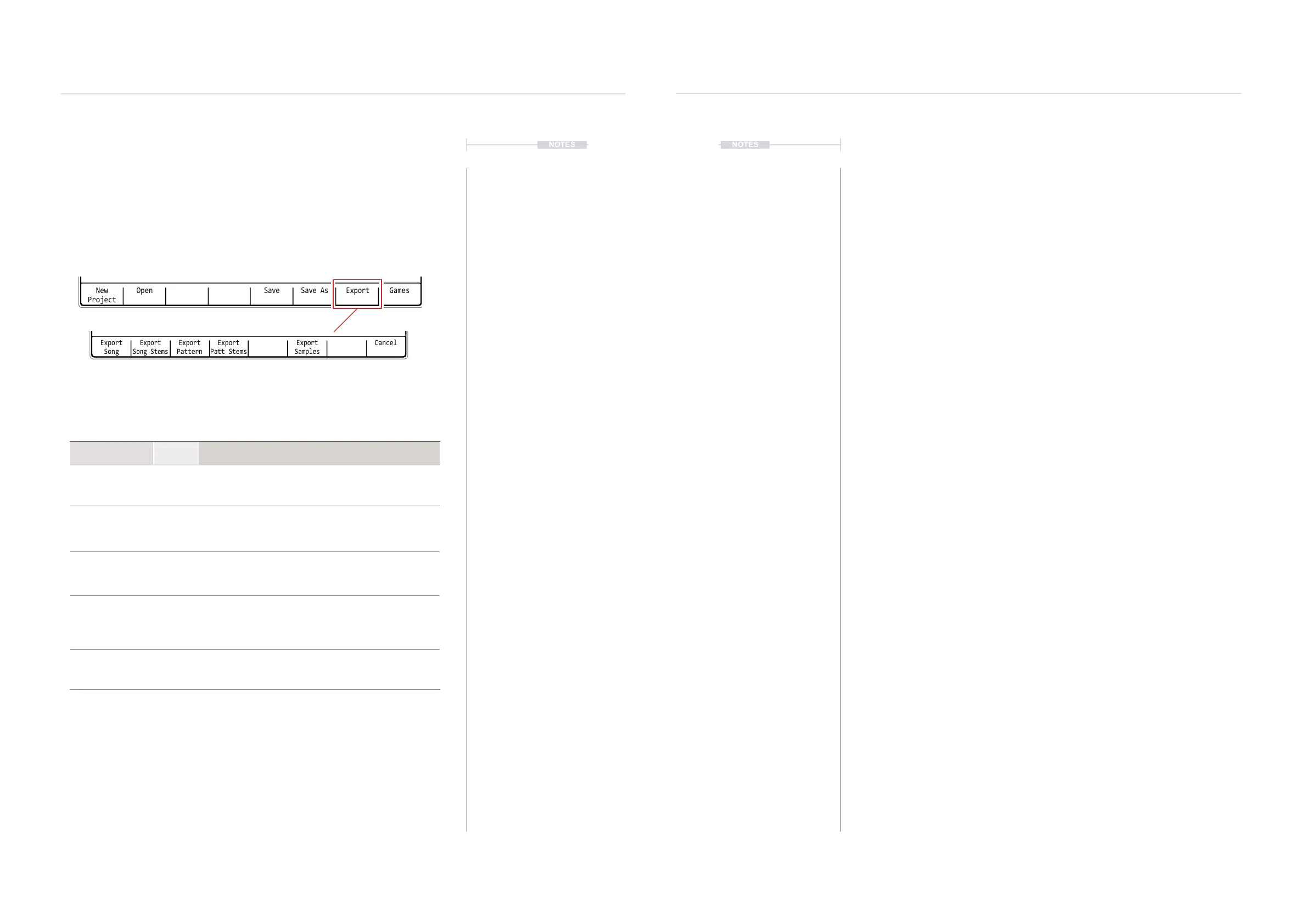
1. Press [File] to select the le options page.
2. Press [Export], 7
th
Screen button to select the export specic options.
3. Press [Export Pattern], 3
rd
Screen button to render and export.
4. The currently active pattern will be rendered and exported. Any muted
tracks are not rendered and therefore remain silent in the exported
audio le.
5. A folder is created on the SD Card that represents the render. This is
located in the /Export sub folder. The le itself will be called ‘master.
wav’. Each time the pattern is exported a new folder is created. The
folder naming convention is:-
Project name_P Pattern number_Sequential render number
▌ RENDER AND EXPORT ALL PATTERN STEMS
1. Press [File] to select the le options page.
2. Press [Export], 7
th
Screen button to select the export specic options.
3. Press [Export Patt Stems], 3
rd
Screen button to render and export.
4. All tracks plus the delay and reverb audio will be rendered in mono and
exported. Also a stereo master le is rendered of all tracks. Any muted
tracks are not rendered and therefore remain silent in the exported
audio le.
5. A folder is created on the SD Card that represents the render. This is
located in the /Export sub folder. The 11 les will be called ‘track 1.wav’
etc, ‘delay.wav’, ‘reverb.wav’ and ‘master.wav’. Each time the pattern is
exported a new folder is created. The folder naming convention is:-
Project name_P Pattern number_S for Stems + Sequential number
Rendering and Exporting Stems
The function to render and export full stems for tracks or full songs and
patterns is found in the ‘File’ options. MIDI Clock IN must be set to Internal
in the Cong settings in order to render stems.
Press [File]
Function
Screen
Button
Description
Export Song 1st
Renders an individual audio les for the selected song. Muted tracks
are not rendered. The stem will cover the entire song length and are
44.1kHz, 16 Bit PCM Wav les.
Export Song Stems 2nd
Renders individual audio les for each of the 8 unmuted tracks and 2
effects, delay and reverb, all in mono. Muted tracks are not rendered.
In addition a stereo mix of the complete song as an audio le. The
stems will cover the entire song length and are 44.1kHz, 16 Bit PCM
Wav les.
Export Pattern 3rd
Renders an individual audio le for the selected project pattern.
Muted tracks are not rendered. The stem will cover the entire pattern
length and are 44.1kHz, 16 Bit PCM Wav les. A unique folder is
created to represent the render.
Export Patt Stems 4th
Renders individual and complete audio les for the project patterns.
Muted tracks are not rendered. The stems will cover the entire
pattern length and are 44.1kHz, 16 Bit PCM Wav les. This will
render 11 stems (Tracks, Delay, Reverb and Master). A unique folder
is created to represent the render.
Export Samples 6th
Exports the project .pti instrument les as .wav les. This captures
instruments to audio. Exported to the SD Card within the folder,
Projects/ProjectName/samples, named by the instrument name.
1.Analog 3 18p
New
Project
Open Save AsSave Export Games
File
0m:00s P1.008
1.Analog 3 18p
Export
Song
Export
Song Stems
Export
Pattern
Export
Patt Stems
Export
Samples
Cancel
File
0m:00s P1.008
Folder location when using the render option in the le page.
/Export/ ProjectName/ Selection - Exports to the folder named for the current project
The rendering process is almost real-time based on the project duration (in fact song stems render approx
20% faster of the time duration of the playback) and operates by rendering stems one by one. This means
when exporting stems the render time can be 2-3 times, maybe even longer than the original song
duration. The render progress is displayed when in operation.



 To Next Page