7088-8000
-24
3.1 Keypad and Display
The keypad provides access to the microprocessor for configuring the flowmeter. The
keypad entries are viewed on the instrument’s 40-character LCD display. During
operation, the display indicates the flow rate and totalizer values. The display is backlit for
ease of viewing in low-light conditions and has a variable contrast setting (Section 3.1.2).
3.1.1 KEYPAD AND DISPLAY COMPONENTS
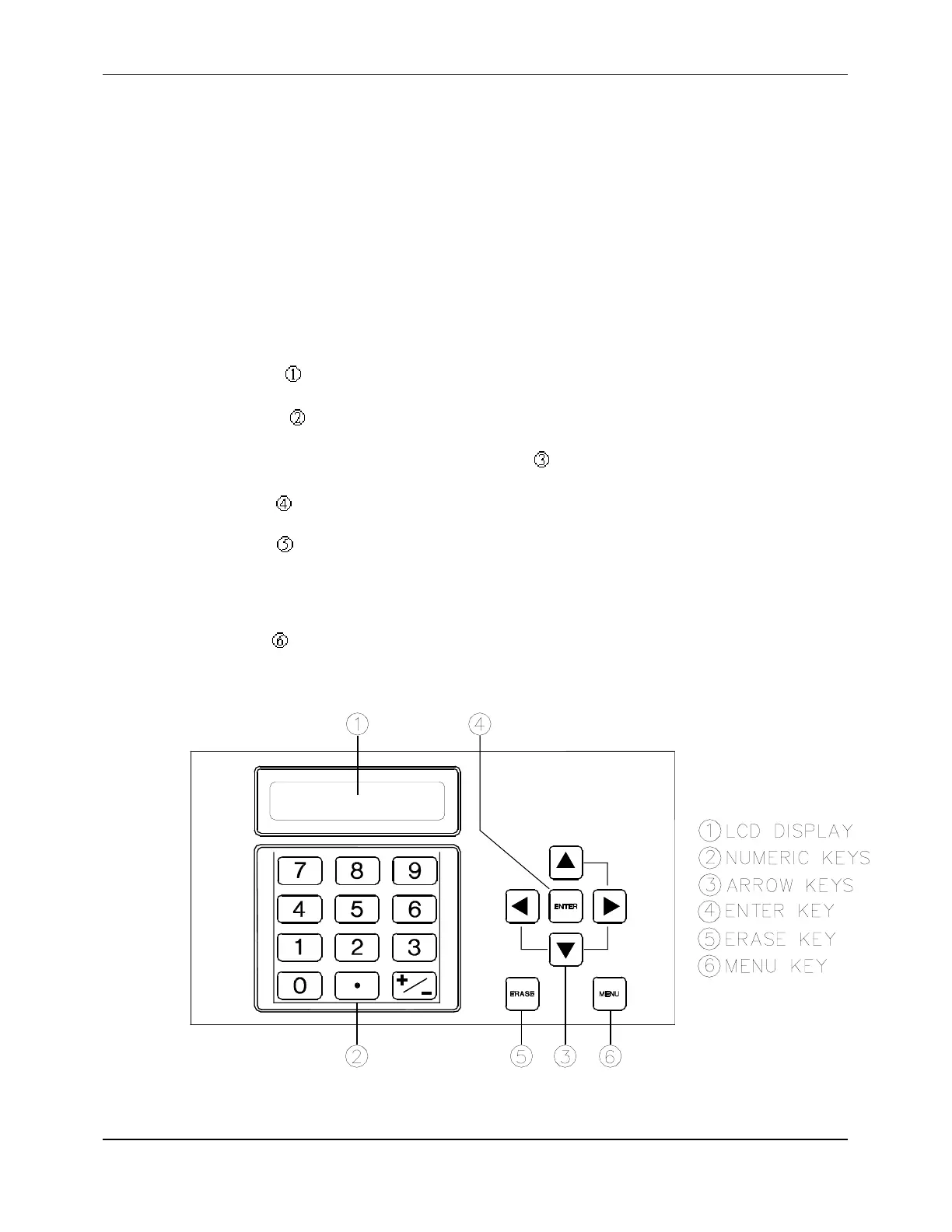
The components of the keypad and display (Figure 3-1) are as follows:
!
LCD Display
!
Numeric keys , including the
0
through
9
keys and the decimal (.) key.
!
UP
,
DOWN
,
LEFT
,
and
RIGHT ARROW
keys for scrolling.
!
ENTER
key , which operates like the
ENTER
key on a computer.
!
ERASE
key which operates like the
BACKSPACE
key on a computer. The
ERASE
key deletes the last entered value from the keypad. In addition, pressing
ERASE
from
most setup and diagnostic menus accesses the Main Menu. Pressing
ERASE
a second
time accesses Menu 00 (the Flow Rate and Net Totalizer display).
!
MENU
key , which provides access to the flowmeter’s setup and diagnostic menus
(Section 3.3)
Figure 3-1 Keypad and Display


 To Next Page