A3156
I.
II.
III.
IV.
V.
VI.
VII.
VIII.
IX.
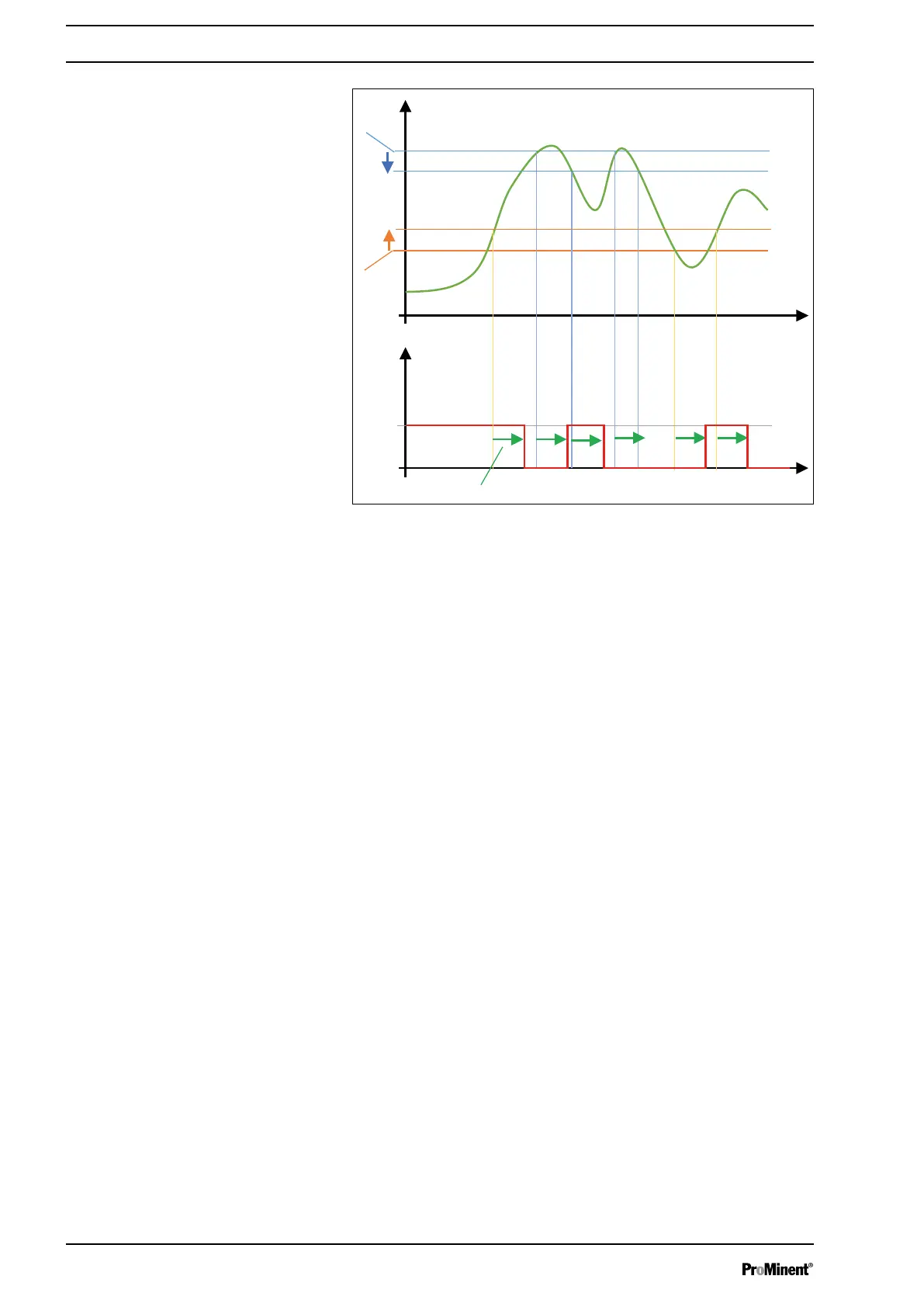
Fig. 105: Control characteristic
I. Measure
II. Time
III Time
IV. Time delay
V. Alarm
VI. Lower threshold
VII. Hysteresis
VIII. Hysteresis
IX. Upper threshold
Hysteresis: This value specifies a value delta in which the alarm
remains active. This permits stable alarms when the measured
value oscillates around the value of an alarm threshold.
8.4
‘Settings’
-
‘CALIBRATE’
menu
For calibration see:
Ä Chapter 10 ‘Calibrating sensors’
on page 114
8.5
‘Settings’
-
‘FLOW RATE’
menu
In the
‘FLOW RATE’
menu you can set the threshold value for low
flow and the levels for dose adjustment.
This menu is only accessible if you have set up a flow sensor in the
‘INSTALLATION’
part. Otherwise, the menu remains grey.
Setting measuring and control parameters
102














 To Next Page