5-1
5 Maintenance
How to use this Section
Chapter
5.1
up to
5.4
inform how to install the consumables. The
user
preventive maintenance
is described in chapter
5.5
Note:
For information about the lifetimes of the consumables see Chapter
7
Technical Data
.
After replacing the consumables document the installation on the pages
in
Chapter 9 Maintenance / Logbook
.
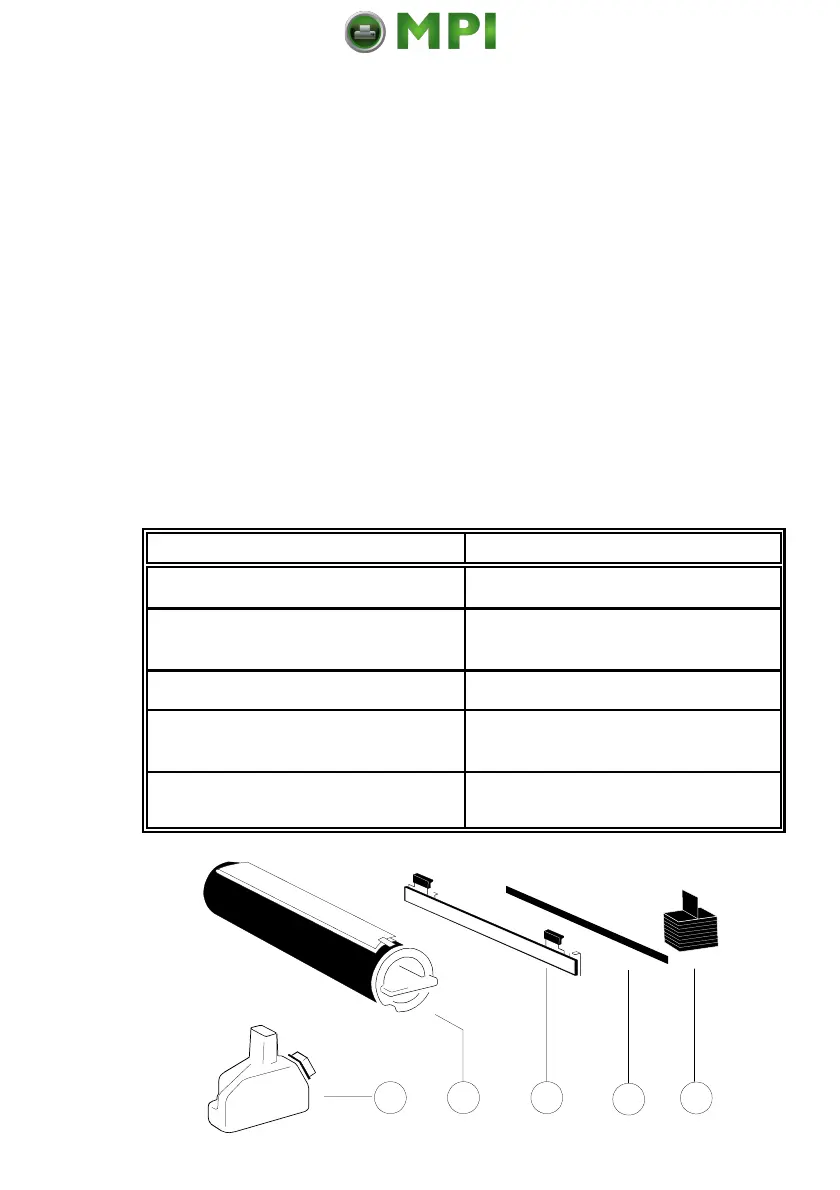
5.1 Installing the Parts of the Toner Kit
A Toner Kit comprises:
Standard Toner MICR Toner
10 Toner Cartridges (1) 10 Toner Cartridges MICR (1)
5 Waste Toner Bottles (2); change it 5 Waste Toner Bottles (2); change it
with every second Toner Cartridge with every second Toner Cartridge
1 Fuser Cleaner Platen (3) 1 Fuser Cleaner Platen (3)
5 Cleaner Felts (4); change it with 10 Cleaner Felts (4); change it with
every second Toner Cartridge
every
Toner Cartridge
5 Ozone Filters (5), change it with 5 Ozone Filters (5), change it with
every second Toner Cartridge every second Toner Cartridge
Mantenimiento Periféricos Informáticos SL C/Canteras, 15 28860 Paracuellos de Jarama Tel: 00 34 917481604 WEB: https://mpi.com.es



 To Next Page