Maintenance
5-13
5.3.1 Replacing the Fuser Unit
Note:
Don´t touch the top of the Fuser Unit,
it might be very hot.
$
Press first . OFFLINE will be displayed.
$
Open the front (21) cover.
$
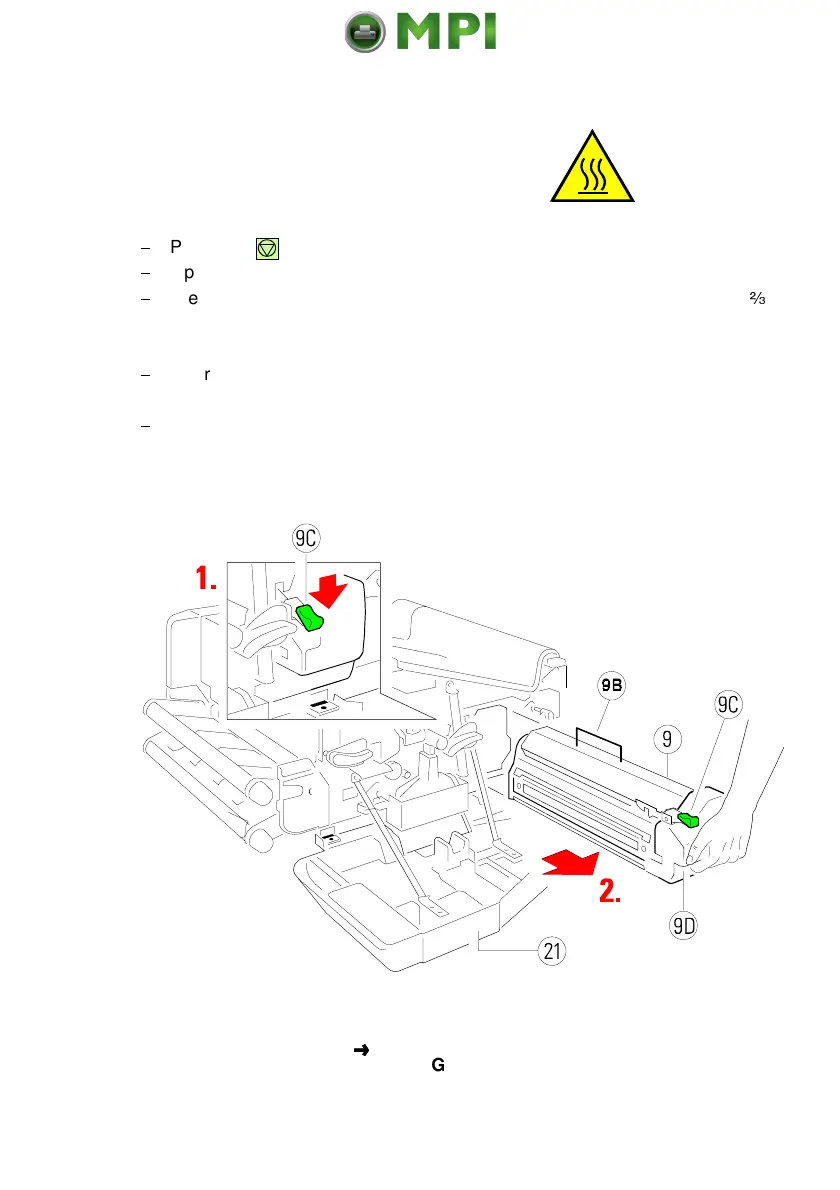
Press lever (9C) down and pull the Fuser Unit (9) on the grip (9D) about
-
out of the housing. Grasp the grip (9B) with the other hand and pull it toward
you off the printer housing.
$
Insert a new Fuser Unit (9) and push it into the printer until you hear a
click.
$
Close the front (21) cover.
Note:
Take away the safety foil (3) before inserting the Fuser Unit (see page
before)!
Note:
Change to the OFFLINE mode and reset the FUSER INFO (see
BASIC SETTINGS
CONFIG MENU)
Mantenimiento Periféricos Informáticos SL C/Canteras, 15 28860 Paracuellos de Jarama Tel: 00 34 917481604 WEB: https://mpi.com.es



 To Next Page