Maintenance
5-19
5.5.3 Cleaning the Ozone Filter below the Transfer Charger
$
Press first .
OFFLINE
will be displayed.
$
Open the front (3) and rear (4) cover.
$
Press the green lever to open the top cover (5), illustrated before.
$
Loosen the screw (2) and remove the Transfer Charge Unit (1), illustrated
on page before.
Note:
The Transfer Charge Unit is a delicate equipment which needs to be
handled with care!
$
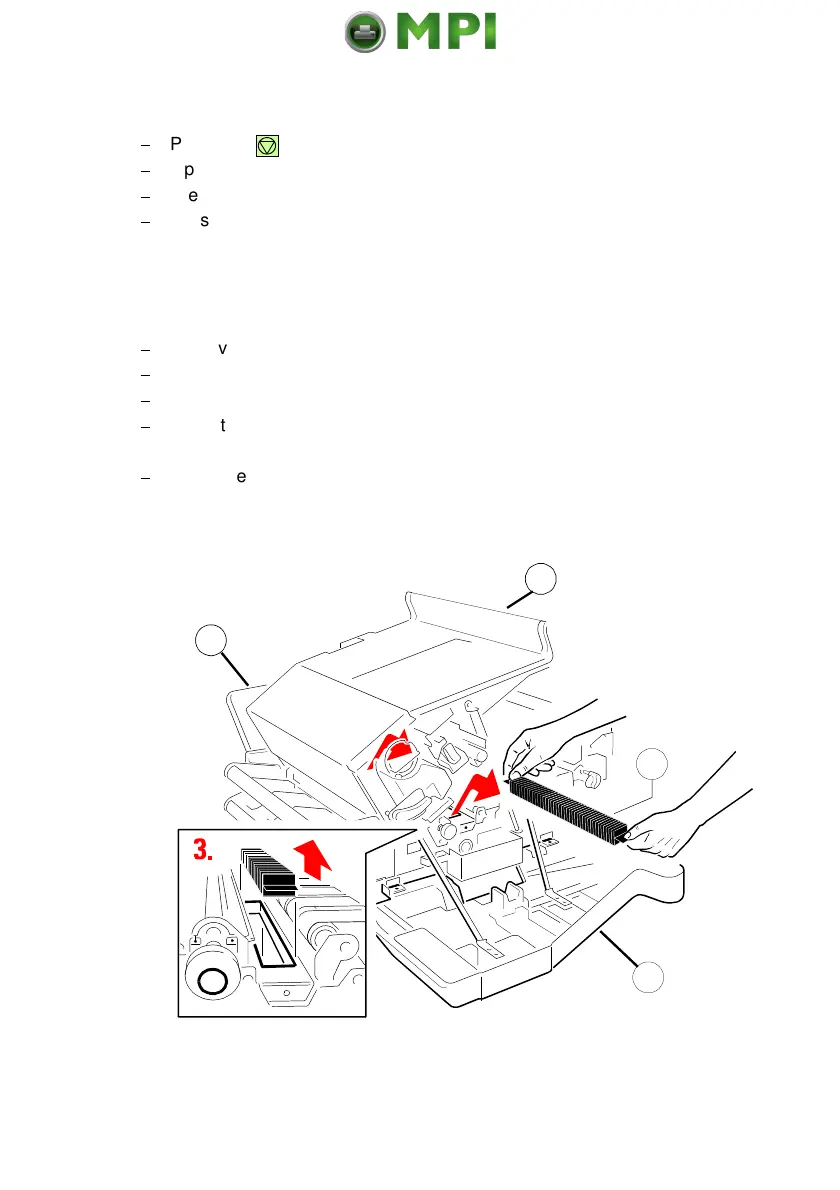
Remove the Ozone Filter (6) by using the small tab at the side.
$
Clean the Ozone Filter (6) using a vacuum cleaner.
$
Insert the Ozone Filter, illustrated below.
$
Insert the Transfer Charge Unit by using the iron band guides at both sides
and fix it with the screw (2).
$
Close the top (5), rear (4) and front cover (3).
Mantenimiento Periféricos Informáticos SL C/Canteras, 15 28860 Paracuellos de Jarama Tel: 00 34 917481604 WEB: https://mpi.com.es



 To Next Page