Installing the Printer and the intelligent Paper Stacker
1-18
1.6 Connection to a Computer or to a Network
Note:
The printer must be powered off!
Parallel and Ethernet Interface
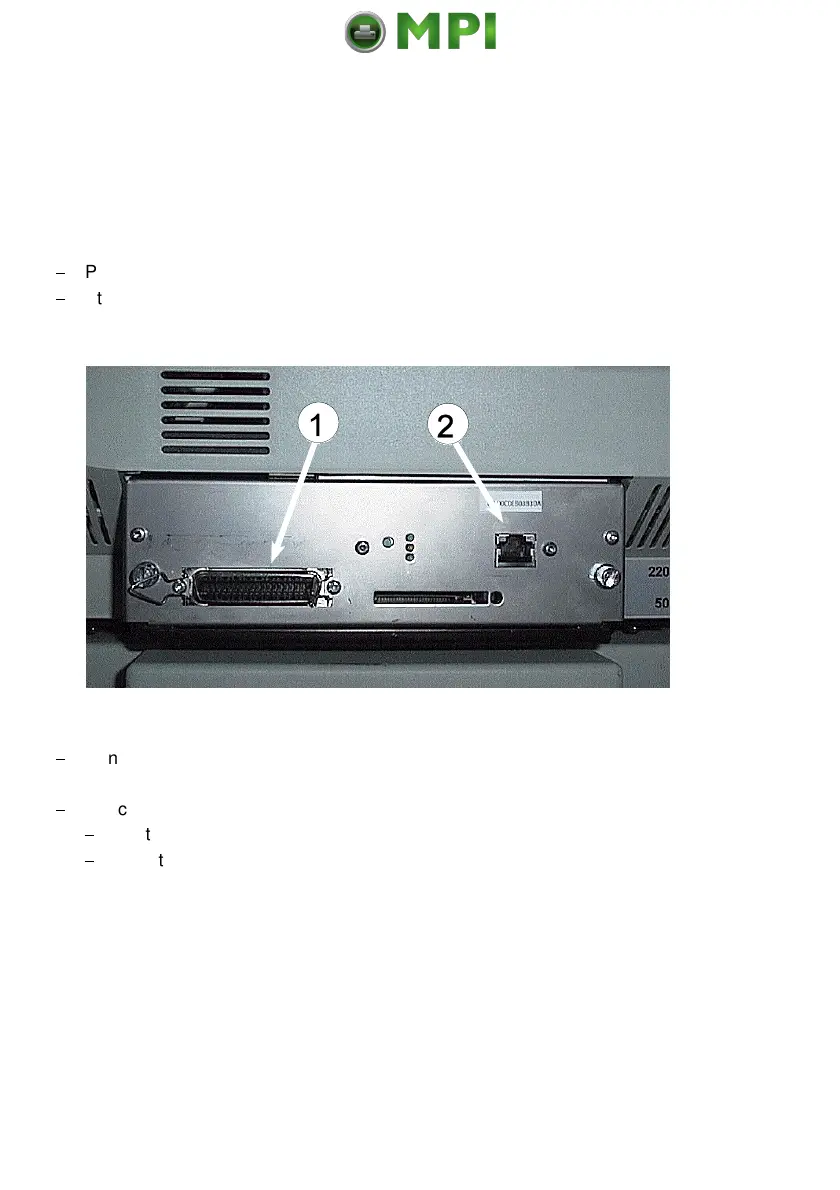
At the rear side of the printer you will find two interface connectors:
$
Parallel IEEE 1284 (1)
$
Ethernet 10 Base T (2)
$
Connect the interface cable coming from the computer or from the network
to the printer´s parallel (1) or 10 Base T port (2).
$
Check in the CONFIG. MENU the HOST CHANNEL.
$
For the parallel connection the setting PARALLEL ONLY is necessary.
$
To activate the 10 Base T interface the setting must be I/O EXTENSION.
Note: For detail information about the Ethernet interface refer to the Ethernet
Reference Manual
Mantenimiento Periféricos Informáticos SL C/Canteras, 15 28860 Paracuellos de Jarama Tel: 00 34 917481604 WEB: https://mpi.com.es



 To Next Page