Maintenance
5-22
5.5.6 Cleaning the Corona Wire
To clean the corona wire follow the steps below:
$
Press . OFFLINE will be displayed.
$
Open the front (21) cover.
$
Take a cotton bud.
$
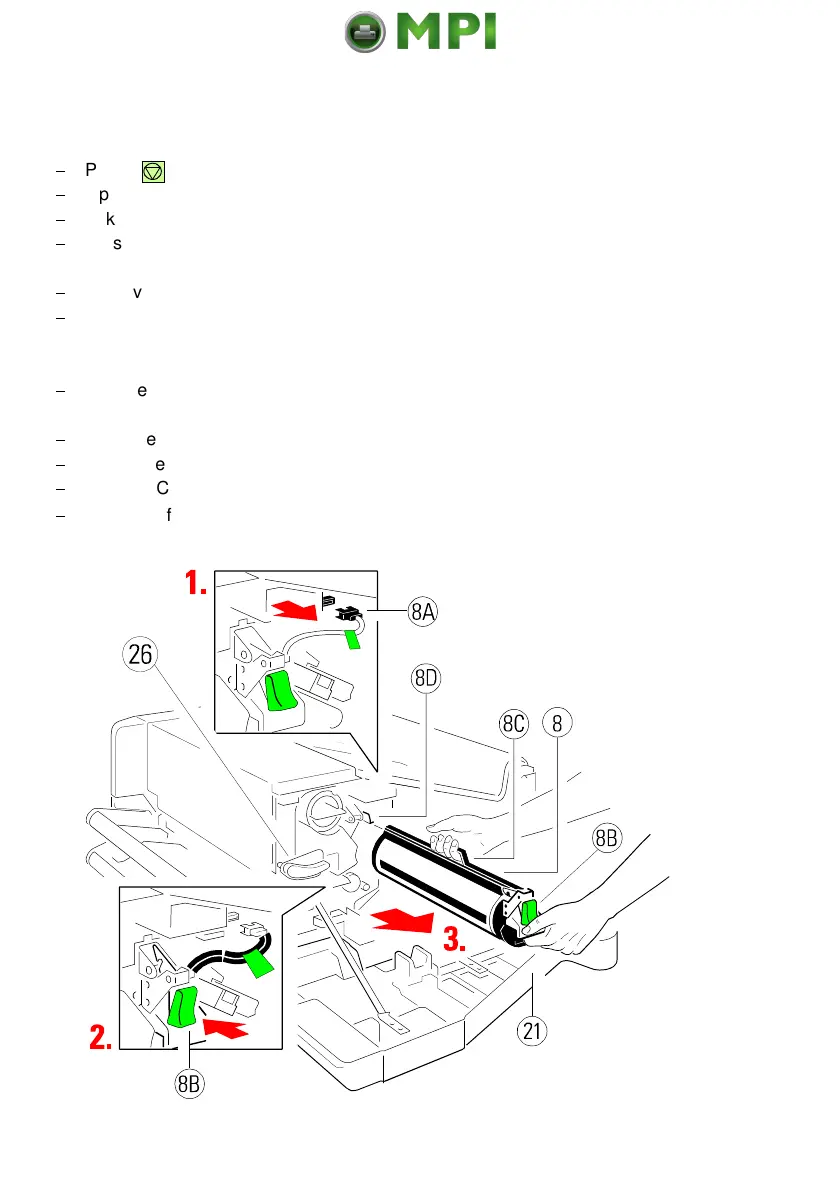
Press the lever (26) to the top to slide the Developer Unit away from the PC
Cartridge.
$
Remove the connector (8A).
$
Press lever (8B) down and pull the PC Cartridge (8) out of the housing until
the slot over the corona is free. Now grasp the grip (8C) with the other hand
to hold the PC Cartridge.
$
Use the cotton bud to clean the corona wire carefully from one side to
the other as shown in the photo next page.
$
Push the PC Cartridge into the printer until you hear a click.
$
Mount the connector (8A).
$
Fix the PC Cartridge again by pressing down the lever (26).
$
Close the front (21) cover.
Mantenimiento Periféricos Informáticos SL C/Canteras, 15 28860 Paracuellos de Jarama Tel: 00 34 917481604 WEB: https://mpi.com.es



 To Next Page