Installing the Printer and the intelligent Paper Stacker
1-14
1.5.3 Inserting the
Waste Toner Bottle
The Waste Toner Bottle is in the Starter Kit package 1
$
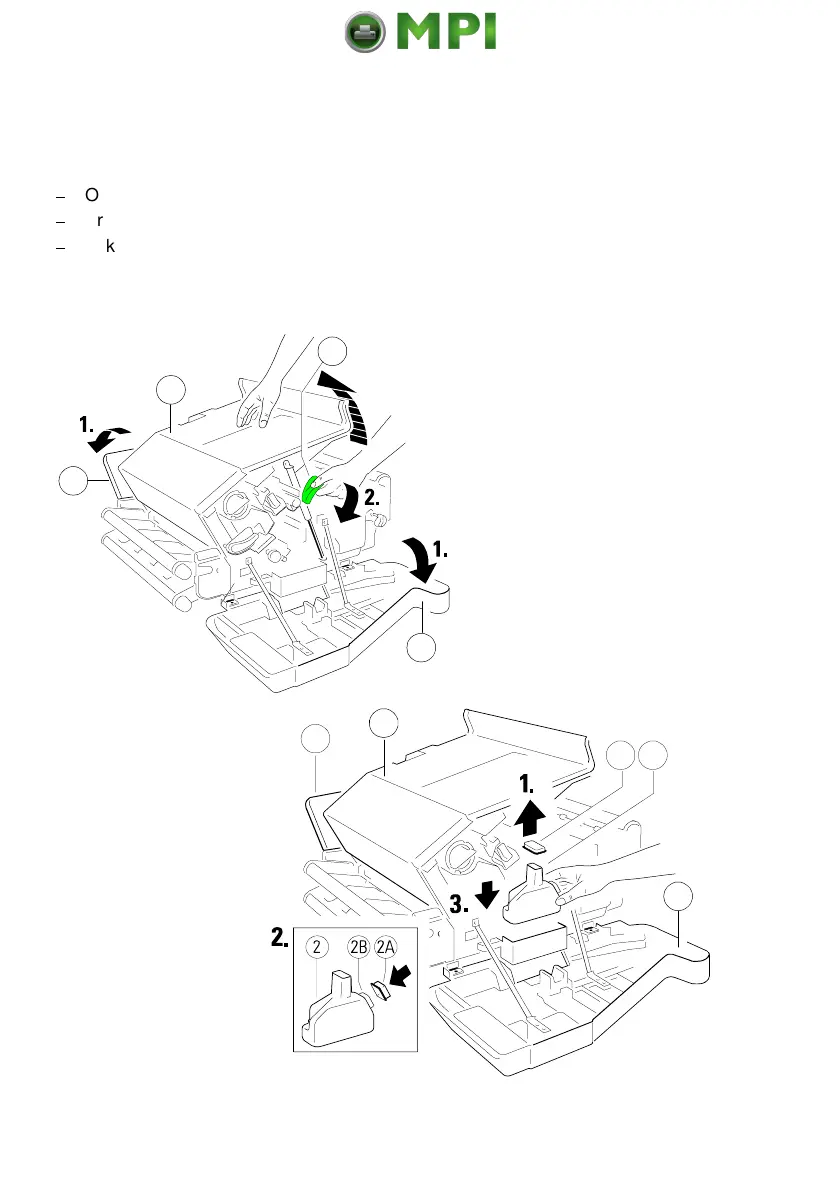
Open the rear (22) cover.
$
Press the lever (23) to open the top cover (24), illustrated below.
$
Take the Waste Toner Bottle (2) and put it into the compartment.
Note:
Please make sure that the cap (2A) is placed onto the cap holder (2B)
and not over the filling hole!
Mantenimiento Periféricos Informáticos SL C/Canteras, 15 28860 Paracuellos de Jarama Tel: 00 34 917481604 WEB: https://mpi.com.es



 To Next Page