Maintenance
5-5
5.1.3 Changing the Cleaner Felt
If a new Toner Cartridge is inserted you should also check the status of the
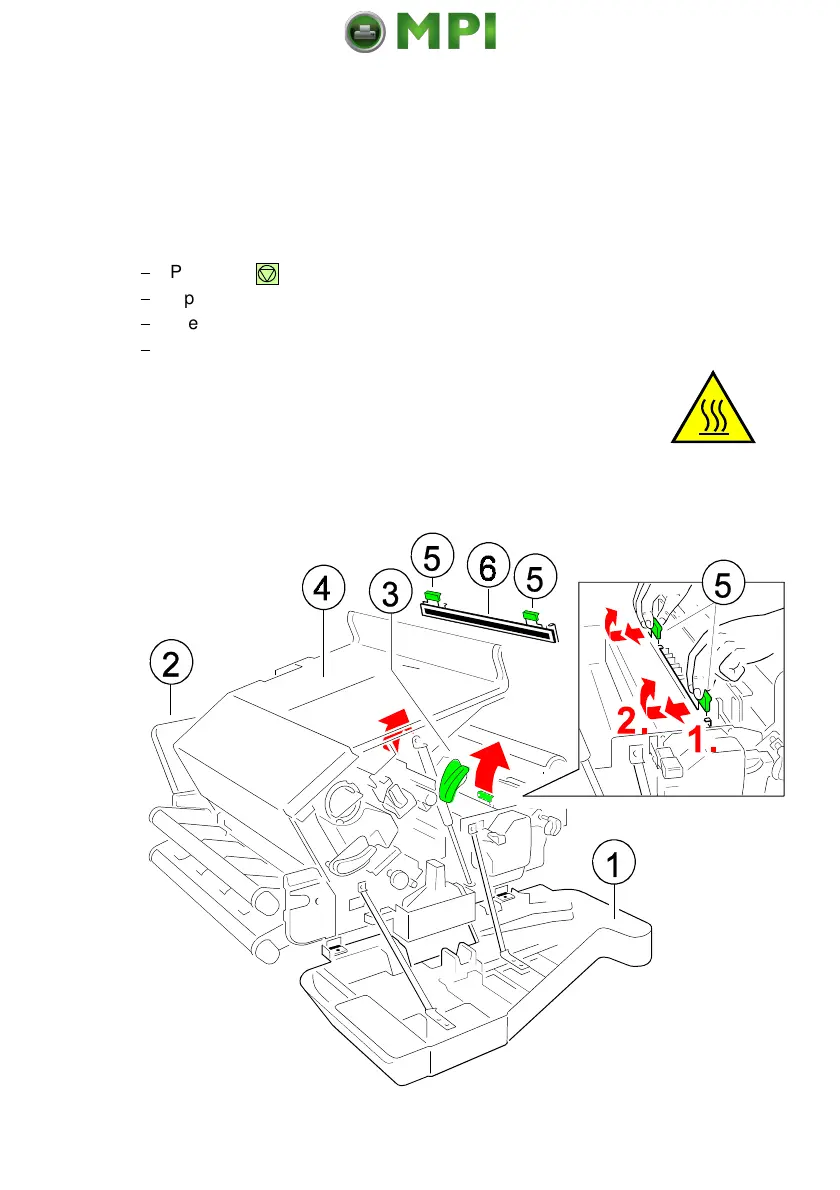
Cleaner Felt. The Cleaner Felt is below the top cover (4) and at the right side of
the fuser unit.
If the Cleaner Felt is very dirty, it is advised to replace it. A new Cleaner Felt (6)
is in the box of the Toner Kit.
$
Press first . OFFLINE will be displayed.
$
Open the front (1) and rear (2) cover.
$
Press the lever (3) to open the top cover (4), illustrated below.
$
Now remove the Cleaner Felt (6) by pressing both green levers (5) in
direction of the arrow and lift it, illustrated below.
Note:
The metal bar of the Cleaner Felt might be very hot.
Don´t throw away the Fuser Cleaner Platen!
Mantenimiento Periféricos Informáticos SL C/Canteras, 15 28860 Paracuellos de Jarama Tel: 00 34 917481604 WEB: https://mpi.com.es



 To Next Page