Maintenance
5-8
5.2 Installing the Parts of the Developer Kit
To guarantee a good print quality you have to replace the Developer Unit at
regular intervals.
It is only allowed to use a Developer Unit which has been released for the
printer.
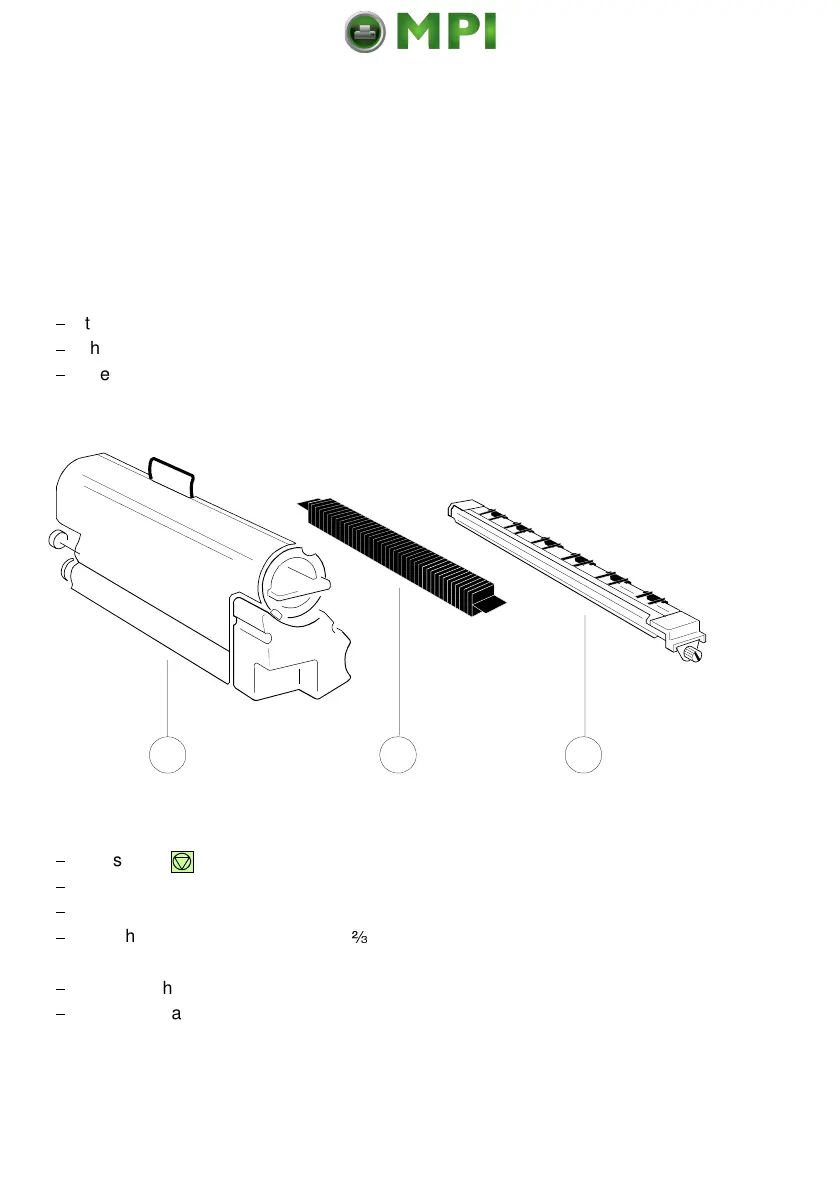
The Developer Unit is part of the Developer Kit which consists of:
$
the Ozone Filter (2) (like a long squared stone)
$
the Developer Unit (1)
$
the Transfer Charge Unit (3)
5.2.1 Replacing the Developer Unit
$
Press first .
OFFLINE
will be displayed.
$
Open the front (4) cover.
$
Press the green lever (9) to the top to unlock the Developer Unit.
$
Pull the Developer Unit (1) about
-
out of the housing and grasp the grip (5)
with one hand and pull it toward you.
$
Remove the plastic bag from the clutch on the rear side.
$
Remove plastic and paper safety strips (6) from the area of the toner output
of the Developer Unit (1).
Mantenimiento Periféricos Informáticos SL C/Canteras, 15 28860 Paracuellos de Jarama Tel: 00 34 917481604 WEB: https://mpi.com.es



 To Next Page