Installing the Printer and the intelligent Paper Stacker
1-12
Installation of the Consumables
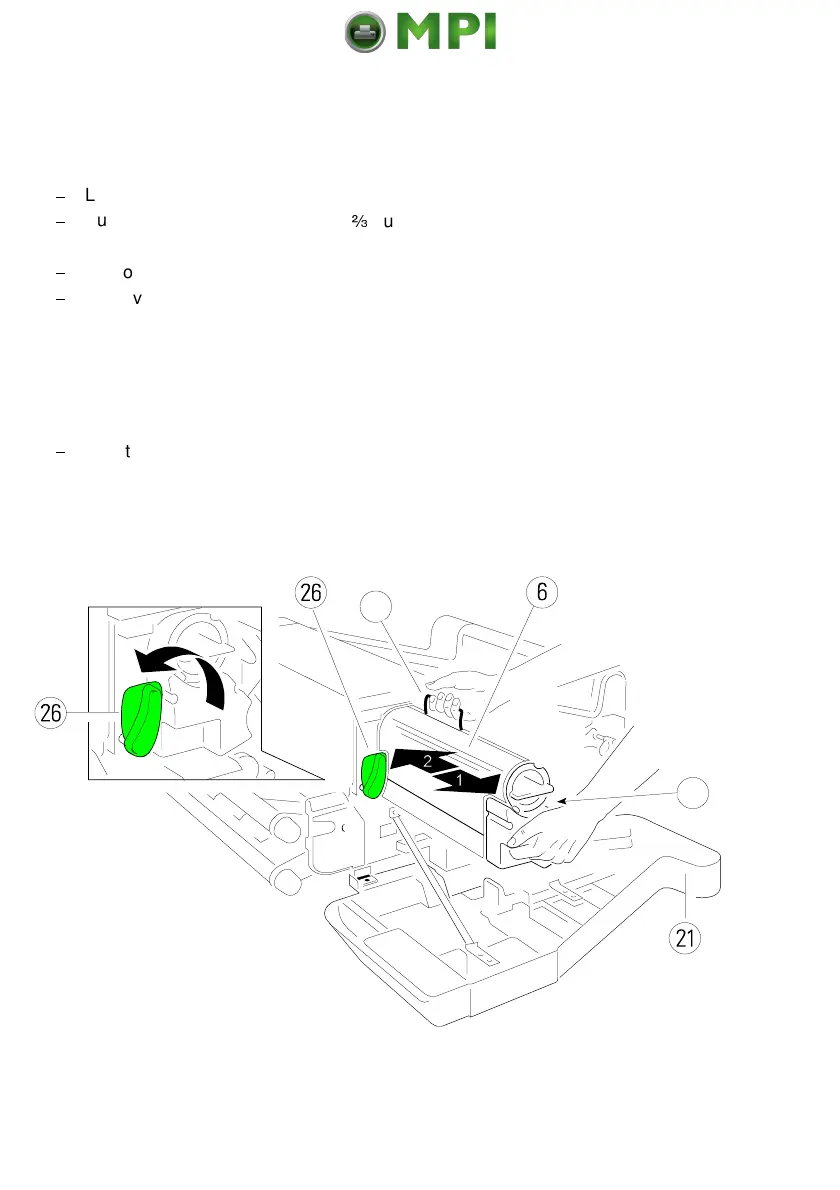
1.5.1 Loading the Developer Unit
$
Lift the lever (26) upwards to unlock the Developer Unit.
$
Pull the Developer Unit (6) about
-
out of the housing and grasp the grip (7)
with one hand and remove it.
$
Remove the plastic bag from the clutch on the rear side.
$
Remove plastic and paper safety strips (8) from the area of the toner output
of the Developer Unit (6).
Note:
Don´t destroy the small plastic lip above the toner output of the
Developer Unit (6).
$
Insert the Developer Unit (6) (step 2.) and secure it by pressing down the
lever (26).
Mantenimiento Periféricos Informáticos SL C/Canteras, 15 28860 Paracuellos de Jarama Tel: 00 34 917481604 WEB: https://mpi.com.es



 To Next Page