Maintenance
5-6
$
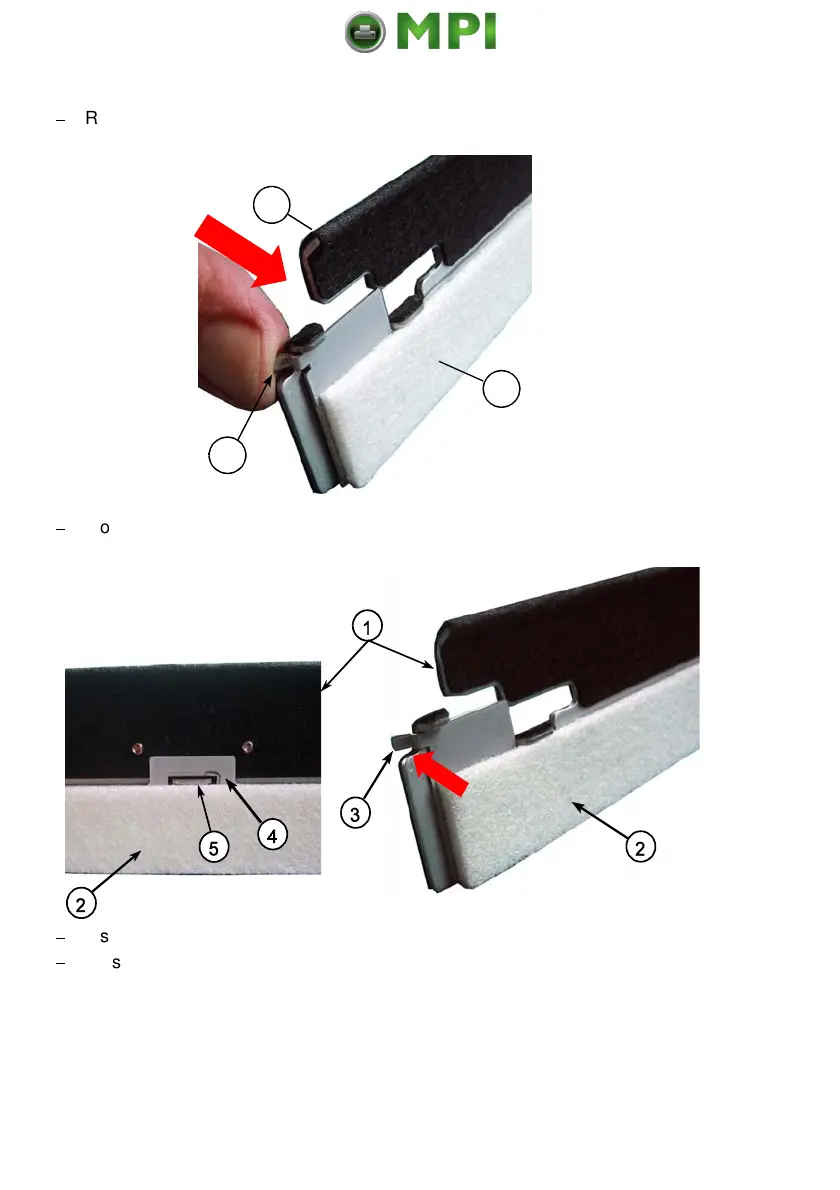
Remove the Cleaner Felt (2) from the Cleaner Platen (1) by pressing the
clamp (3) on both sides of the platen.
$
Mount the new Cleaner Felt (2) with the eye in the middle (4) onto the lug (5)
and press the clamp (3) on both sides onto the Cleaner Platen (1).
$
Insert the new Cleaner Felt (2) including the Cleaner Platen (1).
$
Close the top, rear and front cover.
Note:
Depending on paper properties it might be necessary to change the
Cleaner Felt more often!
Mantenimiento Periféricos Informáticos SL C/Canteras, 15 28860 Paracuellos de Jarama Tel: 00 34 917481604 WEB: https://mpi.com.es



 To Next Page