RADWIN2000CPlusUserManual Release3.5.70 9‐2
RetrievingLinkInformation Chapter9
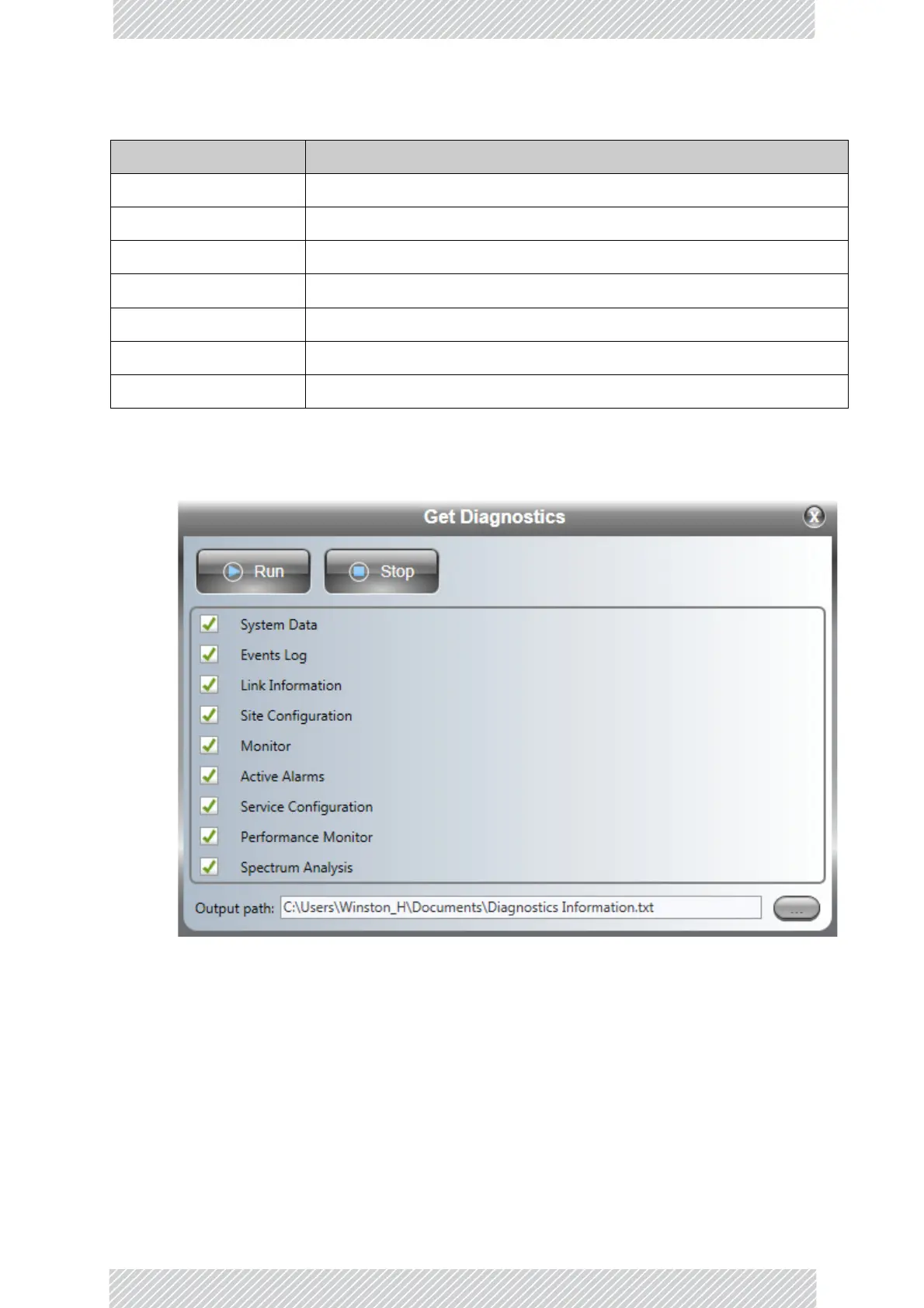
Togetdiagnostics:
1.ClicktheGetDiagnosticsbutton:
Figure9‐1:GetDiagnosticswindow
2.Selectordeselectthedataoptions.IfthefileistobesenttoRADWINCustomer
Serviceleavealloptionschecked.
3.ClickFilePathtospecifythefilenameandolderinwhichyouwanttosavethefile
andthenclickRuntosavetheinformation.
Oncompletion,thestatusofthecheckeditemsisconfirmed:
LinkInformation InformationabouttheHBSandHSUsettings
SiteConfiguration Dataaboutthesiteparameters
Monitor Detailedeventdatarecord
ActiveAlarms ActiveAlarmsareraisedforanyeventaffectingavailabilityorquality
ServiceConfiguration Settings:MIMO,TxRatio,MIR,VLAN,QoS
PerformanceMonitor Networkperformancedataoverdefinedtimeperiods‐‐ever y15
SpectrumAnalysis ForHBS,selectedHSUsandgener alinterfencestatisticsforthesector
Table9‐1:GetDiagnosticsDataandDescription(Continued)
Data Description



 To Next Page