AF2040 emulation mode
1GP71_0E 14 Rohde & Schwarz
5 AF2040 emulation mode
General
In this language emulation mode, the emulation software in the SM* emulates
the SCPI compatible language implemented in Aeroflex’s signal generators of
type
o AF2030
o AF2031
o AF2032
o AF2040
o AF2041
o AF2042
The emulation software is supported on signal generators of type
o SMA100
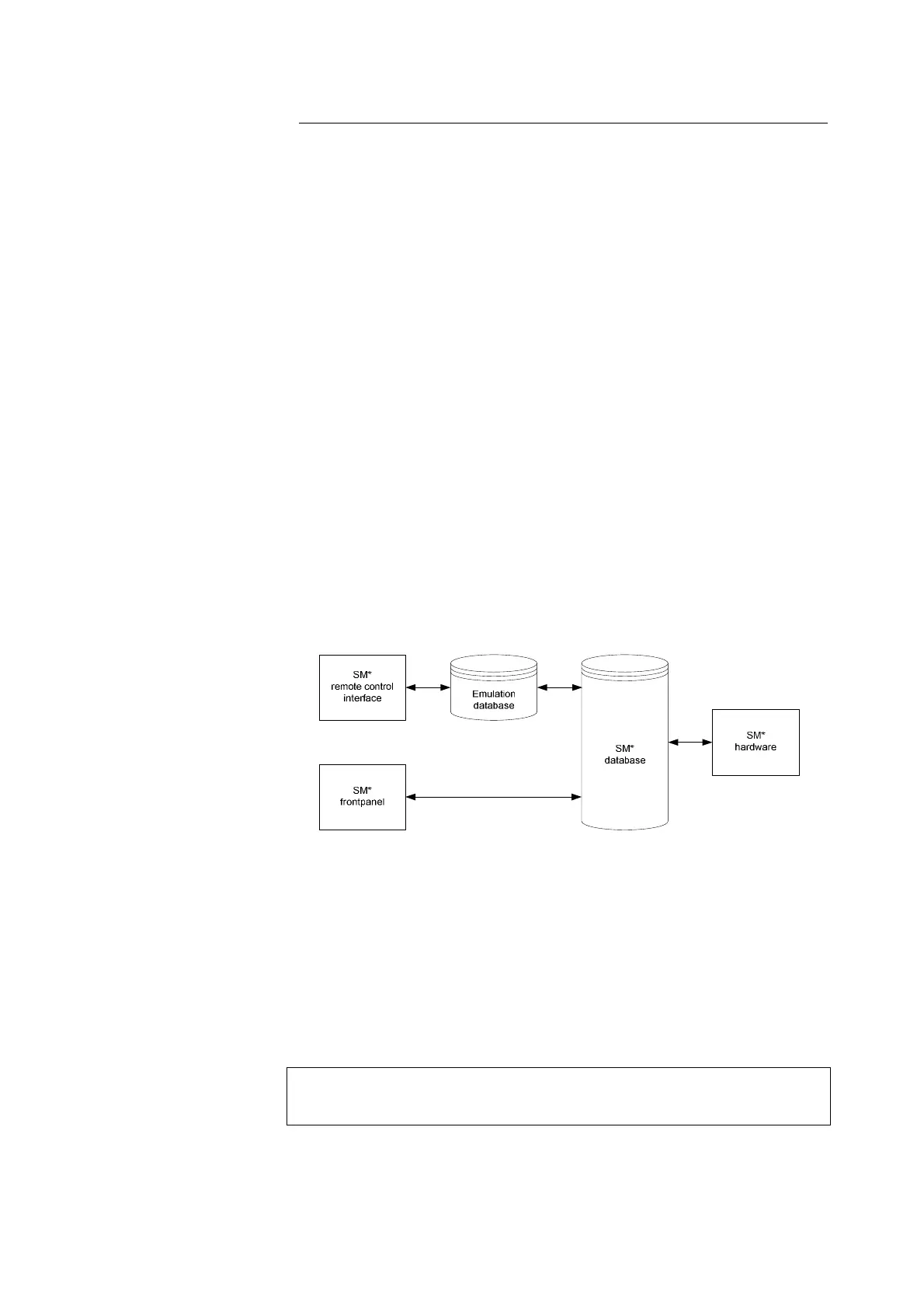
The emulation software simulates the AF2040 data model in the execution unit
and transforms the AF2040 parameters into the SM* parameters.
Figure 2: AF2040 emulation model
This mapping occurs only in one direction: Setting commands that arrive via
the remote-control interface modify the AF2040 parameters. These parameters
are converted into SM* parameters and written to the database.
Modifiying the SM* parameters in any other manner, e.g., via manual operation
at the frontpanel, causes no changes to the AF2040 parameters of the
emulation software.
While this is insignificant in pure remote-control operation, it can lead to
inconsistencies and undesirable effects or malfunctions when you use
both manual and remote control in this language emulation mode.


 To Next Page