NOTE
If you select either of the items (ABX and ABY), you can press down the multifunction knob
continuously to switch between them.
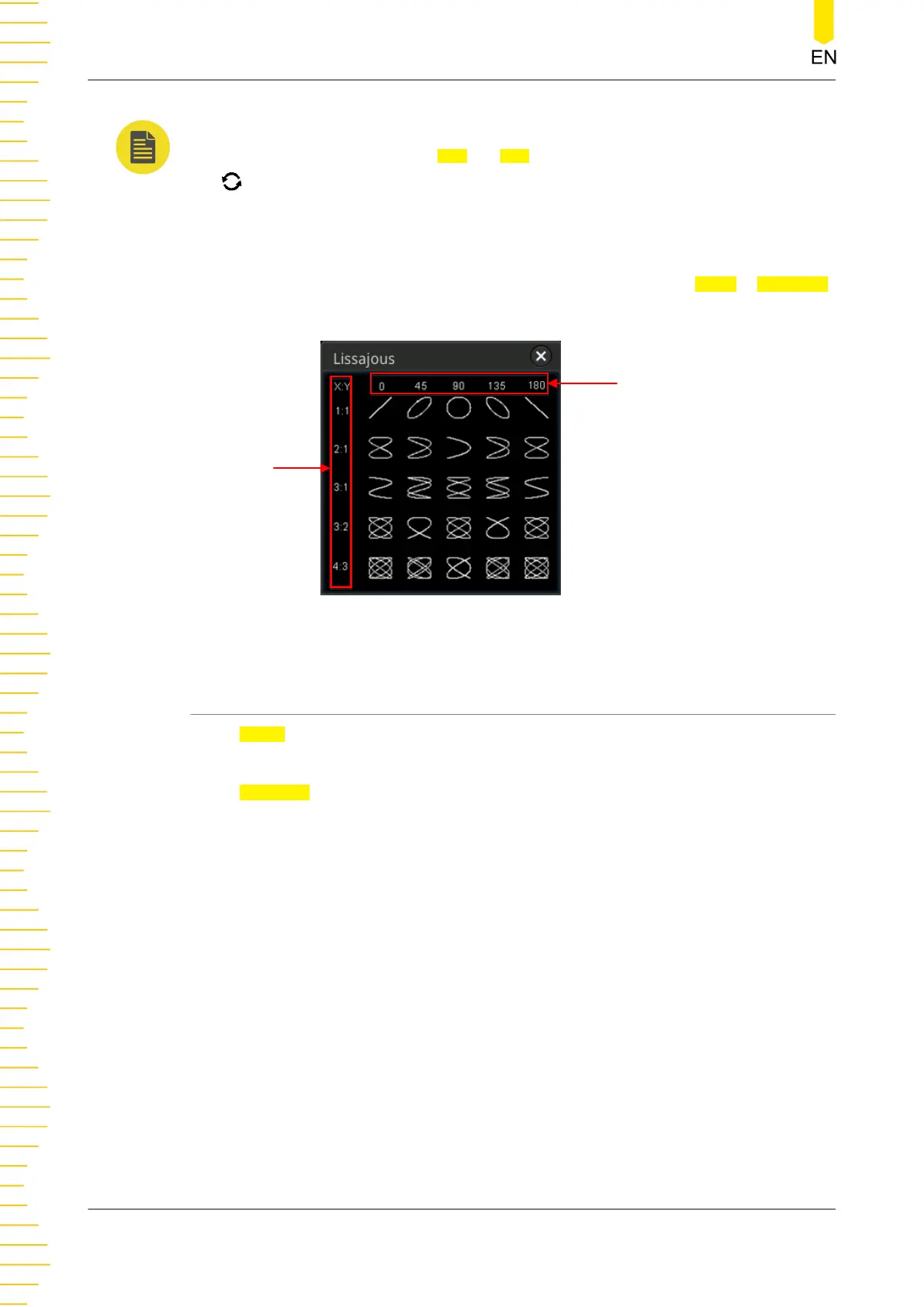
2. Display Lissajous Legend
This oscilloscope provides the Lissajous schematic diagram under different
frequencies and phase deviations, as shown in
Figure 9.4
. Press More > Lissajous,
then the Lissajous schematic diagram is displayed.
Phase deviation
between two signals
Frequency ratio
between two signals
Figure 9.4 Lissajous Schematic Diagram
9.3.4 Measure Mode
Press Mode to select "Measure". In this mode, the cursor position for measurement is
displayed.
Press Indicator continuously to enable or disable the Indicator. If it is enabled, one or
multiple cursors are displayed on the screen. Before enabling the indicator, you need
to enable at least one parameter for auto measurement. The number of cursors will
change along with the enabled measurement parameters.
Operations and Measurements
198
Copyright ©RIGOL TECHNOLOGIES CO., LTD. All rights reserved.



 To Next Page