1-25
Basic Settings
1
ComColor Series User’s Guide 09
*
When using plain paper and recycled paper
(85 g/m
2
(23- lb bond))
■ When using the face down offset
stapler
<Types of paper that can be stapled>
• Paper size: A3, B4, A4, A4-LEF, B5, B5-LEF,
Ledger, Legal, Letter, Letter-LEF, Foolscap
Paper weight: 52 g/m
2
(14-lb bond) to 210 g/m
2
(56-lb bond)
<Number of sheets that can be stapled>
• When using standard size paper
A4, A4-LEF, B5, B5-LEF (Letter, Letter-LEF): 2 to
50 sheets*
Other than the above (A3, B4 (Ledger, Legal)): 2
to 25 sheets*
* When using plain paper and recycled paper
(85 g/m
2
(23- lb bond))
• When using irregular sized paper
Stapling is not possible.
● You cannot use "Staple" and "Booklet binding"
at the same time. (p. 1-21 "Booklet binding")
● You cannot offset printouts when you output to
the face down offset stapler.
● When printing jobs that exceed the maximum
number of sheets that can be stapled, the
sheets are output without being stapled.
● Configure [Staple speed priority] to expedite
the stapling process for simplex printouts.
("Prioritizing speed when stapling simplex
printouts" (p. 1-24))
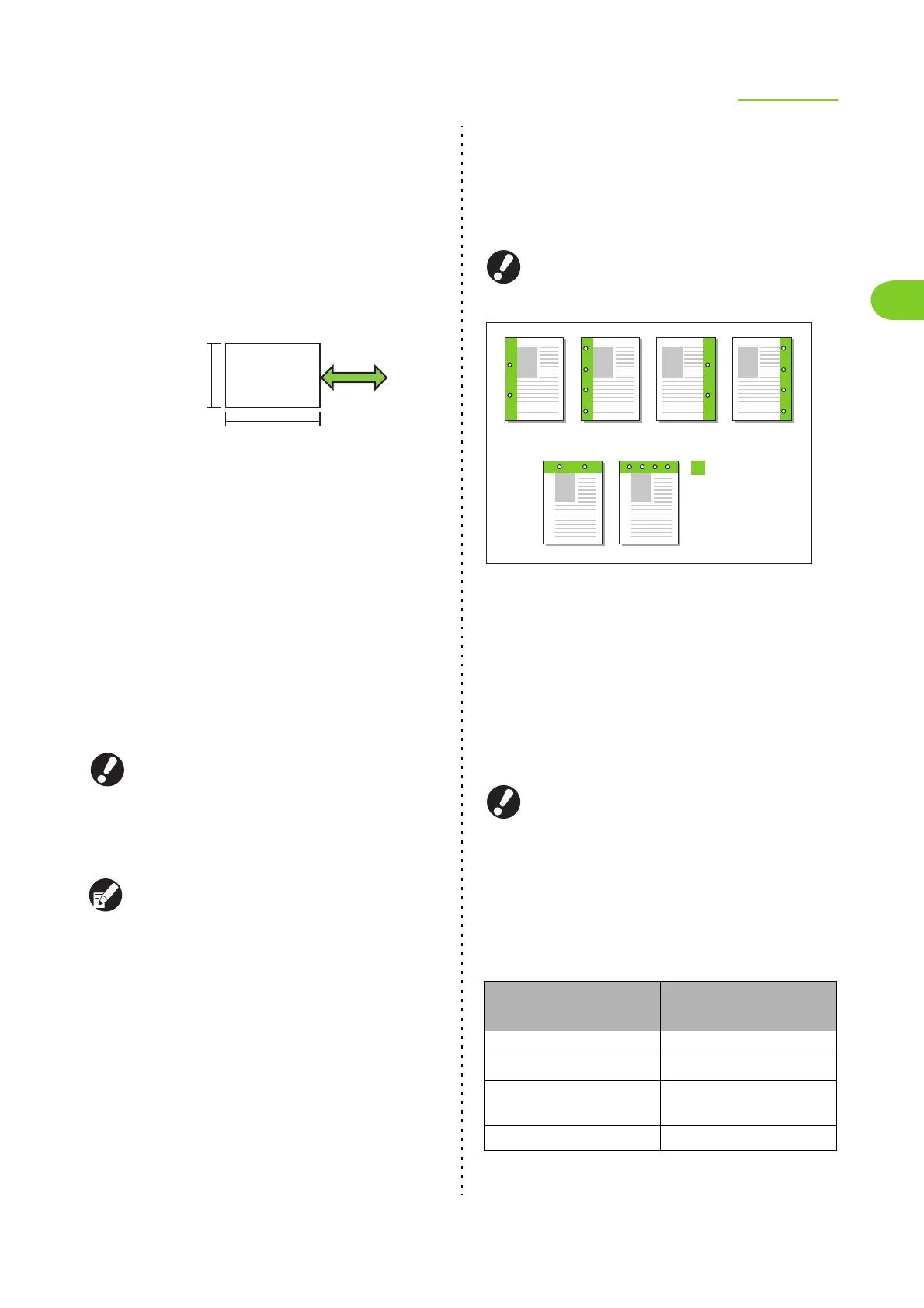
● Punch
Specify the number of holes to be punched.
Punch holes at the position specified in [Binding side].
Select from the following.
[OFF], [2 holes], [3 holes], [4 holes]
The number of holes that can be punched varies
depending on the connected finisher.
<Types of paper that can be punched>
• Size and orientation of paper that can be
punched
2 holes: A3, B4, A4, A4-LEF, B5-LEF, Ledger,
Legal, Letter, Letter-LEF
3 holes: A3, B4, A4-LEF, B5-LEF, Ledger,
Letter-LEF
4 holes: A3, A4-LEF, Ledger, Letter-LEF
• Paper weight: 52 g/m
2
- 200 g/m
2
(14-lb bond -
53-lb bond)
● An optional multifunction finisher is required to
use this setting.
● You cannot use "Punch" and "Booklet binding"
at the same time. (p. 1-21 "Booklet binding")
<Using with stapling>
You can use punching and stapling together. In this case,
the available punching positions are restricted based on
the [Staple] setting.
Paper feed and
output direction
257 mm-432 mm
(10 1/8"- 17")
182 mm-297 mm
(7 3/16"- 11 11/16")
[Staple] setting
Available punching
positions
OFF Left, Upper, Right
Left 2, Left 1 Left
Upper 2, Upper Left 1,
Upper Right 1
Upper
Right 2, Upper right 1 Right
2 holes
Binding side
Binding on the left Binding on the right
Binding at the top
4 holes 4 holes2 holes
4 holes2 holes
The illustrations are the
examples of 2-hole and
4-hole punches.













 To Next Page