2-21
Copying Functions
2
ComColor Series User’s Guide 09
7
Press [Close].
The previous screen is displayed.
● Retrieving Settings
1
Press [Save/Call setting].
Follow Steps 2 and 3 in "Saving Settings".
2
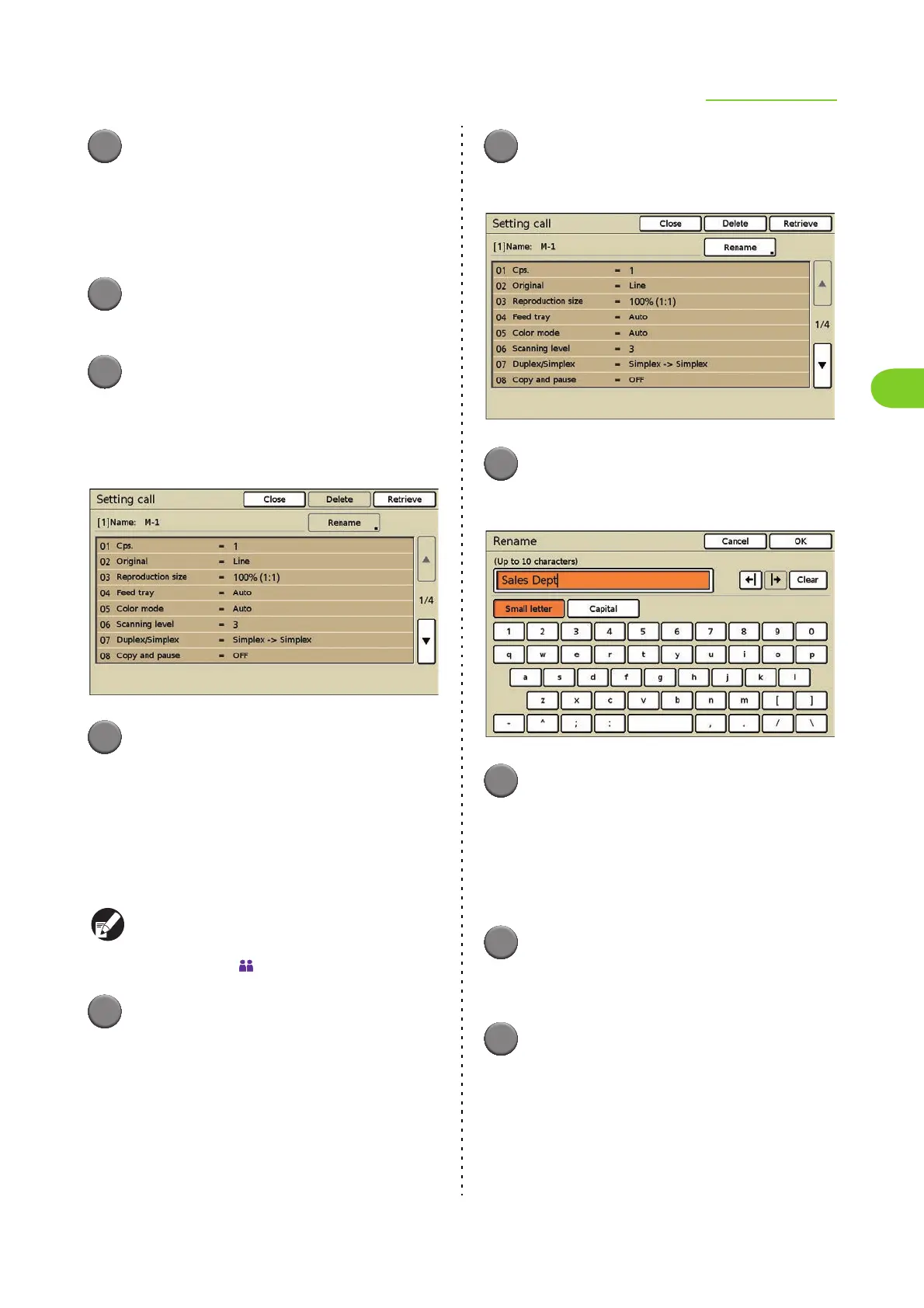
Press the button of the setting to
retrieve.
The [Setting call] screen is displayed.
Confirm the setting.
3
Press [Retrieve].
The setting is retrieved and the copy mode screen
is displayed.
● Renaming the Settings
Rename the buttons with registered settings.
Users without administrative authority cannot
rename shared registered settings (buttons with
the shared mark ).
1
Display the [Save/Call setting]
screen.
Follow Steps 2 and 3 in "Saving Settings".
2
Press a button to rename.
The [Setting call] screen is displayed.
3
Press [Rename].
The [Rename] screen is displayed.
4
Enter a name and press [OK].
• Enter a name up to 10 characters long, and
press [OK]. (p. 19 "Entering Text")
• To erase the character to the left side of the
cursor for entering a new character, press
[Clear].
5
Press [Close].
If you want to register a new setting, press
[Register] at this step.
6
Press [Close].
The previous screen is displayed.













 To Next Page