damaged when transported through the scanner, you can transport them at a
reduced speed. Here you can select the target speed. (see 7.13.5).
Correction scale factor (length): If this parameter is activated, you can set a
correction in y direction between 0,980 and 1.020 per mill in ROWE SCAN/COPY
APP under "Expert mode". In case of existing favorites, this parameter is to be
checked for correctness and to be saved, once.
Margin back/front/left/right: Here you can define additional (global) settings for
the scan margins. For negative values, the corresponding margin is cut off; for
positive values, it is added.
Tolerance for mapping autoformats: Here you can define by how many per mills
the width of a scan format recognized by the width detection may be exceeded
for being allocated to the next smaller format nonetheless.
Delay infeed: Here you can define how long the scanner waits after positioning
the document until it takes the document in.
Standby waiting time: Waiting time until the scanner enables the energy saving
mode (0: Energy saving mode deactivated).
In energy saving mode, the scanner is not recognized by the computer (as if
switched OFF). The operating LED is flashing. By pressing the start key on the
control panel, you can "wake the scanner up".
Delete processed printjobs after said time: Define how long finished printjobs are
hold, before they are deleted.
Secure delete iterations: If your printjobs contain confidential data and you
desire to be sure that all files are really wiped from disk after printing, you can
define the number of overwriting cycles.
Active format systems: Here you can select which format systems are available
in ROWE SCAN/COPY APP when selecting the format.
Stop jobs with resource error after x seconds: If a printjob cannot be performed
immediately because of missing resources (e.g. a medium roll with a certain
width), the queue will be blocked by default until, in order to prevent the
distortion of the order. If you do not want this behavior, you can define a timeout,
after which those jobs are suspended, such that printing continues with the next
job.
Units of measurement: Determine which units shall be used.
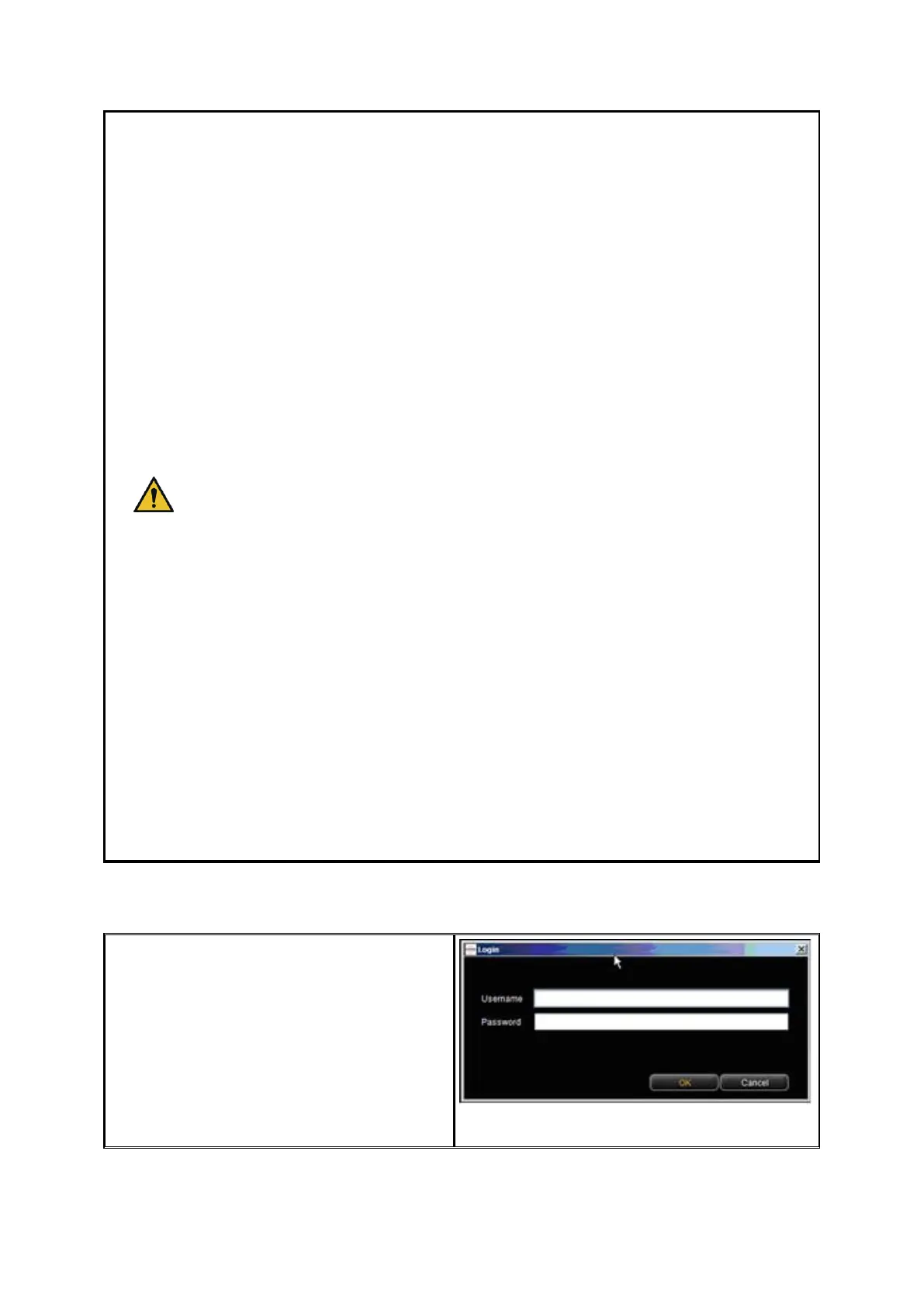
8.11 Login
Some functions in ConfigManager can be
used with special access rights, only. For
this purpose, an administrator account has
been created. Click on the function Login
for authentication. The factory-set access
data is:
Username: administrator
Password: admin
Figure 8.30: ConfigManager - Login


 To Next Page