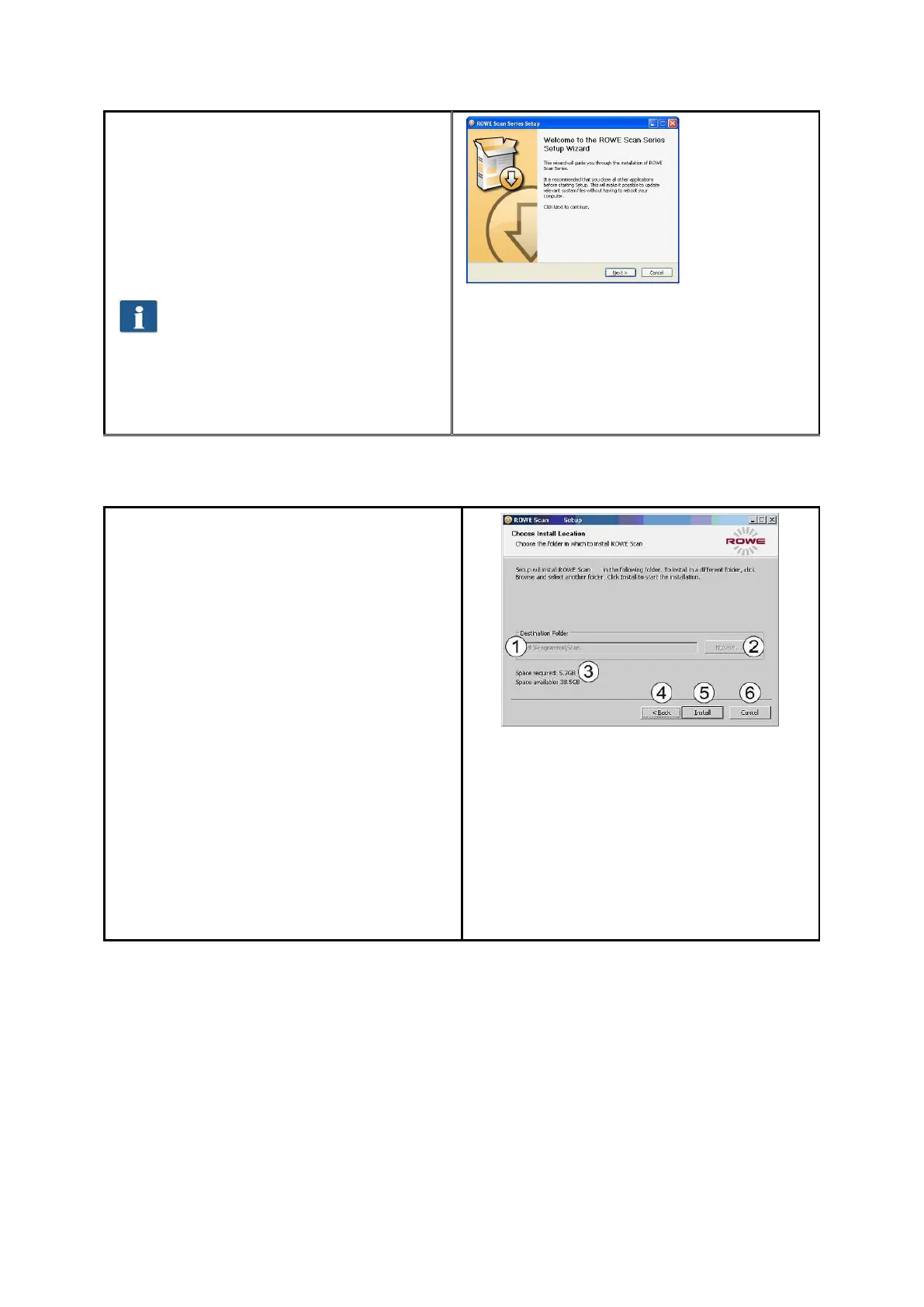
Afterwards, the welcome window is
displayed as shown in Fehler!
Verweisquelle konnte nicht gefunden
werden..
By clicking „Next“ you access the
installation directory (Fehler!
Verweisquelle konnte nicht gefunden
werden.).
You can stop the installation
process at any time by pressing
the "Cancel" button. The software
is not installed then. However, the
ROWE Scan 850i scanner cannot
be operated in this case.
Figure 4.3: Welcome dialog box
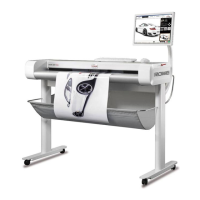
4.3 Selecting Folder
When selecting the folder (Fehler!
Verweisquelle konnte nicht gefunden
werden.), a folder where to install the
ROWE Scan 850i software is already
suggested. The shown figures have the
following meaning:
1. Destination folder: Currently
selected folder is displayed
2. Browse: Selecting another folder
3. Information on the required and
available storage space
4. Back: Return to previous dialog
box
5. Install: Start and/or continue
installation
6. Cancel: Cancel installation
prematurely. The scanner
cannot be used in this case.
Figure 4.4: Selection of folder


 To Next Page