12 en | Cabling DBP Digital Beltpack
2021-06 | 01 | F.01U.380.825
Technical Manual
Bosch Security Systems, LLC
For information on connecting the DBP to the OMS, see
Configure OMS to make a connection
offer, page 16
.
4.2 To OMI
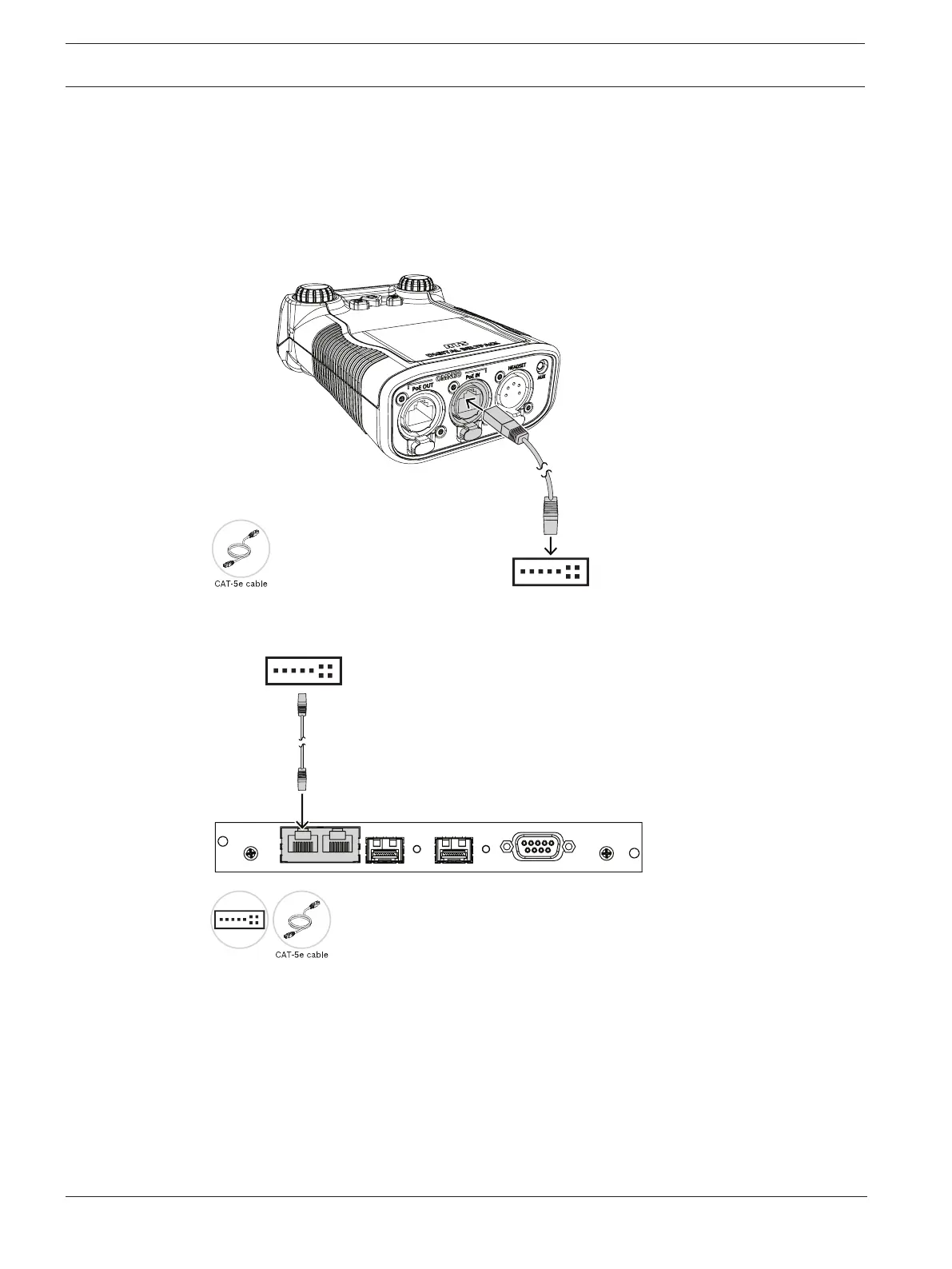
To cable a DBP to an OMI card, do the following:
1. Using a CAT-5e cable, attach one end to the PoE IN connector on the DBP.
2. Connect the other end of the cable to an approved PoE switch.
3. Using a second CAT-5e cable, connect one end to the approved PoE switch.
4. Connect the other end to an Ethernet connector on the OMI card.
SERIAL
J5
J2J1
ETHERNET
OMI-2 BC
J3
J4
PoE Switch
For information on connecting the DBP to the OMI card, see
Configure an OMI card to make a
connection offer, page 23
.
4.3 To ODIN
To connect the DBP to an ODIN matrix, do the following:
1. Using a CAT-5e cable, attach one end to the PoE IN connector on the DBP.
2. Connect the other end of the cable to an approved PoE switch.



 To Next Page