16 en | Create an Intercom connection DBP Digital Beltpack
2021-06 | 01 | F.01U.380.825
Technical Manual
Bosch Security Systems, LLC
6 Create an Intercom connection
6.1 Connect to OMS using Connect Devices
To connect OMNEO devices via the OMS front panel UI, do the following:
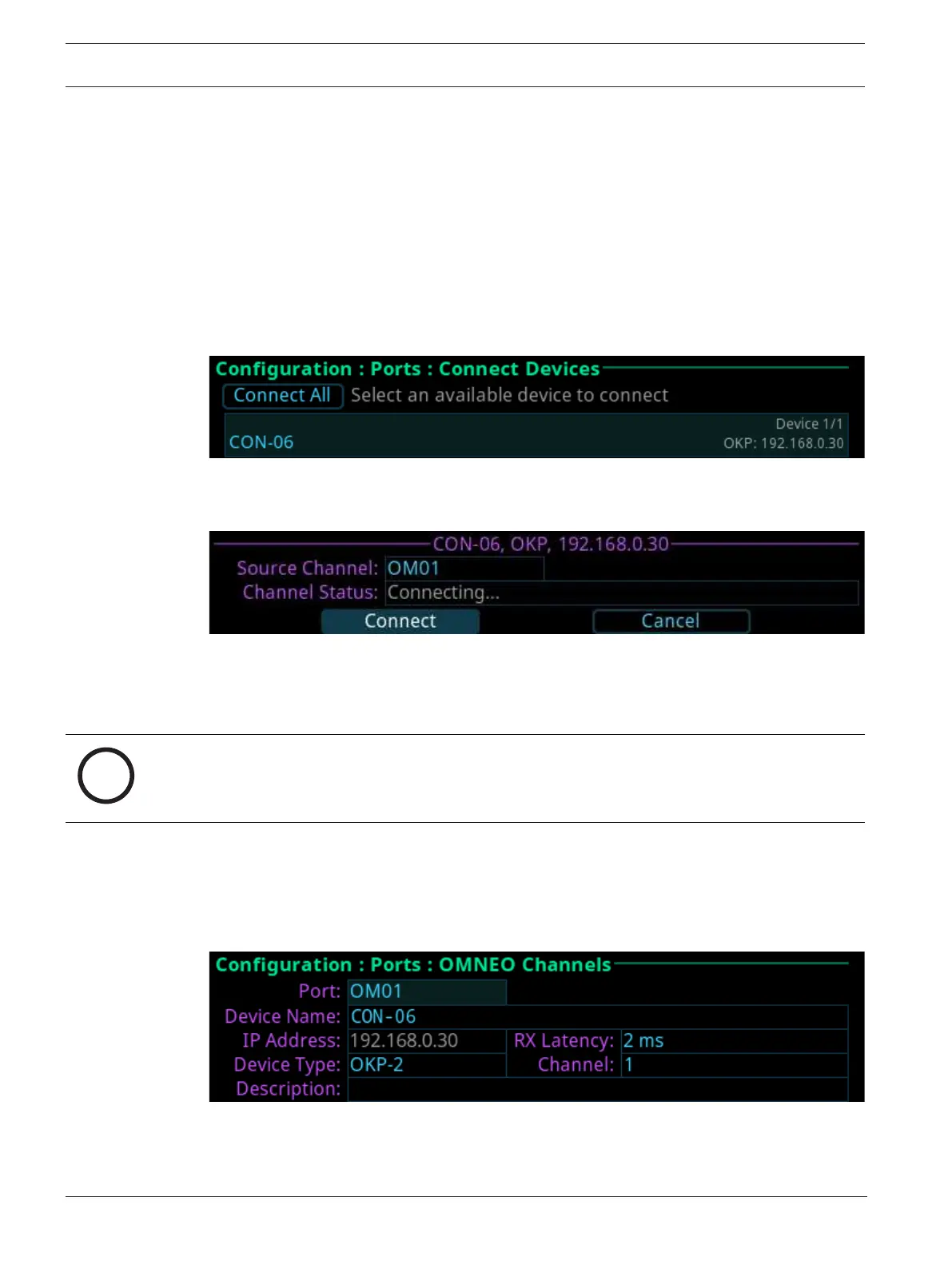
1. Navigate to Connect Devices menu itemmenu item (Configuration | Ports | Connect
Devices).
2. Click the ENC2 encoder knob.
OMS scans for available OMNEO devices, and then shows devices that support Easy
Connect (KP-Series, DBP, OKI, etc.). Discoverable devices need to be powered on,
connected to the network, and be on the same subnet.
3. Navigate to the Connect All button.
OR
Navigate to the OMNEO device.
4. Select the Connect button.
6.2 Configure intercom OMNEO ports to make connection offers
6.2.1 Configure OMS to make a connection offer
Notice!
For more information, see the OMS manual found at www.rtsintercoms.com.
To connect a DBP to OMS, do the following:
1. Navigate to the OMNEO icon (Configuration | Ports | OMNEO).
2. Click the ENC2 encoder knob.
The OMNEO Channels screen displays.
3. Select the port to configure.



 To Next Page