Operating Instructions Cubis
®
MCE 21
Operating Concept
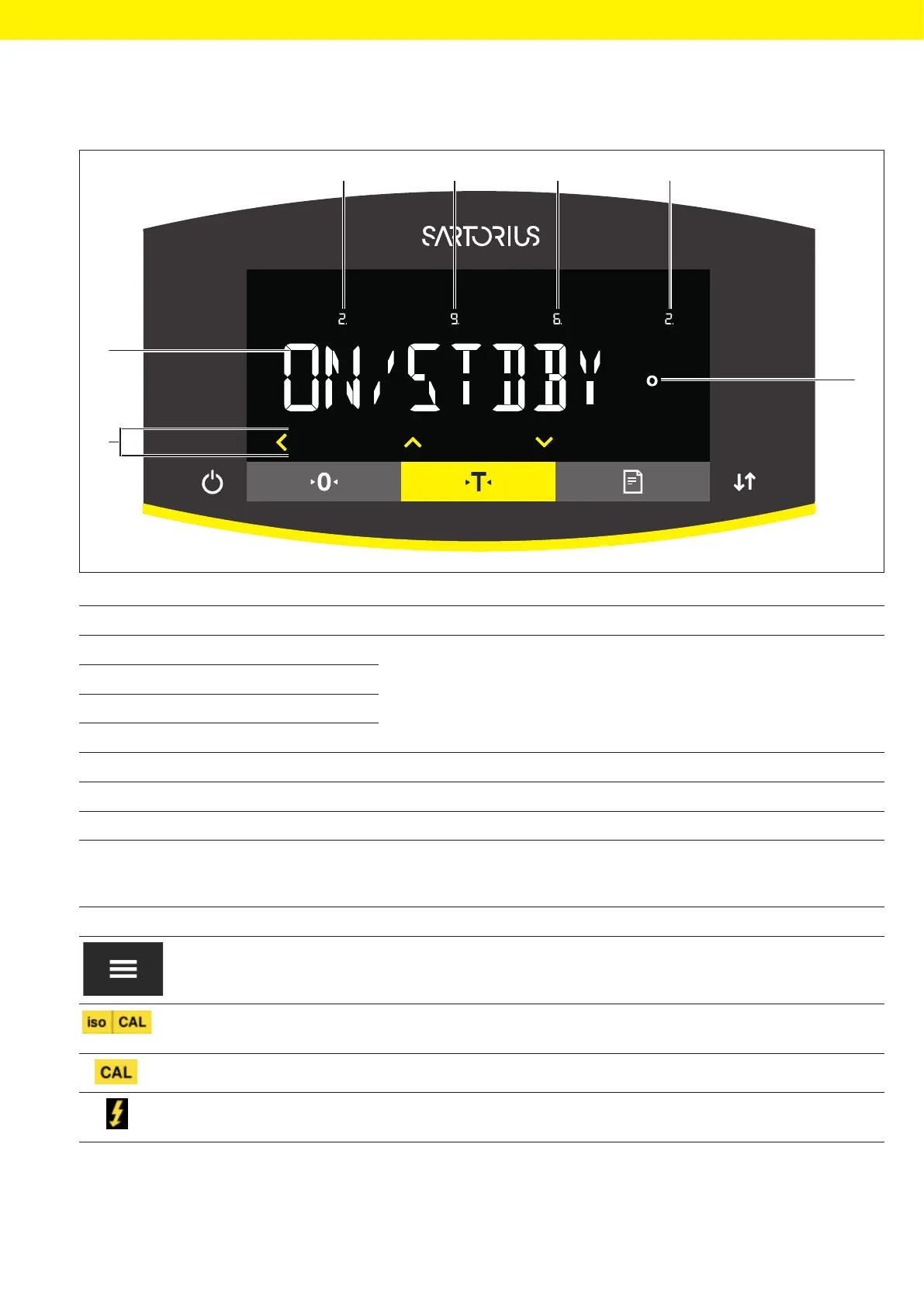
4.2 Operating Display in the Menu
1 2 3 4
5
7
6
Fig. 2: Operating display in the menu (example)
Pos. Name Description
1 Position in the 1st menu level Shows the position of the displayed menu or configuration value in
up to 4 menu levels.
2 Position in the 2nd menu level
3 Position in the 3rd menu level
4 Position in the 4th menu level
5 [Computed values] display Note on the set menu item
6 Operating area
7 Name of the menu or setting
4.3 Buttons and Keys on the Operating Display
Symbol Name Description
[Menu] button − When the button is pressed: The settings menu opens.
− If the button is held down: It switches to version display.
[isoCAL] button − Starts the pre-set calibration or adjustment function. When button
is flashing: Starts the isoCAL function.
[Adjust] button Starts the set calibration and adjustment function.
[Ionizer] button Only semi-microbalances and analytical balances with integrated
ionizer: Starts an ionization process.








 To Next Page