Setup of the Person Machine Interface
3
26 | 184
3.3 Display
The display of the station has two displaying variants:
● Display without window
– Normal view
– Expanded ↑ visibility
– 'Fire Brig. view'
● Display with window for following representations
– Lists
– Input fields
– Command responses
3.3.1 Normal view
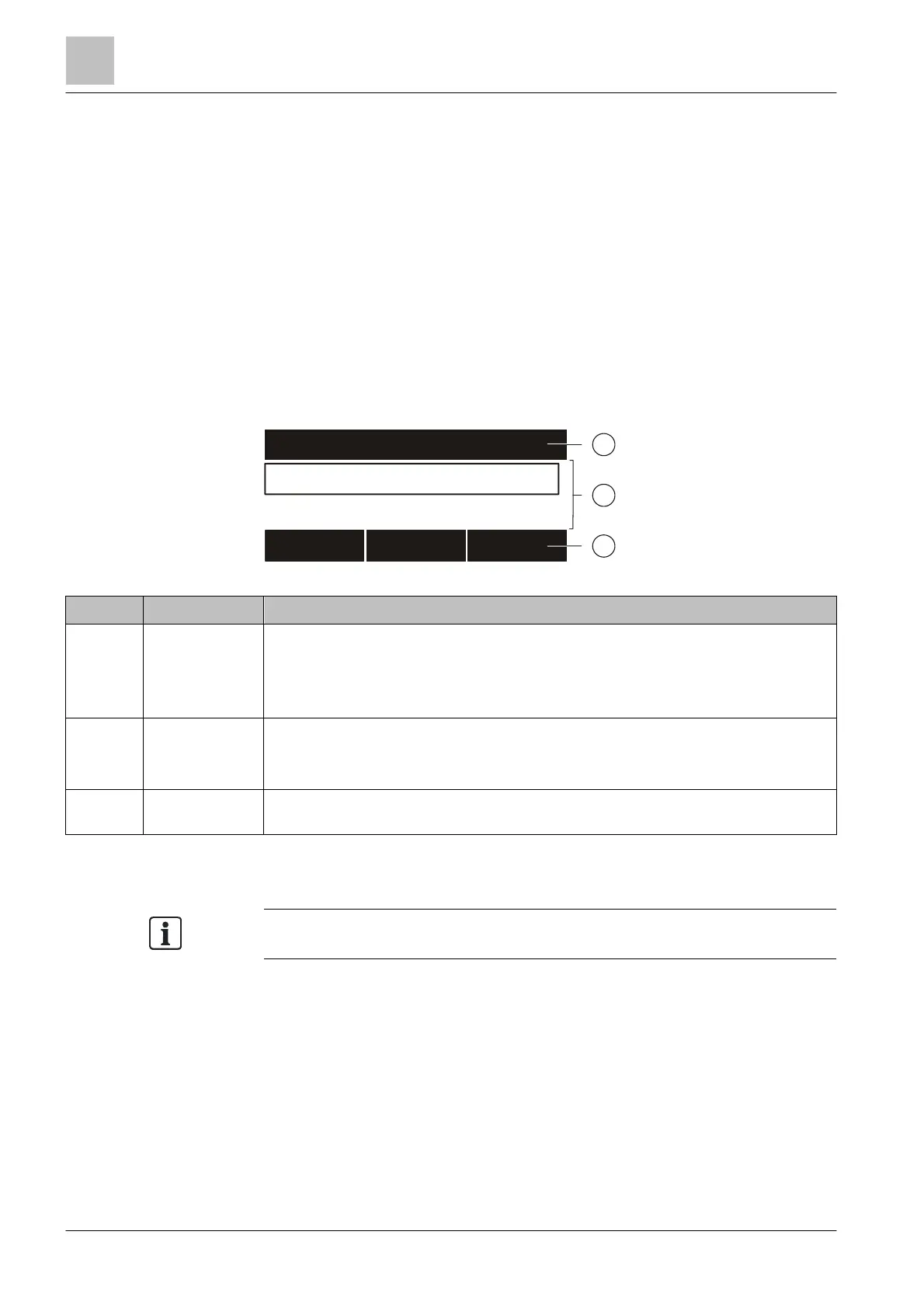
The display of a ↑ 'Station' in 'Standard view' has three sections.
Figure 3: Display in normal view
Position Designation Function
1 Header ● Status indication and system time
● Information and titles for the working area
● Instructions for the operator
● Information for the operator
2 Working area ● Indication of lists
● Selection of list items
● Indication of windows
3 Softkey bar
● Display of the three functions that can be directly executed with the softkey
buttons
Identification of messages
Events occurring in the fire detection installatio
n are indicated on the display. A
special identification informs on the status of an event.
You will find details on the identification in the chapter 'Event status identification'.
See also
1 Event status identification [➙ 169]
001 AAA
001 ABC
ABC
ZZZ
ABCDEFGHI
ZZZ
ABCDEFGHI
ZZZ
YYYY 1



 To Next Page