EasyManua.ls Logo

Siko AG06 - Flowchart of the Profile Velocity Mode Operation Mode (Velocity Mode)

Siko AG06
114 pages
Print Icon
To Next Page IconTo Next Page
To Previous Page IconTo Previous Page
Loading...
Communication via CAN bus
AG06
Date: 07.02.2018 Art. No. 85674 Mod. status 055/18 Page 57 of 114
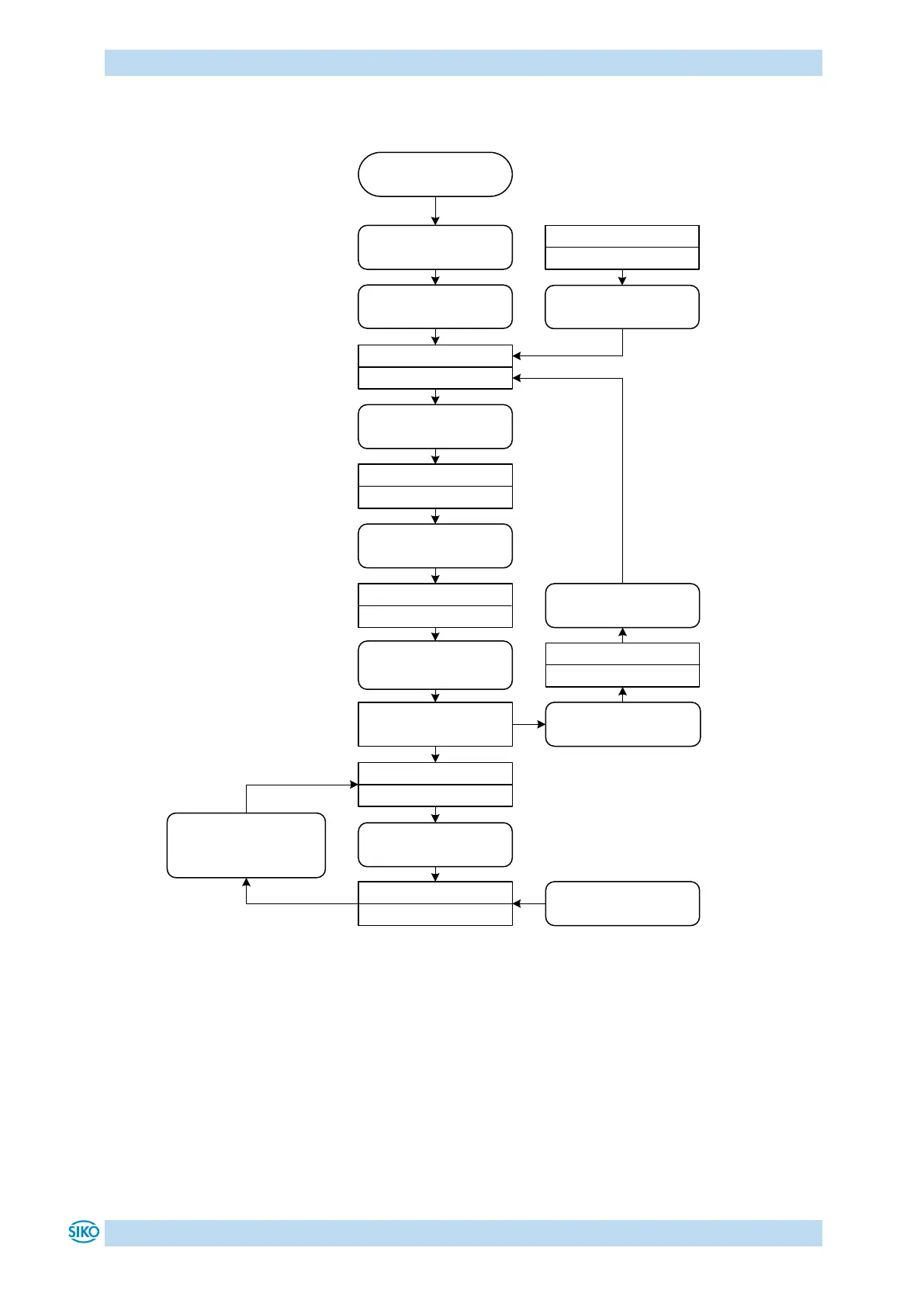
9.8 Flowchart of the Profile Velocity Mode operation mode (velocity mode)
SW = Statusword
CW = Controlword
Means change from
1 tot 0
Means change from
0 to 1
X Bit may be 0 or 1
Enter Operational
(NMT)
Switch on disabled
SW = xxxx xxxx x1x1 0000
Operating voltage On
“Shutdown“- command
CW = 0000 0001 0000 0110
“Switch on“- command
CW = 0000 0001 0000 0111
“Enable operation“ -
command
CW = 0000 0001 0000 1111
Start Velocity Mode
CW = 000 0000 0000 1111
Ready to switch on
SW = xxxx xxxx x01x 0001
Switched on
SW = xxxx xxxx x01x 0011
Operation enabled
SW = xxxx xxxx x01x 0111
Drive raedy to travel
SW = 0001 0x11 0011 0111
Stop Velocity Mode
CW = 0000 0001 0000 1111
or Setpoint = 0
“Fault reset“- command
CW. 7 =
“Quick-stop“- command
CW = 0000 0000 0000 0010
“Disable Voltage“ command
CW = 0000 0000 0000 0000
Quick stop active
SW = xxxx xxxx x00x 0111
Fault
SW = xxxx xxxx x0xx 1000
Change target value
CW = 0000 0000 0000 1111
Velocity Mode activ
SW = 0000 0x10 0011 0111
START
Fig. 12: Flowchart of the Profile Velocity Mode (velocity mode)

Table of Contents

Other manuals for Siko AG06

Related product manuals