User Manual For - CONTROLLER/DATA RECORDER MultiCon CMC-99/141
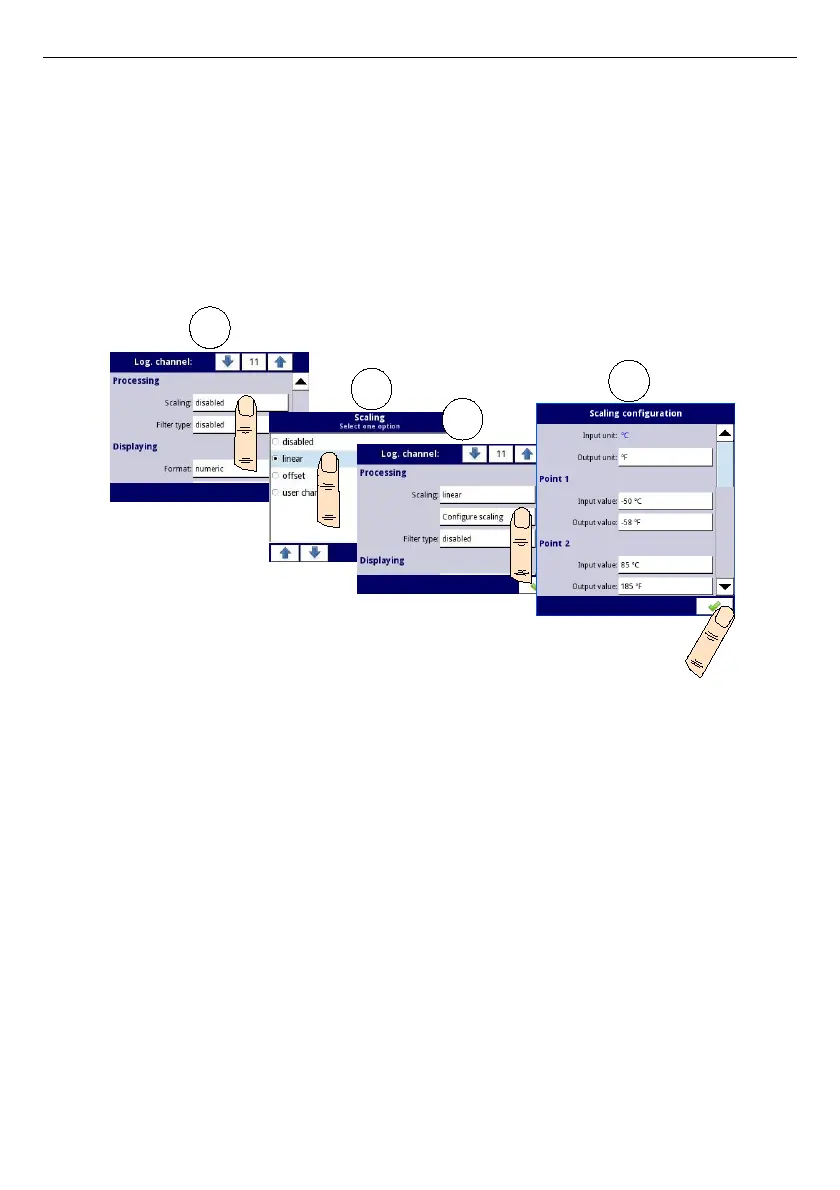
Lets assume that our temperature range is from -50˚C to 85˚C (but this range is arbitrary). In
that case:
–
Scale
parameter set as
linear
,
– enter Configure scaling submenu:
•
in
Output unit
parameter write:
˚F
,
•
in
Input value
parameter for
Point 1
block write:
-50
(which is low range limit),
•
in
Output value
parameter for
Point 1
block write:
-58
(according to the
formula),
•
in
Input value
parameter for
Point 2
block write:
85
(which is low range limit),
•
in
Output value
parameter for
Point 2
block write:
185
(according to the
formula),
Fig. 7.33. Example of scaling configuration
c)
offset
– after choosing this option, parameter appears:
•
Configure scaling
– function, which allows to add a constant value to input
value. It is given by formula:
In this function, there are following parameters:
•
Input unit
– read only parameter, it displays unit of the logical channel
source,
•
Value to add
– it defines offset value,
d)
user char.
- is defined as set of X-Y points. Number of the points is variable and may
be set from 2 to 20 points which make linear segments (see
Fig.
7.34
). After
choosing this option, parameter appears:
•
Configure scaling
– submenu which allows to define further points of the
user characteristic. There are following parameters:
◦
Input unit
– read only parameter, it displays unit of the logical channel
source,
◦
Output unit
– unit of rescaled data,
70



 To Next Page