14215700-IG, Edition 15.0
May 2020, Original document
336
Example of Setting Up Handsets for Handset Sharing
1. A Handset Sharing | IP-DECT/DECT Servers 400/6500/2500/8000 License or Handset Shar-
ing 1 Year | Virtual IP-DECT Server License must be loaded to the Spectralink IP-DECT/Vir-
tual IP-DECT Server.
2. Set up handset for Send MSF: Menu > Settings > Advanced > Long key > Send MSF.
Note:
Alternatively, if you need to do this for many handsets, use the Handset and
Repeater Management Tool.
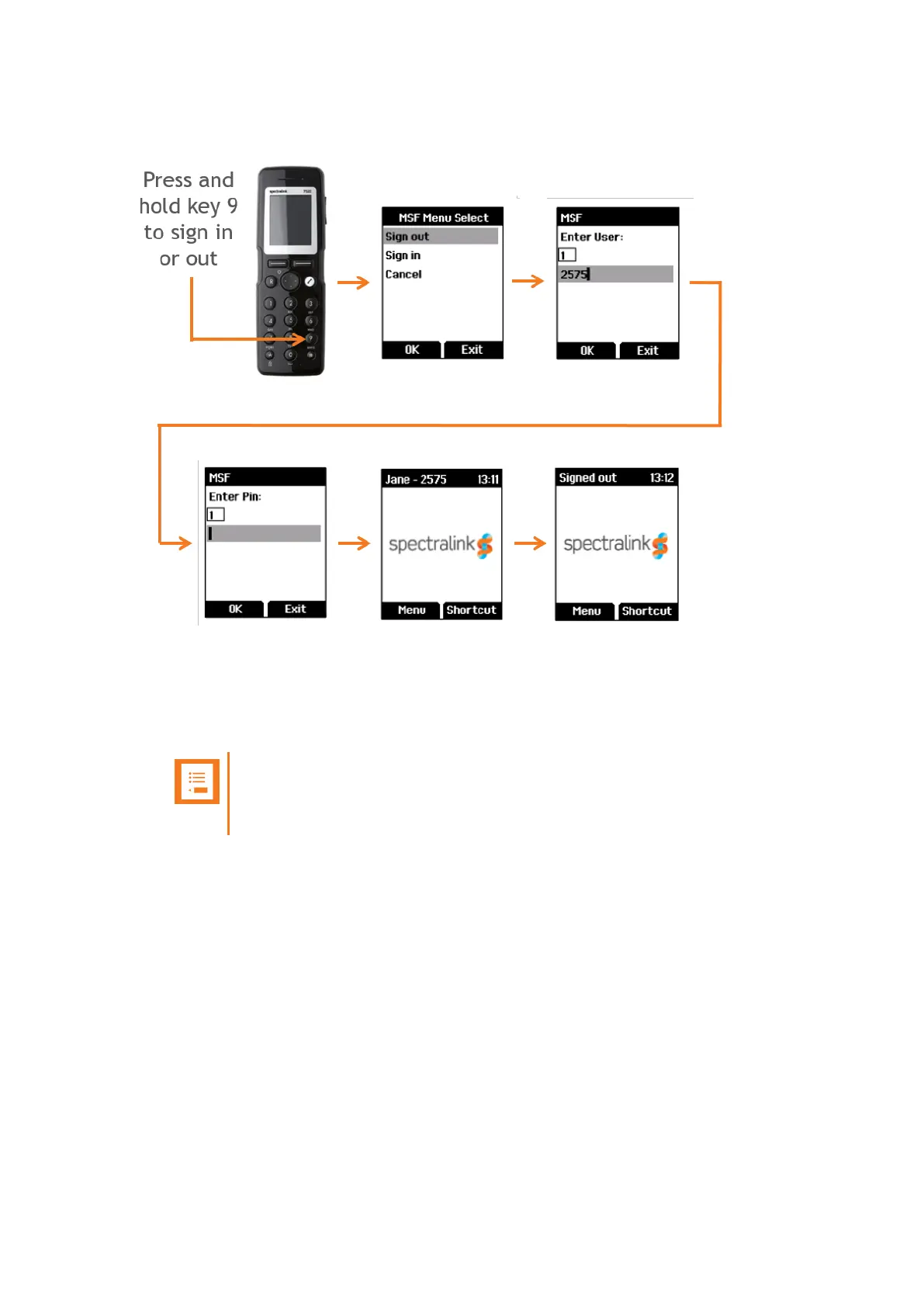
3. To sign in, press and hold key 9 until the sign in screen appears.
4. Select Sign In, and then enter the User number (typically your Extension number).
5. Enter the PIN code.
6. If sign-in is successful the standby text will show in the display.
7. Long press key 9 to sign out. The standby text will show signed out upon successful sign out.
Spectralink IP-DECT Server 200/400/6500 and Virtual IP-DECT Server One Installation and Configuration Guide




 To Next Page