2.04.1 Pressure
• The cutting Pressure (also called Force) ranges from 1 to 160. If it is set too low, the material cannot be
cut. If it is set too high, you will get bad cutting (even incomplete cutting at times) and tearing of the material.
Use suggested settings for the material you are cutting and perform small test cuts before cutting your
actual project. Make adjustments in order to get a clean test cut before proceeding with your project.
• Dull blades will need more force than new blades, thus anticipate increasing the force over the life of the
blade.
• As mentioned in Section 2.03.3, if you wish to use a different pressure for some layers versus others, assign
them as Score on the Style Panel. Mark the option for Use Software Speed and Pressure and then use
different settings for Pressure versus Score Pressure.
2.04.2 Speed and Up Speed
• Speed (also called Cut Speed) is how fast the blade travels while it is in the “down” or cutting position. Up
Speed is how fast the blade travels while in the “up” position, such as when it is moving from the origin to
the location of the first shape to cut or when moving from one cut shape to begin cutting another.
• The SOLO has 12 speed settings ranging from “snail’s pace slow” to “insanely fast.”
The settings from 1 through 4 are the slow speeds and should be used when cutting dense difficult
materials, such as chipboard, craft plastic, styrene, and balsa.
The settings from 5 through 8 are medium speeds and should be used for easy-to-cut materials, such
as cardstock, vinyl, iron-on transfer, and rhinestone template material.
The settings from 9 through 12 are the fast speeds and are useful for engraving, embossing, and
drawing. You may, however, find that some materials, such as vinyl, will cut well at the faster speeds.
• Cut Speed is usually more important to control since the blade may need more contact time with a
particular material. Up Speed can usually be left quite high although, for Print+Cut accuracy, it may need to
be lowered if there are many shapes to be cut from a printout.
• On the SOLO control panel, the default setting is to have the Up Speed and Cut Speed the same and
referred to as SPEED. This can be adjusted by pressing the Force/Speed icon and setting the SPEED to
the desired level. In order to enter a separate Up Speed on the control panel, press Set>Advanced
Settings>Up Speed and Up Speed will now appear on the Force/Speed screen.
2.04.3 Blade Offset and Overcut
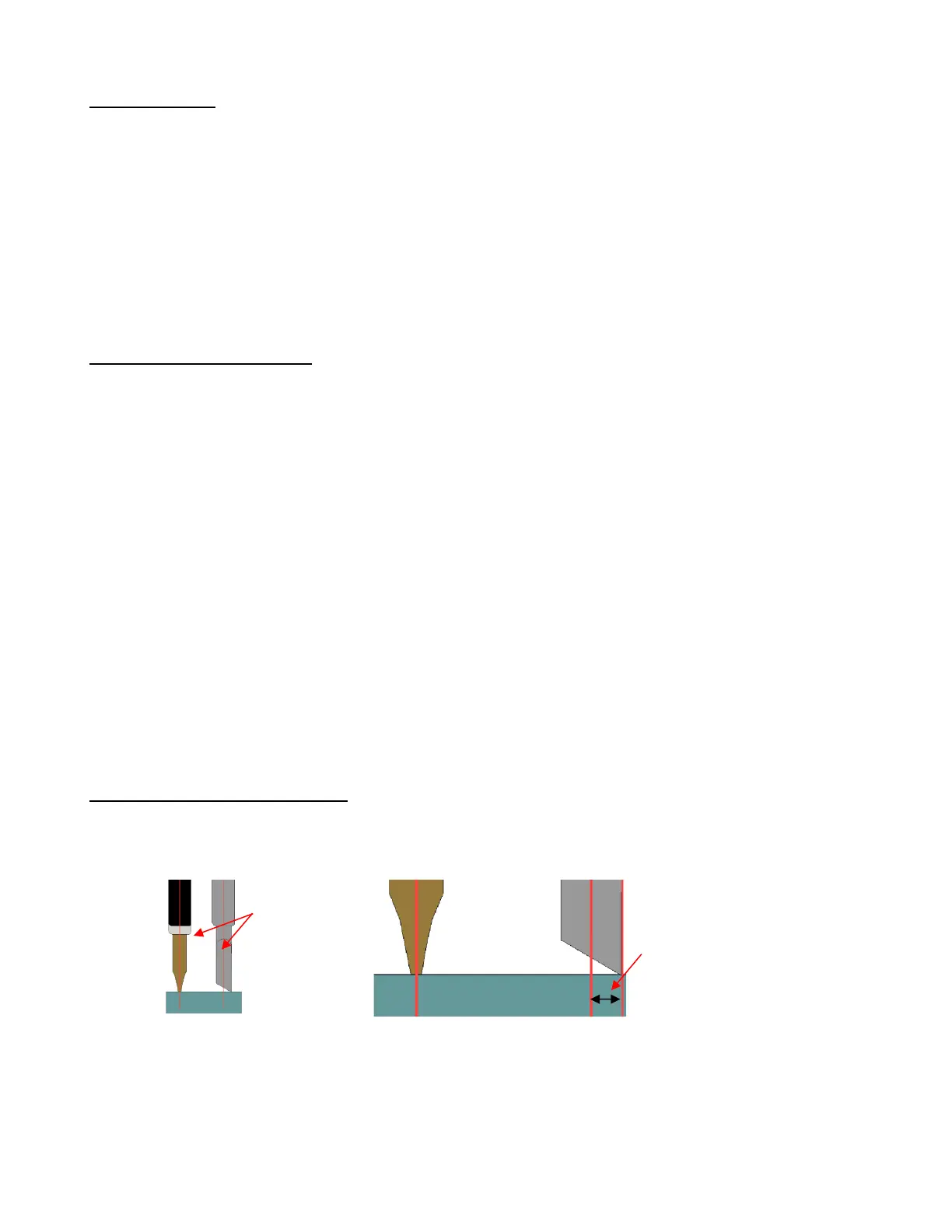
• Blade Offset is the horizontal distance from the center of the blade shaft to the tip of the blade. A pen has
an offset of 0 because the tip is centered with the center of the pen itself. But a blade is different:
• If you set the Blade Offset to 0 when cutting with a blade, corners will be rounded. On the other hand, if it is
set too high, bubbles will be cut on sharp corners:



 To Next Page