4.02 Common User Preferences and Screen Tools
4.02.1 Common User Preferences
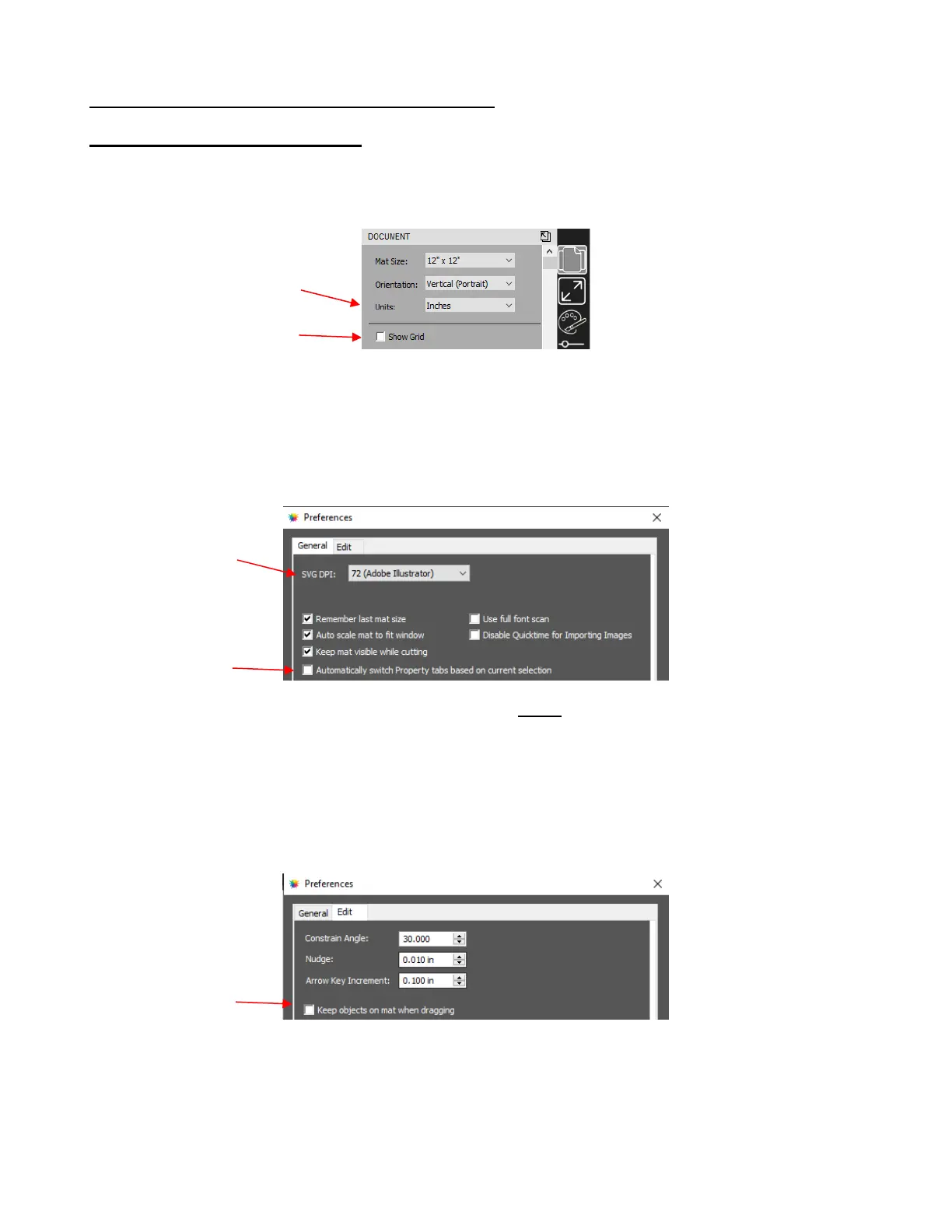
There are a number of preferences that will affect your experience as you learn CREATE. They are presented
here for your consideration:
• Document Panel preferences:
Units: On the Document Panel, under Units, you can choose which units you prefer.
Show Grid: some users prefer having the grid showing all of the time. Other users find it annoying or
cluttering. On the Document Panel, uncheck the option for Show Grid and you can reactivate any time
you like.
• General Preferences - Go to Edit>Preferences and on the General tab:
SVG DPI: This controls the sizing of SVG shapes you import into CREATE. For example, an SVG
exported from Adobe Illustrator will import at a different size than the same-sized SVG from Inkscape. If
you are unsure, leave it set to 72.
Automatically Switch Property tabs: Based on which tool is in use, the Properties Panel will
automatically activate whichever panel is directly related to that particular tool. This can prove annoying
so disabling that option is preferred by some users.
• Edit Preferences - Go to Edit>Preferences and on the Edit tab:
Keep objects on mat when dragging: Disable this setting so that you can freely drag shapes outside
of the boundaries of the Page.
• To prevent the Library from automatically opening whenever you launch CREATE, a custom workspace
can be set up. Close the Library and go to Window>Workspace>Save Workspace. A window will open
and you can name this new configuration:


 To Next Page