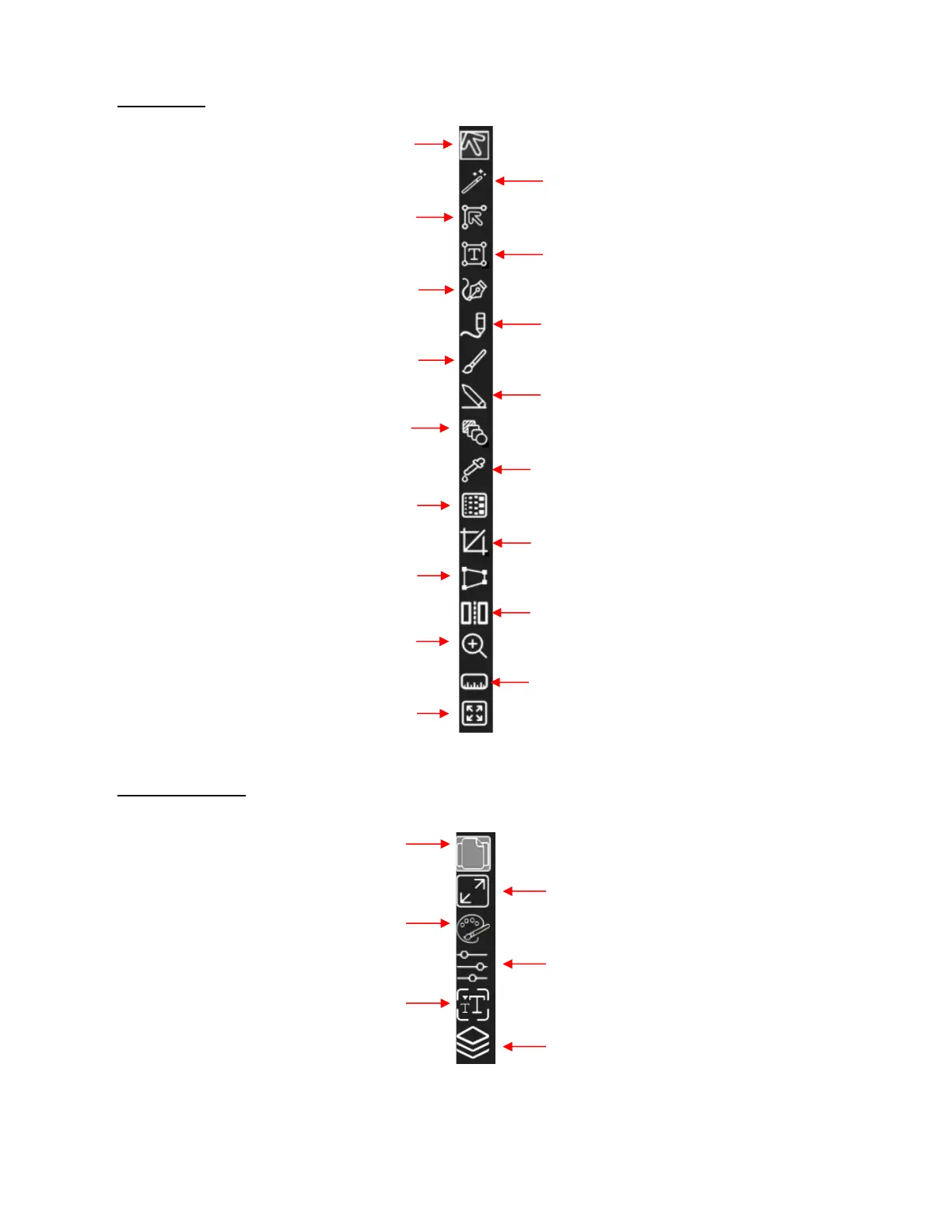
• Tools Panel
• Properties Panel:
Selection: drag a path to lasso-select shapes
3.02
Selection Tool: click or drag mouse to select
shapes 3.02
Shape Tool: edit nodes and reshape paths 6.11
Draw Tool: Add straight lines and Beziér curves;
also add nodes
5.04.1
Brush: Freely draw thicker lines with a mouse or
stylus 5.04.3
Rectangle (aka Basic Shapes): add a
rectangle/square, rounded rectangle/square,
circle/oval, triangle, polygon, star or spiral 3.01
Type Tool: Enter text with options for vertical
text, type on path, and type on arch 4.08.1,
4.04.1
Freehand: Freely draw with a mouse or a stylus
5.04.2
Eraser: Erase parts of a vector image 6.06
Distort: Drag bounding box handles to warp a shape
3.07.2
Gradient: drag mouse on a gradient-fill shape to alter
gradient-fill positioning 3.14.4
Dropper: Change fill and stroke properties on one
shape to match those of another 3.16
Knife: Drag mouse to cut through a shape or Crop:
Drag mouse to select a portion of a shape to retain
6.07
Stencil Bridge: Bridge interior paths to the exterior
or use to do straight-line erasures
4.10
Ruler: Drag mouse to obtain dimensions, distance
and angle measurements 6.10
Zoom In Tool: Zoom in, out, to selected shape,
to
Page, or custom zoom size 4.02.2, 1.09.1
Hand/Pan Tool: Pan around the Page while
zoomed in close 4.02.2, 1.09.2
Style Panel: Options for how shapes will
cut, print+cut options, apply clipping
Document Panel: Set up Page and
show/hide its features 1.11.3, 4.02,1.06
Fill & Stroke Panel: Set color or fill options for
shapes, and dashed lines
Position & Size Panel: Resize shapes,
position them, align, rotate, and flip
4.07.2, 3.04-3.06, 3.08, 3.18
Text Panel: Select font, change sizing,
spacing, rotate/skew, assign to
Layers Panel: Organize shapes, group,
hide/show, lock/unlock, change order
4.05, 2.04



 To Next Page