EasyManua.ls Logo

Starcraft SOLO - Page 73

Starcraft SOLO
114 pages
Print Icon
To Next Page IconTo Next Page
To Previous Page IconTo Previous Page
Loading...
73
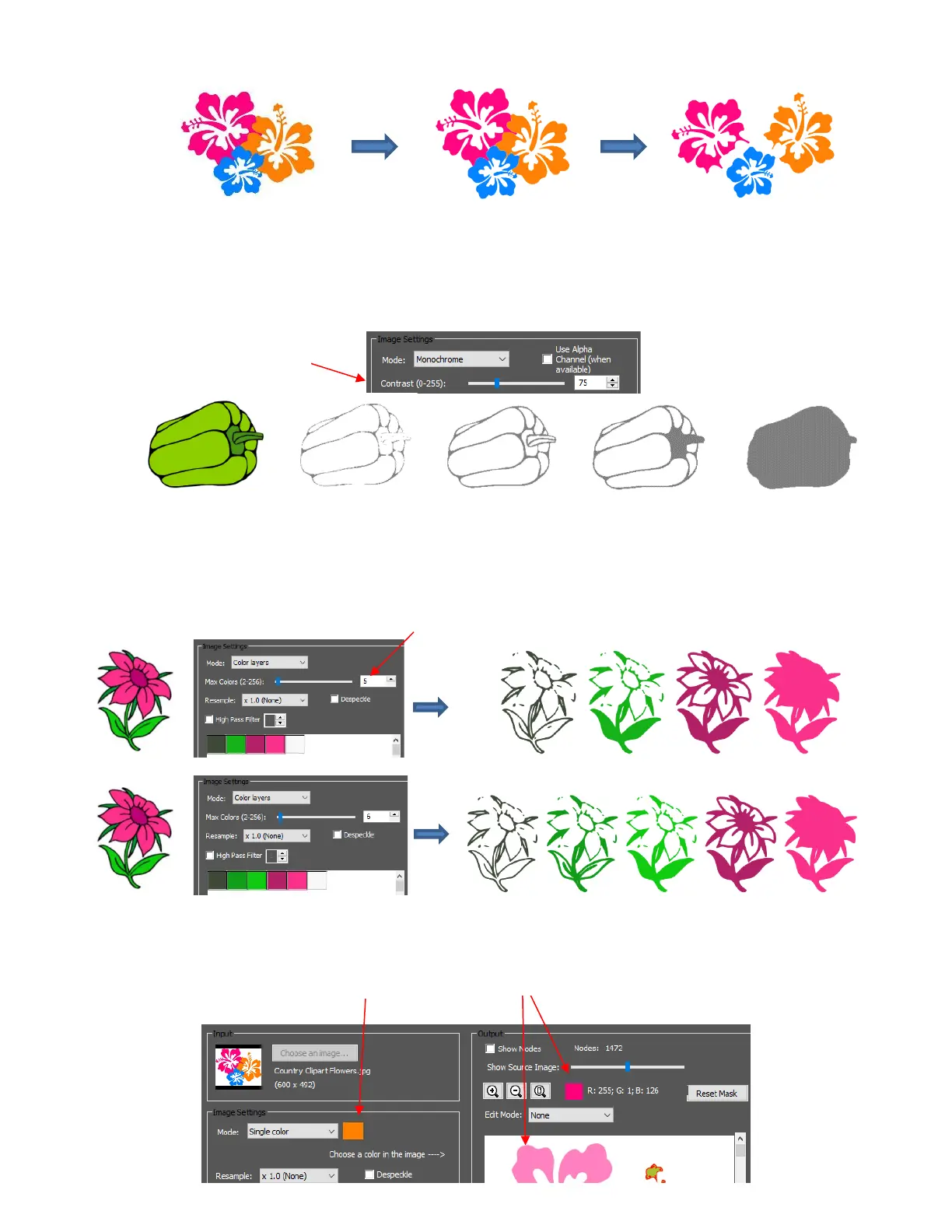
Each Mode has its own setting which affects what gets traced:
Monochrome: Increase Contrast to trace more, decrease Contrast to trace less:
Color Layers: Select the number of colors to trace. Note that 4 layers are produced when 5 colors are
selected because white is always included, if present, but not separately traced:
Single Color: Double click on the color box and then hover over the preview to find the color you wish
to trace:

Original image
Tracing ungrouped
and separated
Tracing of image if each
color is selected
Contrast: 5
Contrast: 75
Contrast: 100
Original Image
Contrast: 120
Adjust Contrast
Select # of colors
Double click
Move mouse around image to find next color to trace

Table of Contents