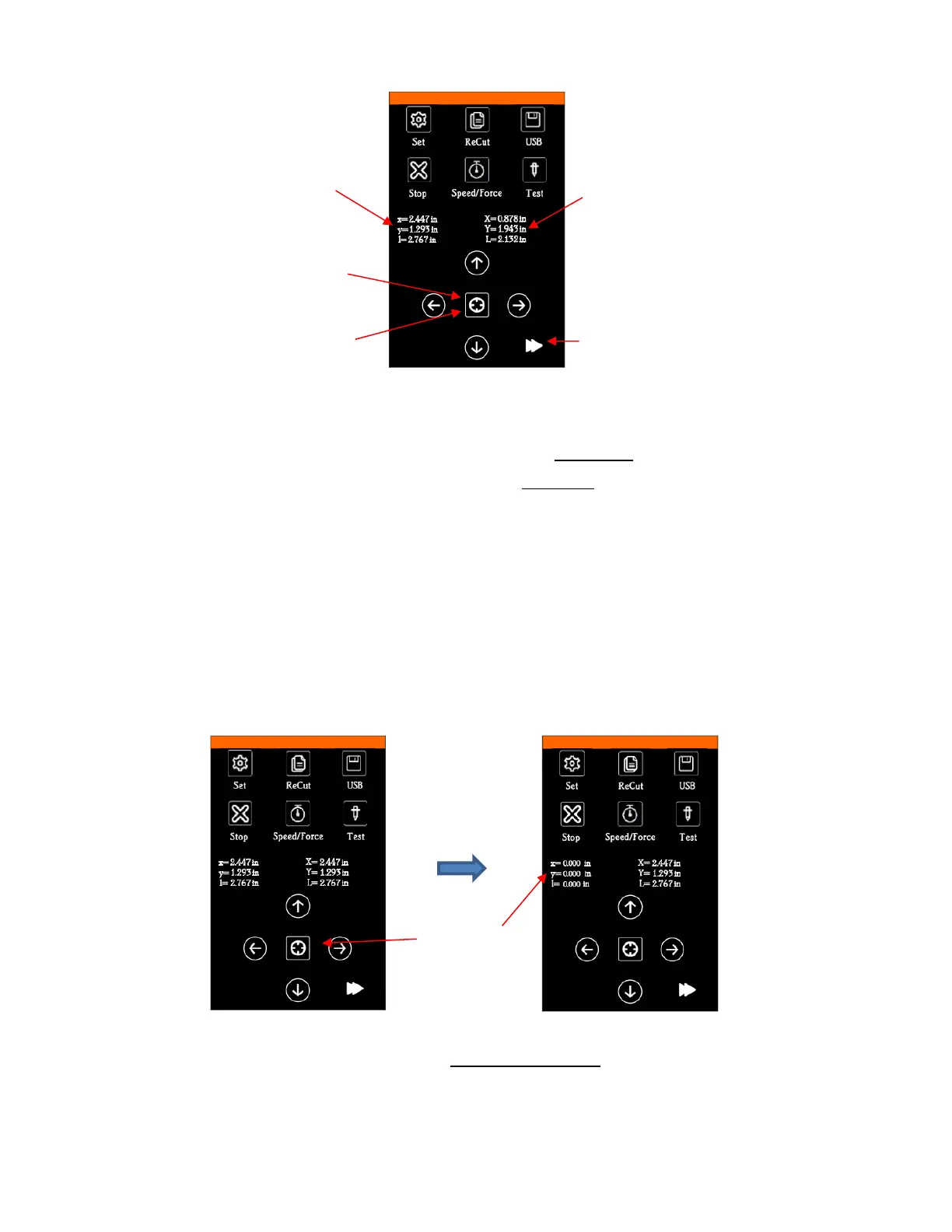
• Note that the middle button which is normally used to toggle the arrow button speeds will be moved to the
bottom right and replaced with the Origin Set button.
• xyl represents the Secondary Location and can be reset by a quick press of the Origin Set button.
• XYL represents the Primary Origin and can be reset by a long press of the Origin Set button which also
resets the Secondary Origin.
• Note that:
X (or x) is the left-to-right location
Y (or y) is the up-&-down location
L (or l) is the straight-line distance from X (or x) to Y (or y)
• At any time, if you press on top of the current location of either XYL or xyl, the blade carriage will return to
its last origin.
• To set an origin for cutting that can be returned to after either finishing a cut or stopping a cut, quick press
the Origin Set button before sending the cut.
• After the cut, you can move the mat or material (using the arrows keys on the control panel) to check the
quality of the cut. If needed, you can then press on top of the xyl displayed location (i.e., the Secondary
Location) to return the blade carriage to its Secondary Origin. Then press Re-Cut on the control panel to
repeat that same cut.
• This feature can also be useful for production processes, such as repeating the same Print+Cut.



 To Next Page