Home
Sun Microsystems
Desktop
SPARCstation 5
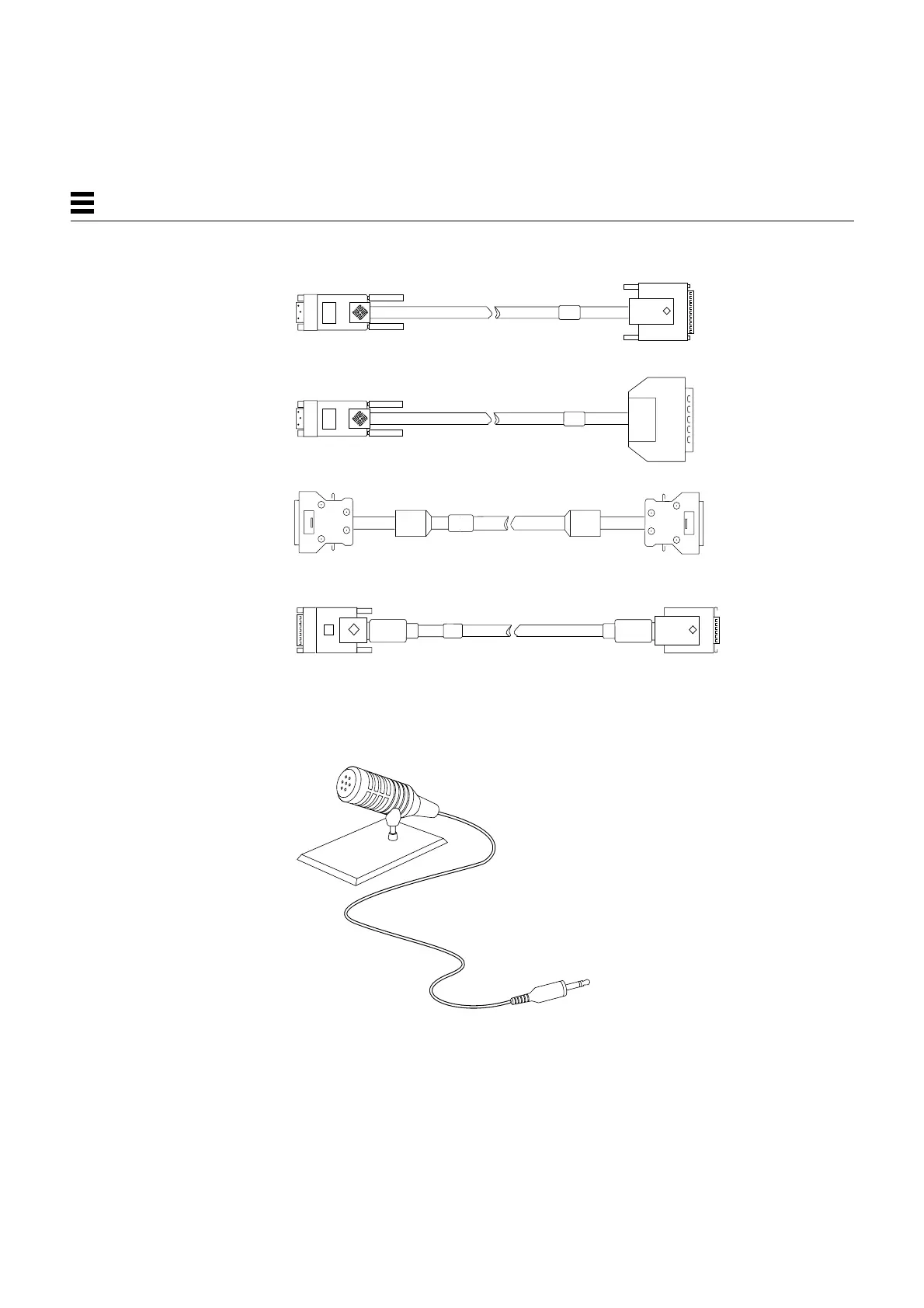
Page 168 (Figure 12-3 Optional External Cables)
Sun Microsystems SPARCstation 5 - Figure 12-3 Optional External Cables; Figure 12-4 Microphone and Cable
210 pages
Manual
Save Page as PDF
To Next Page
To Next Page
To Previous Page
To Previous Page
Loading...
12-4
SP
ARCstation 5 Service Manual
—
November 1996
12
Figure
12-3
Optional External Cables
Figure
12-4
Microphone and Cable
SCSI cable
IBM parallel printer cable
AUI Ethernet adapter cable
Centronics parallel printer cable
167
169
Table of Contents
Main Page
Default Chapter
9
Table of Contents
9
Part 5 -System Board
26
Figure 1-1 Basic Sparcstation 5 System
26
Figure 1-2 Interior View of Sparcstation 5 System
27
Table 1-1 Internal Options
29
Table 1-2 Selected External SCSI Peripheral Options
30
Table 2-1 NVRAM Parameters Used During POST and Boot Sequence
37
Table 2-3 Diagnostic Tools
39
Table 2-4 Selected FORTH Diagnostic Tests
42
Figure 3-4 Sparcstation System Banner
48
Table 3-1 Interpreting the Keyboard Diagnostic Leds
48
Figure 3-5 Location of System Power LED
53
Table 4-1 Troubleshooting Tips
56
Figure 4-1 Power Supply Connector
58
Table 4-2 Power Supply Connector Pin Assignments
59
Table 4-3 Troubleshooting Disk Drive Errors
60
Figure 4-2 DSIMM Slot Locations
62
Table 4-4 Physical Memory Address Ranges for Slots 0 through
63
Table 5-1 Safety Precautions
68
Figure 7-1 Removing the Rear Panel Cover Screws
80
Figure 7-2 Removing the Cover
81
Figure 7-3 Grounding the Wrist Strap to the Power Supply
82
Figure 7-4 Replacing the Cover
83
Figure 7-5 Securing the System Unit Cover
84
Figure 8-1 Removing the Power Supply
87
Figure 8-2 Connecting the DC Power Harness to the Power Supply
88
Figure 8-3 Speaker/Power LED Cable Connections
90
Figure 8-4 Routing the LED Cable
91
Figure 8-5 Removing the Speaker Cover
93
Figure 8-6 Removing the Speaker
94
Figure 8-7 Speaker Connectors
95
Figure 9-1 Drive Locations
100
Figure 9-2 Removing a Hard Disk Drive
102
Figure 9-3 Replacing a Hard Disk Drive
104
Figure 9-4 Removing the CD-ROM Drive
105
Figure 9-6 Replacing the CD-ROM Drive
107
Figure 9-7 Diskette Drive Location
108
Figure 9-8 Removing the CD-ROM Filler Panel
109
Figure 9-9 Disengaging the Diskette Drive
110
Figure 9-10 Removing the Diskette Drive
111
Figure 9-11 Replacing the Diskette Drive
113
Figure 9-12
114
Figure 9-13
115
Figure 9-14
115
Figure 9-15
117
Figure 9-16 Replacing the System Board
118
Figure 9-17 Backpanel Captive Screws
119
Figure 9-18 System Board Cable Connections
120
Figure 9-19 Rear Panel Captive Screws
120
Figure 9-20 Removing the System Board
121
Figure 9-21 Internal Cable Routing
122
Figure 9-22 Replacing the System Board
124
Figure 9-23 Rear Panel Captive Screws
125
Figure 9-24 System Board Cable Routing
126
Figure 9-25 Audio Cable Connector on the CD-ROM Drive
127
Figure 9-26 CD-ROM Audio Connector on the System Board
128
System Board Overview
133
Damage Prevention
134
Handling System Boards and Assemblies
134
Figure 10-1 Sparcstation 5 System Board
135
Replaceable System Board Components
135
System Board Layout
135
System Board and Component Replacement
137
Sbus Cards
138
Removing an Sbus Card
138
Figure 11-1 Sbus Slot Locations
138
Figure 11-2 Opening the Sbus Card Retainers
139
Figure 11-3 Removing the Extractor from the Sbus Card
139
Figure 11-4 Installing the Sbus Card Extractor
140
Figure 11-5 Removing a Single-Width Sbus Card
140
Replacing an Sbus Card
141
Figure 11-6 Removing a Double-Width Sbus Card
141
Figure 11-7 Inserting the Sbus Card
142
Figure 11-8 Closing the Sbus Card Retainers
143
S24 Frame Buffer Card
144
Removing an S24 Frame Buffer Card
144
Figure 11-9
144
Figure 11-10 Opening the Card Retainers
145
Replacing an S24 Frame Buffer Card
146
Figure 11-11 Removing an S24 Frame Buffer Card
146
Figure 11-12 Inserting an S24 Frame Buffer Card
147
Figure 11-13 Closing the Card Retainers
148
Removing a DSIMM
150
Figure 11-14 DSIMM Slot Locations on the System Board
150
Replacing a DSIMM
151
Figure 11-15 Ejecting a DSIMM
151
Figure 11-16 Orienting a DSIMM
152
Figure 11-17 Installing a DSIMM
153
System Board
154
Removing the System Board
154
Figure 11-18 System Board Cable Connections
155
Figure 11-19 System Board Captive Screws
155
Replacing the System Board
156
Figure 11-20 Removing the System Board
156
Figure 11-21 Installing the System Board
157
Figure 11-22 System Board Captive Screws
157
Setting Jumpers
158
Figure 11-23 Setting the Serial Port Jumpers
159
Removing the NVRAM Chip
160
Figure 11-24 Locating the NVRAM
160
Replacing the NVRAM Chip
161
Part 6 -Illustrated Parts Breakdown
163
Figure 12-1 Selected Crus in the System Unit
166
Figure 12-2 Standard External Cables
167
Figure 12-3 Optional External Cables
168
Figure 12-4 Microphone and Cable
168
Table 12-1 Part Number List-Customer-Replaceable Units
169
Table 12-2 Part Number List-Miscellaneous Items
170
Figure 9-5
175
Table A-3 Environmental Requirements
175
Figure B-7 Audio Ports
177
Figure B-2 Parallel Port Micro-D Connector
179
Table B-2 Pinout for Parallel Port Micro-D Connector
179
Figure B-3 Attachment Unit Interface (AUI) Micro-D Connector
180
Table B-3 Pinout for Attachment Unit Interface (AUI) Micro-D Connector
180
Figure B-4 Twisted-Pair Ethernet Connector
181
Table B-4 Pinout for Twisted-Pair Ethernet Connector
181
Figure B-5 Serial Connector
182
Table B-5 Pinout for Serial Connector Ports a and B
182
Figure B-6 Keyboard/Mouse Connector
183
Table B-6 Pinout for Keyboard/Mouse Connector
183
Table B-7 Signals for the Sparcstation 5 Audio Ports
184
Figure B-8 13W3 Video Connector
186
Table B-8 13W3 Video Connector Pin Assignments
186
Table C-1 SCSI Targeting-Solaris 1.X (Sunos 4.X) Operating Systems
188
Table A-2 Input Power Requirements and Power Dissipation
174
Figure D-1 Displaying FORTH Diagnostics
191
Related product manuals
Sun Microsystems SPARCstation 20
266 pages
Sun Microsystems SPARCstation 10
221 pages
SPARCstation 10SX
30 pages
SPARCstation 5 Model 110
180 pages
Sun Microsystems Ultra 5
34 pages
Sun Microsystems SPARC classic
198 pages
Sun Microsystems MCS 2000 SL
84 pages
Sun Microsystems Sun Blade 2500
56 pages
Sun Microsystems Ultra 20 M2
136 pages
Sun Microsystems Ultra 25
198 pages
Sun Microsystems Blade 1500
500 pages
Sun Microsystems Ultra 45
198 pages














 To Next Page