7 – Other module parameter setting screens
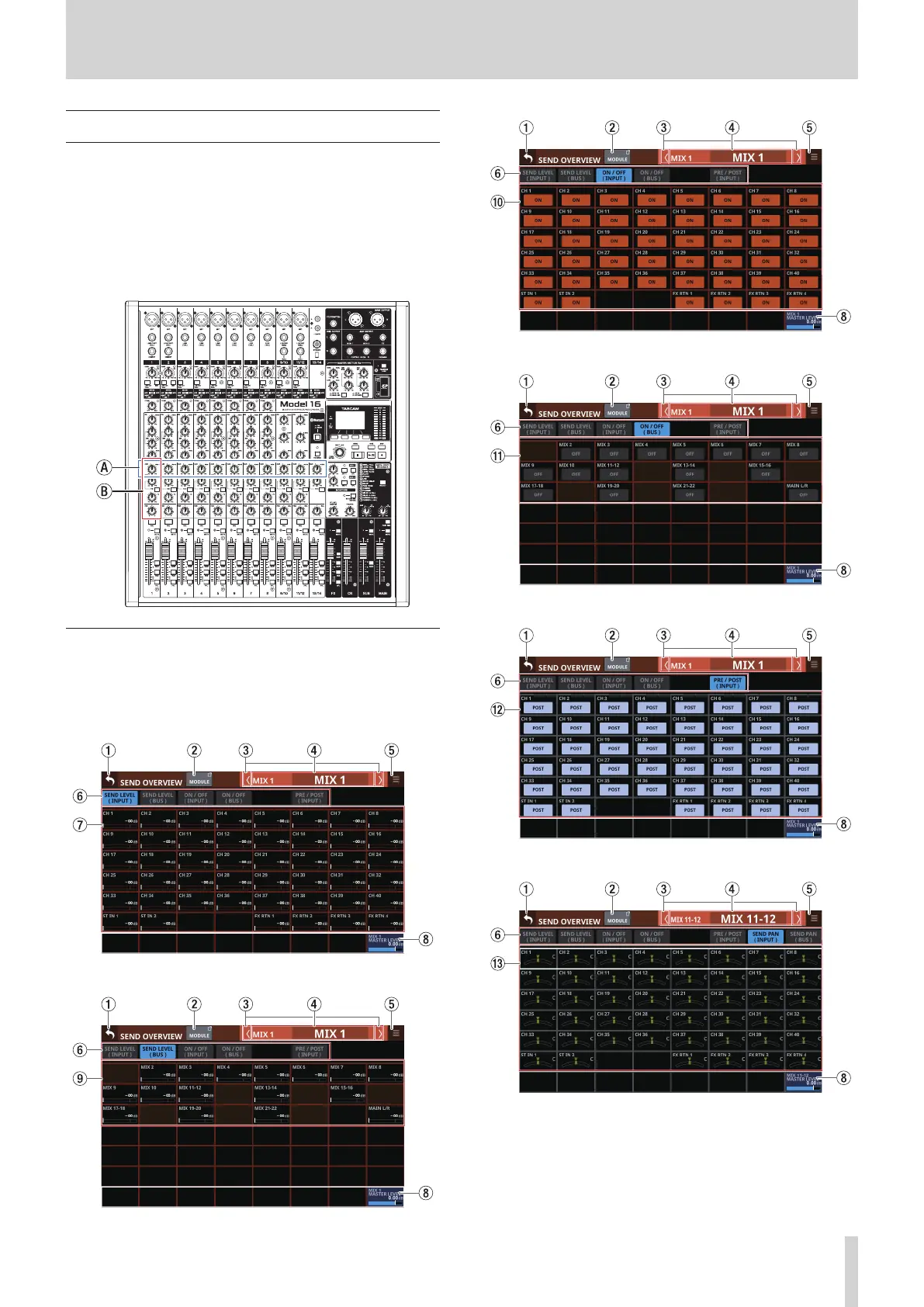
SEND OVERVIEW screen
SEND parameters for the selected bus (MIX 1–22, FX 1–4 or
MAIN L/R) are shown in a list and can be operated.
The MODULE (SEND/PAN) Screen shows a list of the SEND
parameters (b) aligned vertically on the analog mixer, and can
be used to operate them.
In contrast, the SEND OVERVIEW Screen shows a list of the SEND
parameters (a) aligned horizontally on the analog mixer, and
can be used to operate them.
MIX 1–22 bus SEND OVERVIEW Screen
Tap Menu Screen > Mixer Setup menu> MIX Send Overview to
open this screen. The SEND OVERVIEW button at the top of the
MODULE Screen for a MIX 1–22 module can also be tapped to
open this screen.
SEND LEVEL (INPUT) page
SEND LEVEL (BUS) page
ON/OFF (INPUT) page
ON/OFF (BUS) page
PRE/POST (INPUT) page
SEND PAN (INPUT) page
TASCAM Sonicview 16/Sonicview 24 V1.1.0 149



 To Next Page