SYNCHRO Excite +: Service & maintenance manual - rev. 7.1
Page 7.8
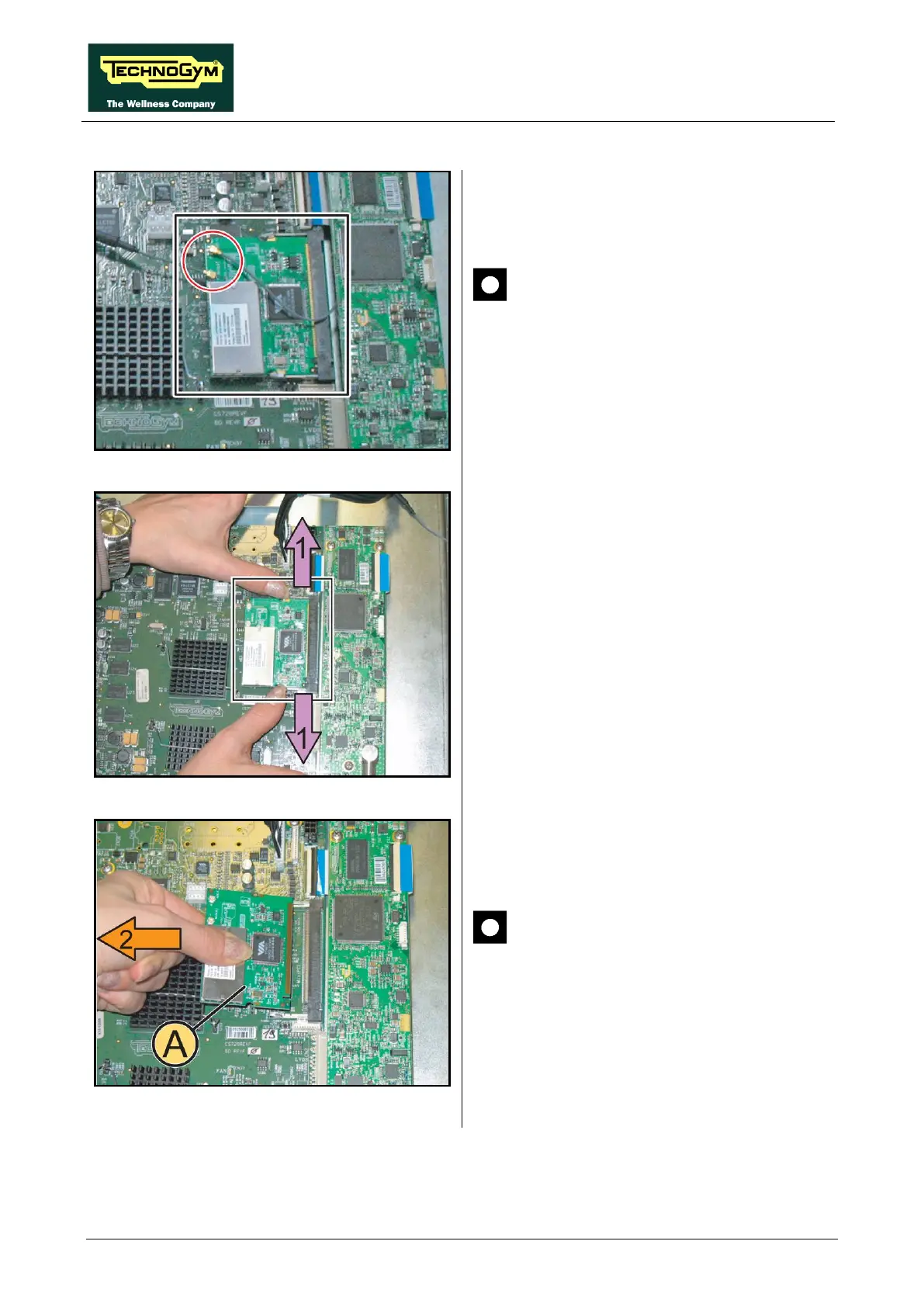
7.2.2.1. Wireless board (A)
Figure 7.2-5
1.
Unplug the 2 antenna connectors of the
wireless board, highlighted in the figure.
CAUTION: Pay particular attention
to the wireless antenna cables and
connectors, because extremely
sensitive, moreover in case of
disassembly, it is important to follow
the cable routing as shown in Figure
7.2-8.
Figure 7.2-6
2.
Push simultaneously the 2 side tabs outward,
in the direction of the purple arrows (1)
Wireless Board will automatically lift up
Figure 7.2-7
3. Remove the Wireless Board (A)
direction of the orange arrow (2), as shown in
the figure at the side.
CAUTION: During the reassembly,
mount the antennas of Figure 7.2-5 on
Wireless Board
and after the Board in
its housing; so not press on the CPU
circuits.
To reassemble the Wireless Board, follows the
above steps in the reverse order.
Continued on following page ...














 To Next Page