c.
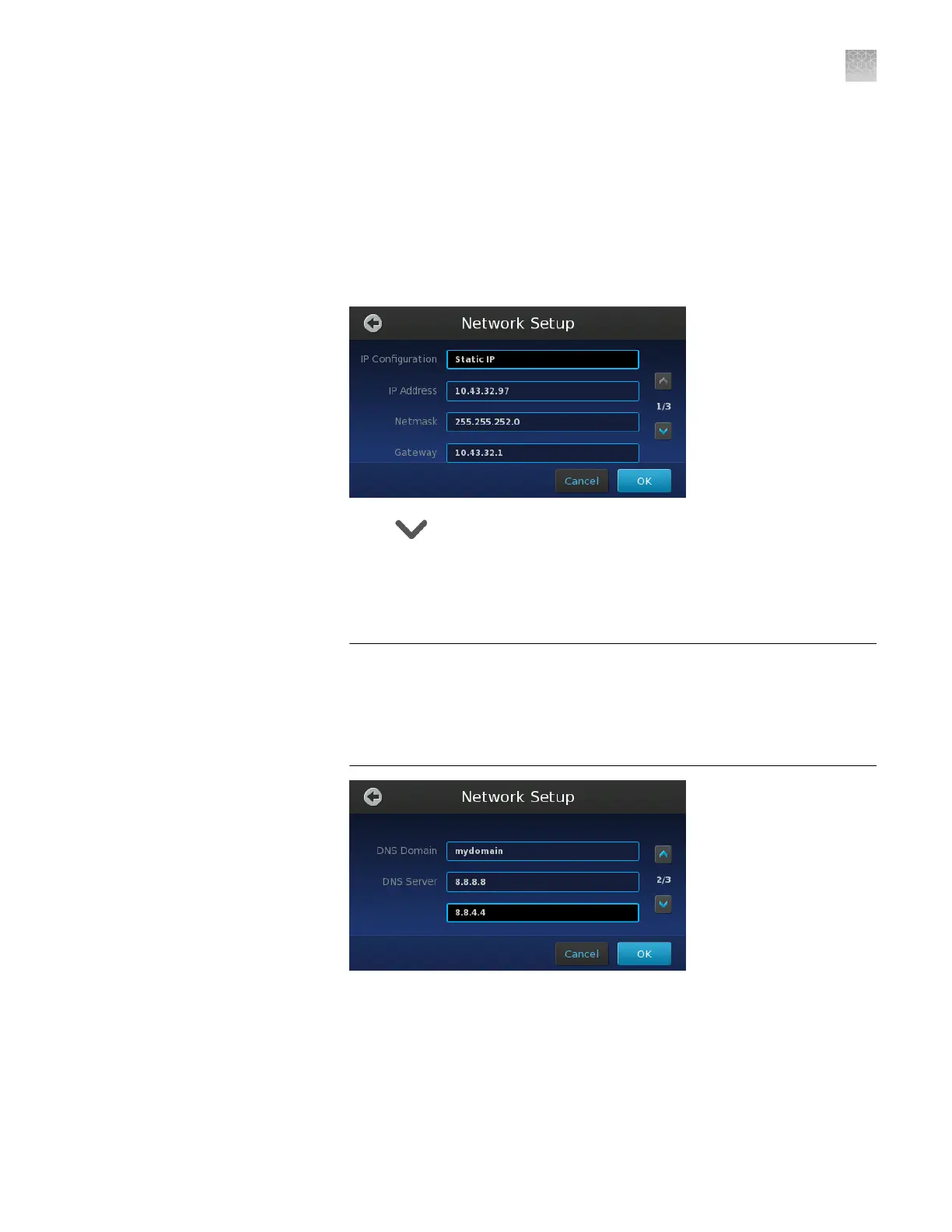
If you elected to assign a static IP to the instrument, touch the following
elds and enter the:
•
IP Address—Enter the static IP address for the instrument.
•
Netmask—Enter a subnet mask for the network if applicable.
•
Gateway—Enter a default gateway for the network if applicable.
Note: For each setting, touch the associated eld, then enter the setting
using the keypad and touch Enter to accept the value.
d.
Touch , then congure the domain name service (DNS) settings:
•
DNS Domain – Enter the domain name of the DNS server that you
want the instrument to use.
•
DNS Server – Enter the IP addresses for the primary (top) and
secondary (bottom) DNS servers.
IMPORTANT! DNS settings are required if you:
·
Specify the Connect cloud-based platform as a data destination (for your
QuantStudio
™
3D AnalysisSuite
™
Software projects).
·
Want to use Network Time Protocol (NTP) for instrument date/time
synchronization.
Appendix D Networking
Connect the instrument to the network
D
QuantStudio
™
3D Digital PCR System User Guide
101











 To Next Page