MAP
Touch this soft-key when you want to display a map of
your current position. (See the Map Viewer section for
details).
Inputting Information
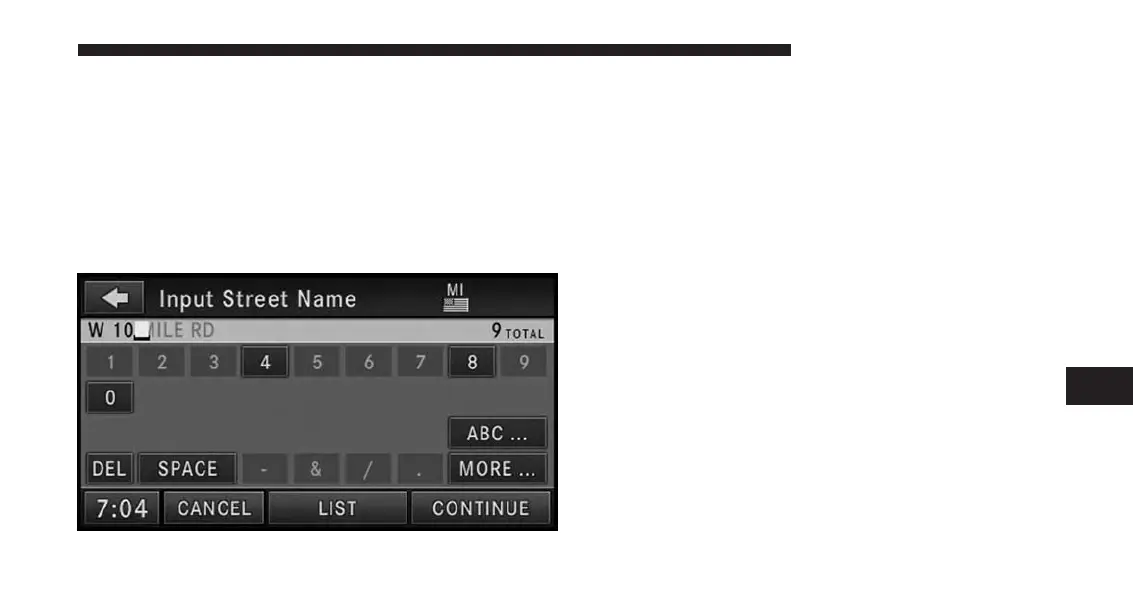
Names (e.g., city names or street names) are entered with
a smart speller.
It is possible to spell only names contained in the
database. Unavailable letters are in a lighter color and are
not selectable. If the desired street name is shown com-
pletely, touch the CONTINUE soft-key to proceed. If
there are only a few choices left, you may touch the LIST
soft-key to display a list of street names.
IMPORTANT NOTE: Use the space symbol as a space
between words (e.g., NEW_YORK_CITY).
NOTE:
•
Touch the DEL soft-key to delete a misspelled
letter or press the NAV hard-key to go back to the
Navigation Main Menu.
•
Touch the 0-9 soft-key to access numbers, and
touch the MORE... soft-key to access special char-
acters, if needed.
7
Uconnect® GPS Navigation 145



 To Next Page