www.wegener.com 800009-01 Rev. J 3
iPump 6400 User’s Manual
playlist indefinitely, complete the playlist and repeat only the last program indefinitely, or
complete the playlist and simply return the decoder to its previous state.
Routing
The
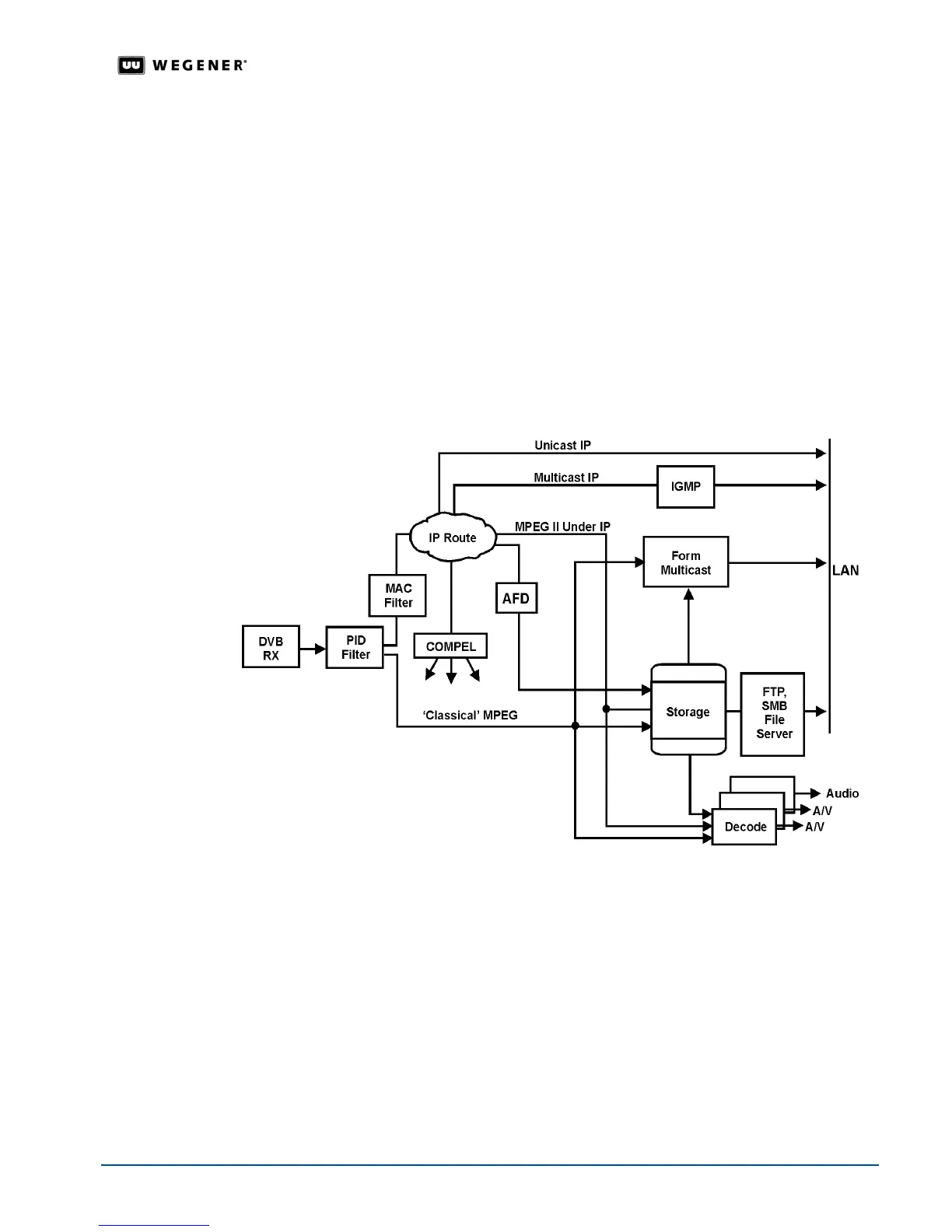
iPump 6400 can serve as a satellite-to-LAN IP router. Both unicast and multicast IP
traffic is supported.
Multicast traffic can include, for example, MPEG video streaming data.
The IGMP protocol is followed for multicast traffic.
Stream Creation
The
iPump 6400 can create IP multicast video streams and present them on the LAN for
use by other equipment. The source of the video stream may be either a prerecorded or
downloaded file or a "classical" DVB program.
The
iPump 6400 can also multicast previously-stored streams to the LAN. See Figure 1.1:
iPump 6400 routing
for an illustration of iPump 6400 routing paths.
Figure 1.1: iPump 6400 routing
Scheduled Operation
Schedules of record, play, and other operations for automatic execution by the
iPump 6400
may be set up using the
Compel network and may be viewed from the web browser
interface. (Schedule operations support wild cards and ranges in day, date, and time fields
for repetitive events.)
File Downloads
The
iPump 6400 accepts files downloaded from the satellite link via Compel’s Assured File
Delivery
package. Application software and other files may also be downloaded. Up to five
downloads may be performed simultaneously up to an aggregate data rate of 25 Mbps.
The
iPump 6400's file download and record functions may be used to load the unit with
content for playout (according to a pre-arranged schedule if desired) at any time. This can



 To Next Page