www.wegener.com 800009-01 Rev. J 27
iPump 6400 User’s Manual
for LNB LO Frequency, LNB DC Power, Date and Time, and Unit Label should be made at
this time.
Pre-configured
Transport In
Settings
A few of the Transport In Settings (
LNB LO Value, SNR Alarm Threshold, and SNR Margin
Warning
) are preconfigured and should only be changed if advised by your satellite
operator.
Table 3.3 lists these settings as they are originally configured from the factory.
Table 3.3: iPump 6400 pre-configured Transport In Settings
Navigation to
Transport In
Setup Screen
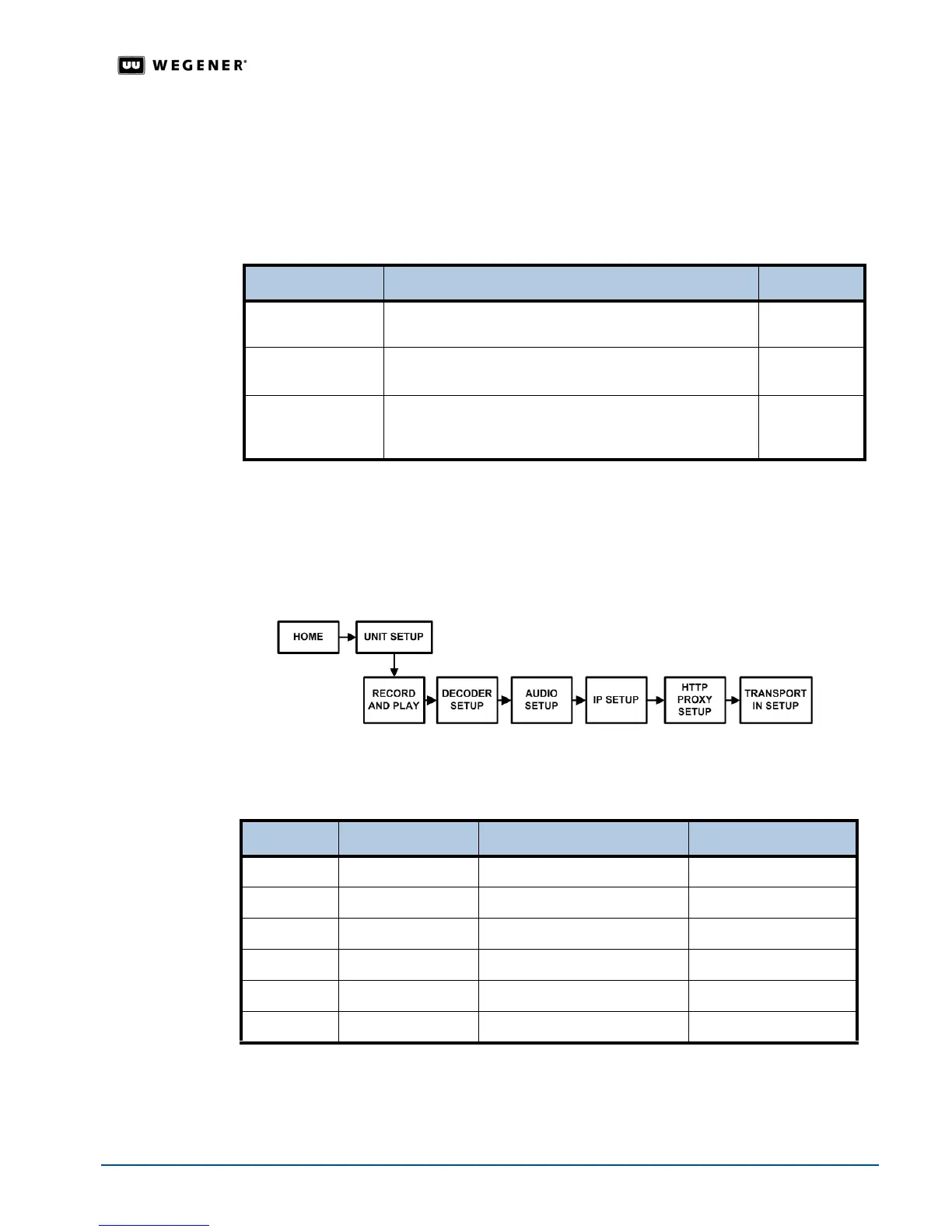
Use the front panel navigation buttons to go to the Transport In Setup screen as shown in
Figure 3.10 and Table 3.4. From the Transport In Setup screen, you can set:
!"Transport In Current Channel
!" LNB LO Frequency
!"LNB DC Power
Figure 3.10: LCD menu navigation to Transport In Setup screen
Table 3.4: Menu navigation to Transport In Setup screen
Begin from the
HOME screen.
Transport In
Current
Channel
Setup
Configure the Transport In Current Channel from the Transport In Setup screen.
Figure 3.11 and Table 3.5 detail the procedure for adjusting the Current Channel settings.
Parameter Application / Description Preset Value
LNB LO Value
Default appropriate for Ku-band reception. 5150 MHz
would be an appropriate setting for C-band operation.
10750 MHz
SNR Alarm
Threshold
Signal-to-noise ratios below this value results in an alarm
condition.
5.0 dB
SNR Margin
Warning
Warning condition triggered when signal-to-noise ratio is
within 3.0 dB of the SNR Alarm Threshold (under 8.0 dB as
preset).
3.0 dB
Step Press Displayed Screen Type
1. #
UNIT SETUP
Menu
2.
ENTER RECORD AND PLAY
Menu
3. #
DECODER SETUP
Menu
4. #
AUDIO SETUP
Menu
5. #
IP SETUP
Menu
6. #
TRANSPORT IN SETUP
Menu



 To Next Page