Operation
26 800009-01 Rev. J www.wegener.com
3.4 Front Panel Operation
Operate the iPump 6400 from the front panel using the push buttons and the LCD. Menu
screens on the LCD direct you to screens that control various operating parameters or
display information about the
iPump 6400. Menu titles represent either a category of control
(such as
Unit Setup, Record and Play, and Transport In Setup) or the name or category of
parameters or information to be displayed (such as
RF Status, Active Recordings, or
Navigation Help).
LCD Menu
Navigation
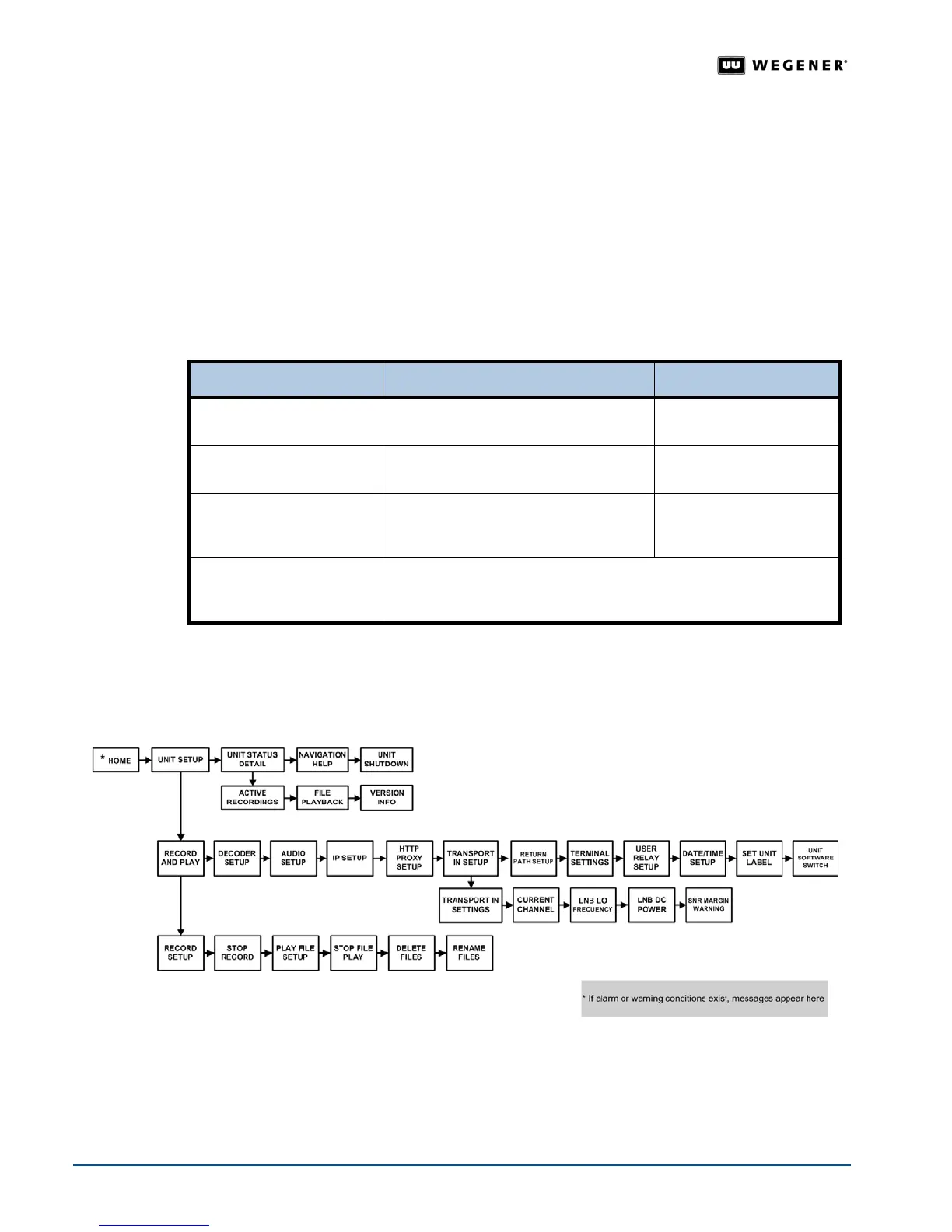
Figure 3.9
below illustrates the complete LCD menu structure including user input screens.
User input screens shown below the menus allow control of items such as Program Number
to Record
, File to Record to, Decoder Number to Play File to, and others.
For more
information on use
, see User Input Screens on page 20
.
Note: When you reach the last menu of a particular level, pressing the right arrow button
again moves you back to the first menu of that level.
Pressing the
ESC button repeatedly always returns you to the Home screen.
Figure 3.9: iPump 6400 LCD menu structure
3.5 Front Panel Initial Unit Setup
Some of the iPump 6400’s settings are preconfigured or should be configured during the
iPump 6400's initial setup and are not likely to require adjustment on a regular basis. Setup
Press the... To... As shown by the arrows...
right and left arrow button
s
!"#
!"move between menu screens on the
same level
connecting the left and right
sides of the boxes
top and bottom arrow buttons
$"%
!"moves up or down a level connecting the tops and
bottoms of the boxes
ENTER
button
!"move down to the next level
!"view the information and user-input
screens within a particular category
connecting the tops and
bottoms of the boxes
ESC
button
!"move up a level
!"move to the first menu of the current level
!"
return the
Home
screen



 To Next Page