Operation
58 800009-01 Rev. J www.wegener.com
Note: When deleting a playlist using an alias name from Compel, the actual playlist is
deleted along with the alias only if there are no other aliases that exist for that
playlist. However, if the playlist is deleted using the actual playlist name, then
only
the actual playlist itself is deleted and not any of its aliases.
To edit the alias in an open playlist:
1. From the menu bar, click
Edit Alias
. T
he Playlist Builder opens the Alias box for editing.
2. To create or delete a playlist’s alias:
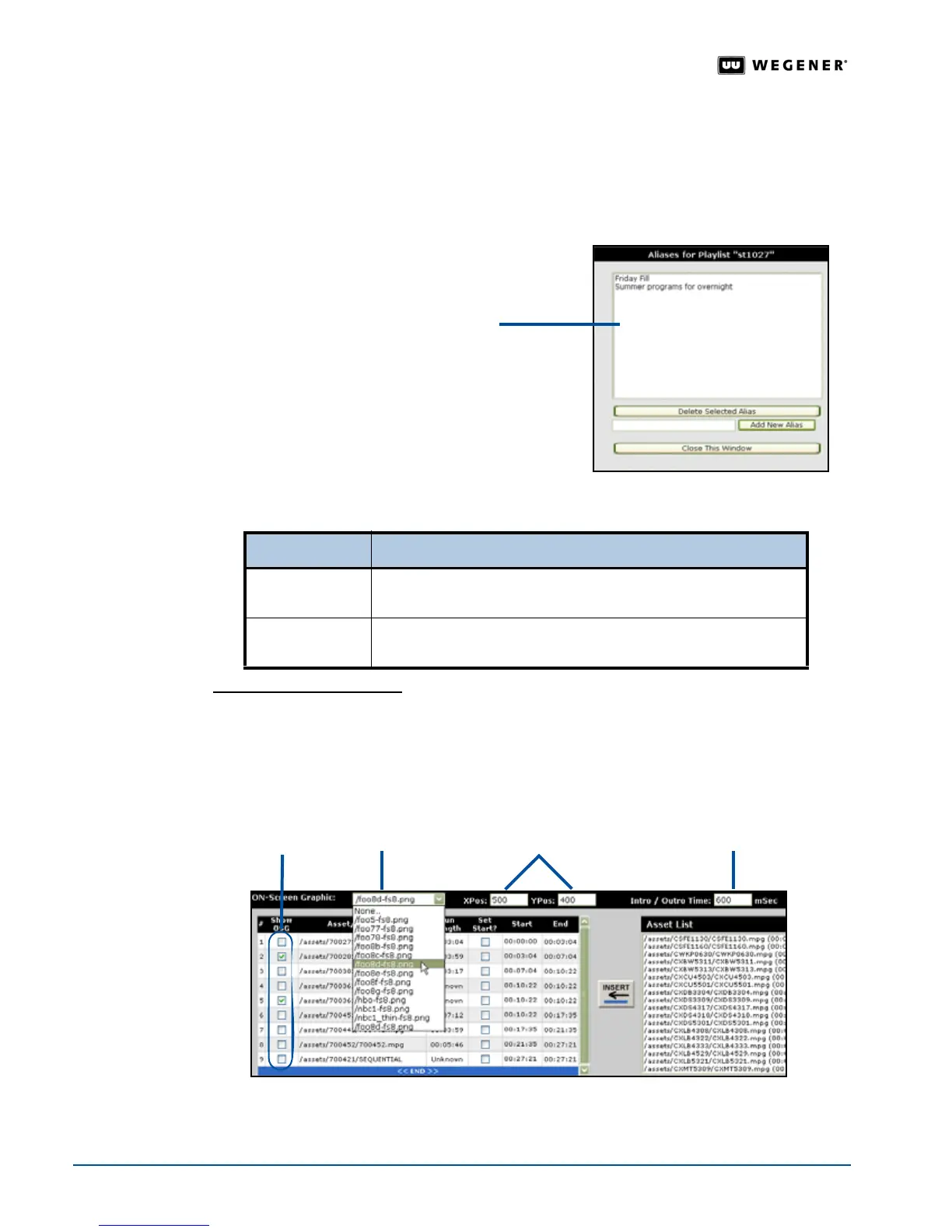
Adding on-screen graphics
Any item in a playlist can display an on-screen graphic, also referred to as OSG or bugs. To add
an OSG to any or all items in an open playlist:
1. In the active playlist, select the appropriate
Show OSG
check box for an item to display the
selected OSG.
2. Select an image from the OSG drop-down list.
To... In the Alias box...
create an alias
type the alias name in the Add New Alias text box. Click Add
New Alias
. The Playlist Builder adds the alias to the alias list.
delete an alias
select an alias from the alias list and click Delete Selected Alias.
The
Playlist Builder deletes the alias.
alias list
Show OSG
check boxes
OSG drop-
down list
X & Y coordinates
Intro/Outro
Time box



 To Next Page