www.wegener.com 800009-01 Rev. J 61
iPump 6400 User’s Manual
Table 3.13: Procedure for switching iPump 6400 software version
Begin from the
Unit Software Switch to B-Up screen.
Verify
Software
Version
Procedure
After switching the software, you may want to verify that the intended software is in use. Use
the procedure below to verify the version of software in use on the
iPump 6400.
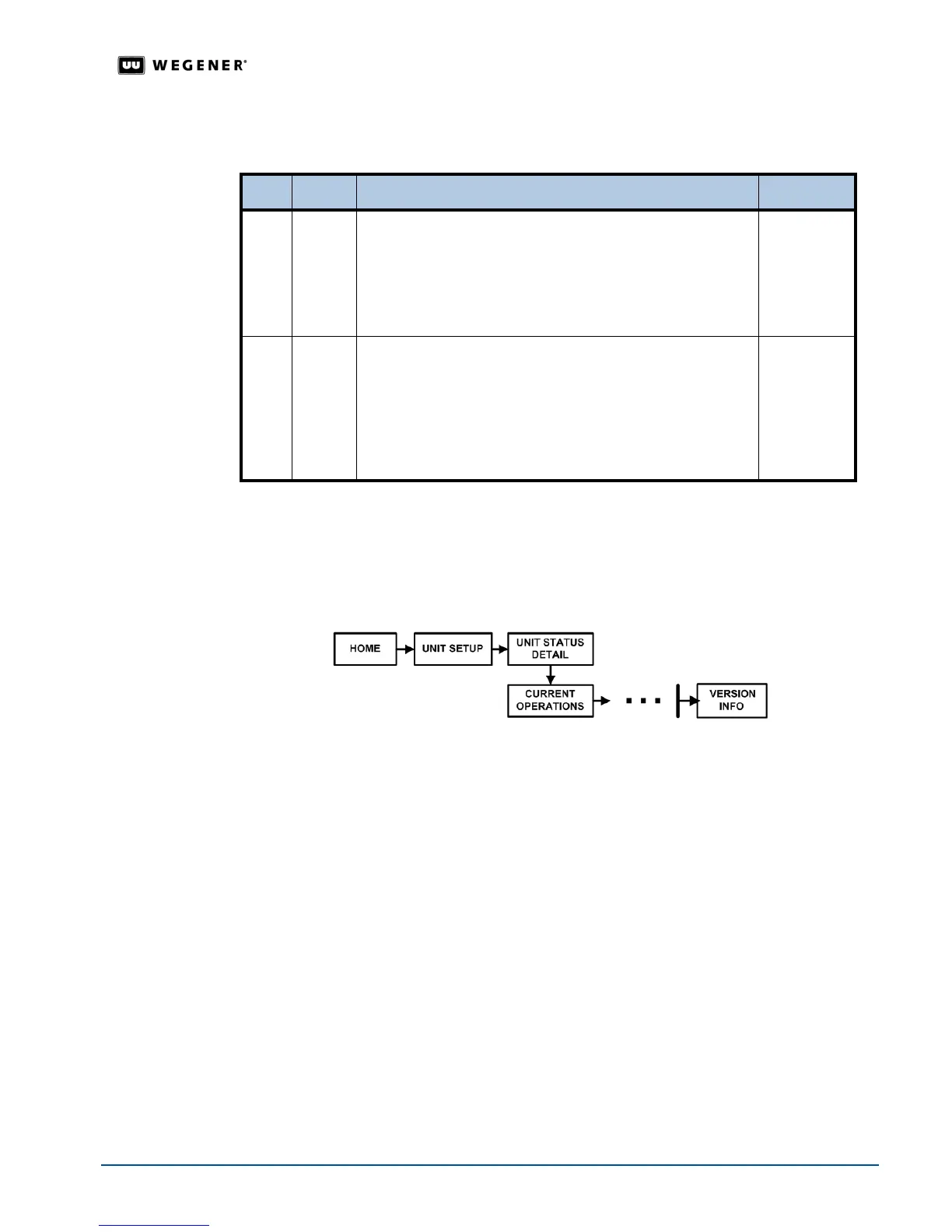
1. Navigate to the
Version Info
screen as shown in
Figure 3.31
.
2. Press
ENTER
.
The
iPump 6400
displays the version number of the software in use.
Figure 3.31: Menu navigation to Version Info
Step Press Displayed/Field Details Screen Type
1.
ENTER SW FROM v111 TO v222 PRESS <ENTER>
Note: v111 and v222 represent the current and
available software versions.
Press ENTER to begin loading the alternate software version
or press
ESC to cancel the switch.
Menu
2.
ENTER V x.x Booting, please wait . . . . .
Note: Vx.x represents the version number that the
iPump 6400 displays. It may not correspond to
the actual loading version.
The expanding and contracting ellipsis indicate that the
alternate software is loading.
Status
Display



 To Next Page