Version 18-01 · 9401-191-003-EN · Exclusive and IS 600 E
Page 10
G
F
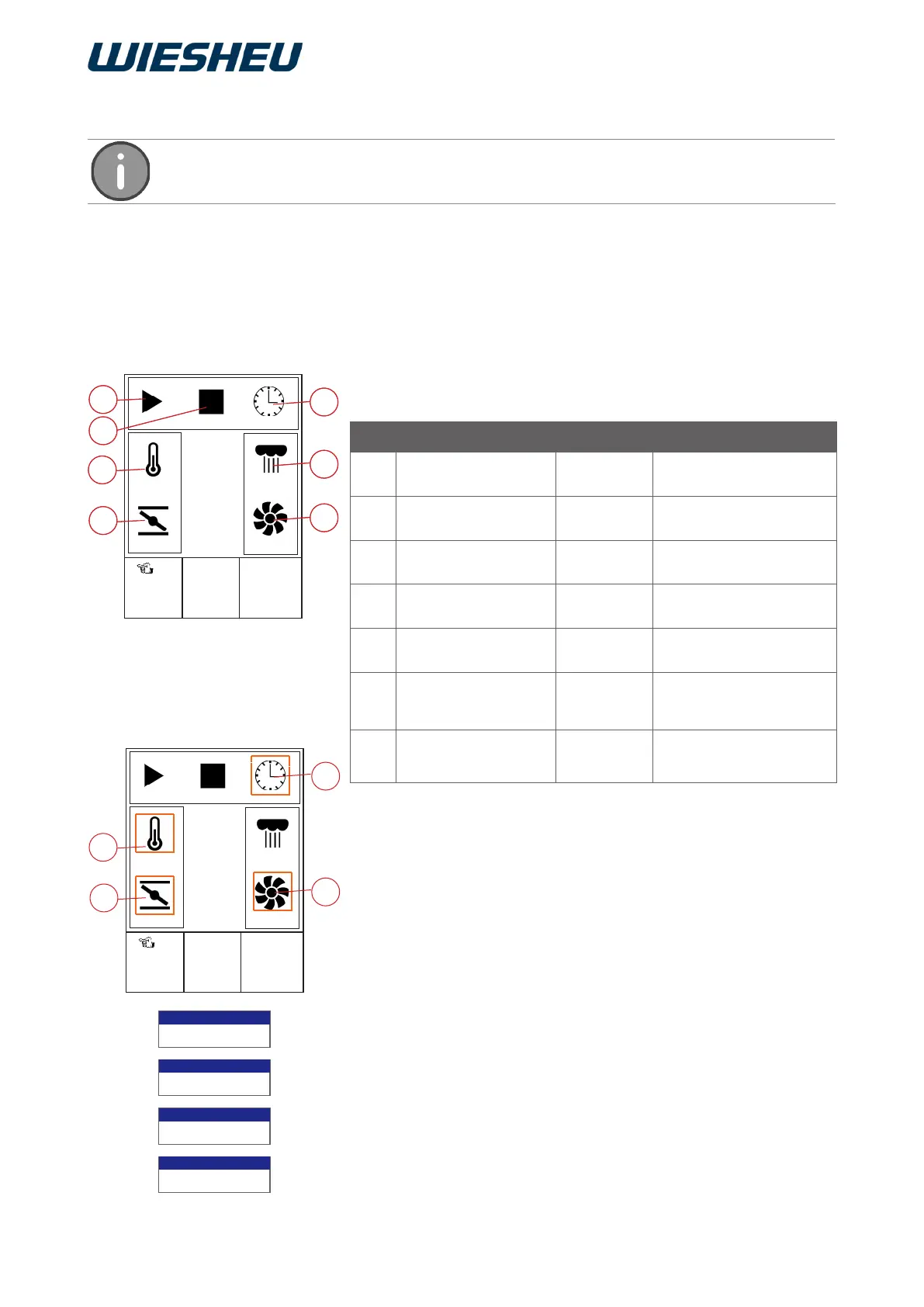
5.2 Rapid access to “Manual baking” via the Main menu
■ If necessary, use the slider/rotary button to change the specified
settings.
→ You can change the following parameters:
▪ Time setting (L)
▪ Temperature setting (H)
▪ Exhaust air damper setting (K)
▪ Motor speed (M)
■ Use the slider/rotary button to choose the parameter that you want
to change.
■ Press the “Return” button to confirm.
→ The system opens an input eld.
■ Use the slider/rotary button to correct the parameter.
■ Press the “C” button.
→ The system closes the input eld.
→ The parameter has been changed.
Start the program manually or use the simple icons to set your own
individual baking parameters.
You are in the “Main menu” item.
■ Choose the “Manual baking” submenu.
→ The system shows the adjacent icons on the display.
→ The system displays the baking parameters that you set last.
2017-01-11
15:32:15
Start
8:00 min
175 °C
Open
2 50%
000 ml
8:00 min
Item Designation Setting Notice
A Start
(Start the program)
B Stop
(Stop the program)
The system displays the
remaining baking time
C Temperature 30 - 250 °C Ebo up to 280 °C
D Exhaust air damper
setting
open /
closed
Not with Dibas 64 blue
E Time set-up 1 - 240
Minutes
F Manual steam injec-
tion
Steaming is running
when the button is
pressed
G Motor rotation speed
1 - 8
(12-100 %)
Not with Ebo
A
C
B
E
D
Auto-start
175°C
Enter temperature
Auto-start
Open
Exhaust air open/closed
Auto-start
2 50%
Enter motor speed
Auto-start
08:00 min
Enter time
M
2017-01-11
15:32:15
Start
8:00 min
175 °C
Open
2 50%
000 ml
8:00 min
L
H
K
G
F
A
C
B
E
D
You can activate/deactivate this function in the following menu:
Settings > User settings > Display > Display manual baking.



 To Next Page