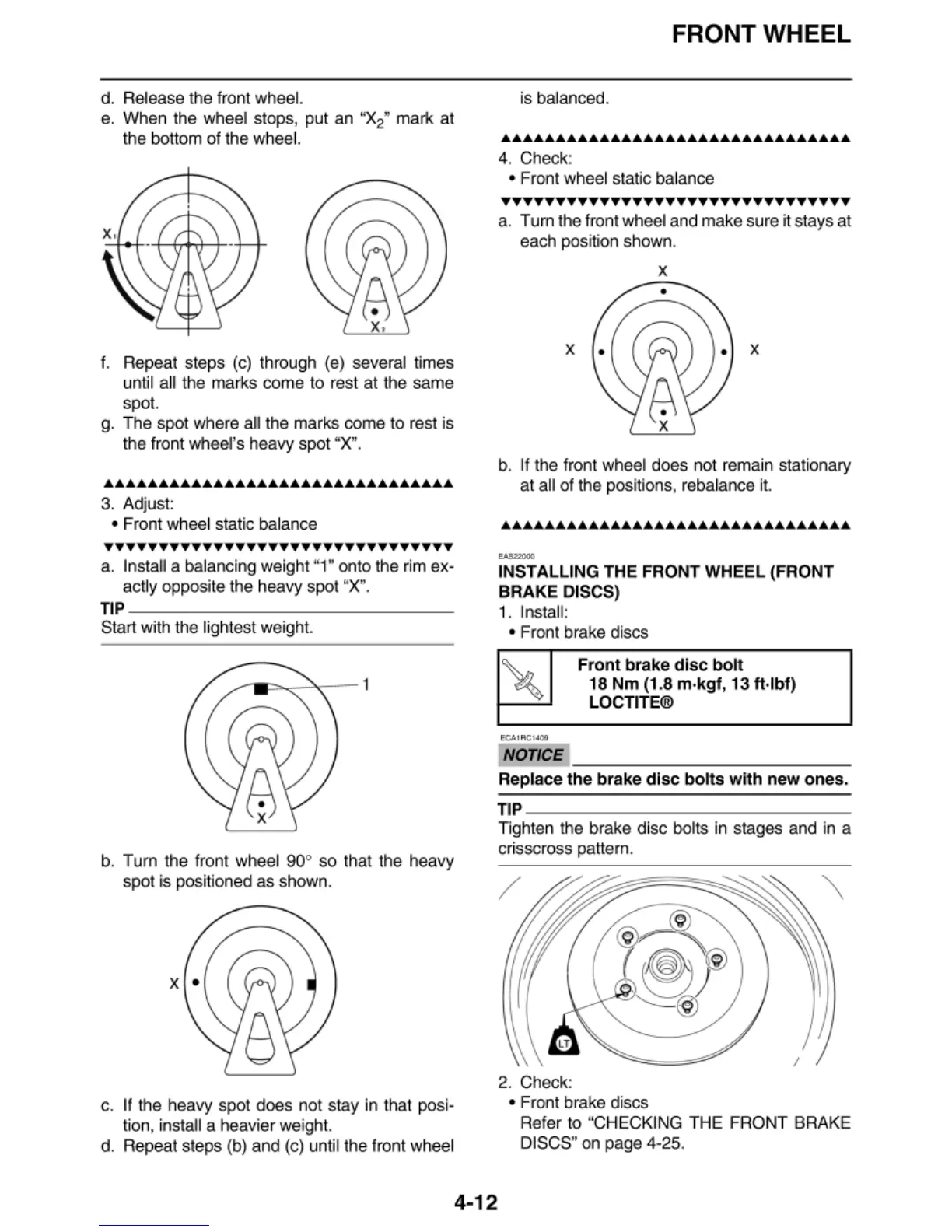
d. Release the front whee
l.
e. When the wheel stops, put an "X
2
"
mark at
the bottom
of
the wheel.
f.
Repeat steps (c) through (e) several times
until a
ll
the marks come to
re
st
at
t
he
same
spot.
g. The spot whe
re
all the marks come to rest is
the front wheel's heavy spot
"
X"
.
••••••••••••••••••••••••••••••••
3. Adjust:
• Front wheel static balance
TTTTTTTTTTTTTTTTTTTTTTTTTTTTTTTT
a. Install a balancing
we
ight "1" onto the rim ex-
actly opposite the heavy spot
"X
".
TIP
---------------
Start with the lightest weight.
b. Tum the front wheel 90° so that the heavy
spot is posit
io
ned as shown.
x •
c.
If
the heavy spot does not stay in
th
at posi-
tion, install a heavi
er
weigh
t.
d. Repeat steps (b) and (c) until the front wheel
FRONT WHEEL
is balanced.
••••••••••••••••••••••••••••••••
4. Check:
• Front wheel static balance
••••••••••••••••••••••••••••••••
a. Tu
rn
the front wheel and make sure it stays at
each posit
io
n shown.
x
•
x x
b.
If
the front wheel does not remain stationary
at
all
of
the posit
io
ns, rebalance i
t.
......,,.
INSTALLING THE FRONT WHEEL (FRONT
BRAKE DISCS)
1.
Insta
ll
:
• Front brake discs
ECA1ACl409
NOTICE
Front
brake
disc
bolt
18
Nm
(1.8 m·kgf, 13
ft
·
lbf)
LOCTITE®
Replace the brake
disc
bolts
with
new
ones.
TIP
--------------~
Tighten the brake disc bolts in stages and in a
cr
isscross pattern.
/
I
2. Check:
• F
ren
t
br
ake discs
Re
fer to "CHECKING THE FRONT BRAKE
DISCS" on page 4-25.
4-12


 To Next Page
 Loading...